Checked against the burner22/numbat repository and its discussions, Hugging Face and PyTorch documentation, and Moonshot AI’s announcement on 2 November 2026.
On 1 November, a Hugging Face repository called burner22/numbat spread across X as a leaked Anthropic checkpoint. It had 772 safetensors shards, about 7.72 TB of data and a model card describing a 14-trillion-parameter mixture-of-experts model. It also had a config file and custom code. By that evening, people who had read parts of it had shown that the tensors they tested were random numbers, generated from the tensors’ own names.
Nothing about the files gave that away. That’s the problem this guide addresses: how to verify model weights before you trust a download, when the platform, the format and the file size can all look right.
Key Takeaways
- Start from the lab, not a search result. Follow the repository link the publisher publishes.
- Checksums prove integrity, not origin. Compare against a reference from a trusted channel.
- Safetensors is safer, not proof. Numbat used it.
- File size can be consistent and still fake. Use it to catch errors, not confirm authenticity.
- Conversions need a traceable chain: publisher, base model, revision, method.
trust_remote_code=Trueruns someone else’s Python. Read it and pin the revision.- Keep
weights_only=Truefor PyTorch files, and know it doesn’t stop denial-of-service attacks. - Do the first load in isolation, without credentials or network.
Quick Navigation
- The file that looked like a frontier model
- Why a repository can't verify model weights for you
- Seven checks to verify model weights before loading
- Check 1: Before you verify model weights, verify the publisher
- Check 2: Verify model weights against a trusted checksum
- Check 3: Inspect the file format before anything parses it
- Check 4: Size and architecture can't verify model weights on their own
- Check 5: Verify model weights in quantized conversions and re-uploads
- Check 6: Read the custom code before you run it
- Check 7: Load it in isolation the first time
- The five layers you need to verify model weights
- A workflow to verify model weights you can save
- Kimi K3.1 Pro: verify model weights from the official source
- When not to download or load a model at all
- Frequently asked questions
- How do you verify model weights before downloading?
- How do I verify model weights on Hugging Face?
- Is safetensors enough to verify model weights?
- Can PyTorch model files execute malicious code?
- How do I verify model weights with SHA-256?
- How do I verify model weights from a community quantization?
- Does file size help verify model weights?
- Does a checksum verify model weights are authentic?
- Should I use trust_remote_code=True?
- How should I safely load an unfamiliar AI model?
The file that looked like a frontier model
The repository was created on 23 October by an account named burner22, according to CellCog’s timeline. Its card claimed “~14T param, 114 layers,” 1,224 experts in NVFP4 (4-bit) precision, and a checkpoint “pulled mid-pretraining.” It said numbat was “Anthropic’s next Mythos-class training run.” Hugging Face’s own metadata listed the model at 6.8T parameters, a mismatch one user flagged in the discussions.
The original audit, posted by the user FloxUnder on 1 November, found that 43 complete tensors, 730,368 BF16 values, could be regenerated bit for bit. The recipe:
- Hash the tensor’s name with SHA-256.
- Seed NumPy’s PCG64 generator from the hash.
- Draw normal values in the tensor’s shape, apply a fixed scale and round to bfloat16.
The 43 were normalisation weights and convolution kernels from early and final layers. The auditor recorded predictions for 21 tensors before reading them, and every value matched. They downloaded about 90 KB through HTTP range requests and ran none of the repository’s code.
Two follow-ups widened the picture. In Discussion #19, user cekal applied a similar recipe to the 4-bit expert matrices, which they estimate make up about 99.6% of the bytes. They reported that the signs of 162,246,496 values across 770 of 772 shards all matched, and that a partial rebuild of 10 tensors reproduced almost every 4-bit code. CellCog’s rerun regenerated nine tensors from the first shard exactly; a wrong seed matched none.
What the evidence does and doesn’t show
A trained parameter starts as random noise and is changed by millions of gradient updates. A tensor that still equals the output of a random-number generator seeded with its own name hasn’t been changed by training. The auditor noted one exception they couldn’t rule out: deliberately frozen parameters.
The limits matter. Full regeneration covers 43 tensors in the audit and nine in CellCog’s rerun. The 770-shard result checks signs, not every bit. Nobody has published a byte-for-byte check of all 7.72 TB. “Synthetic, at least for the parts anyone tested” is what the evidence supports. As of CellCog’s update on the evening of 1 November, Anthropic hadn’t commented, and I found no statement from Anthropic or Hugging Face by 2 November.
Why a repository can’t verify model weights for you
Hugging Face is a hosting platform. Anyone can create an account and upload files that look like a lab’s release. The platform scans uploads, but its pickle security page says plainly that “this is not 100% foolproof.”
Numbat passed every surface check people instinctively use. It used safetensors, the safer format. Its size was in the right range for its claimed parameter count. Its files would have matched the platform’s own checksums perfectly, because the checksums describe what the repository serves, not whether it’s genuine.
So verification is several separate questions: who published the files, whether they match the publisher’s reference, whether they’re the trained weights claimed, whether they can be read without running code, and what happens when they run.
Seven checks to verify model weights before loading
Check 1: Before you verify model weights, verify the publisher
This check establishes who stands behind the files. Start from the lab’s own announcement, not a search result, and follow the link it publishes. Then check that the organisation page on Hugging Face links back to the lab’s website. Look at the account’s history: a new account with one enormous repository is a different thing from an organisation with years of releases.
Know which kind of repository it is:
- Official repository: published by the lab’s own organisation.
- Official quantization: a smaller-precision build the lab itself publishes.
- Community conversion: a third party’s quantization or format change, ideally linking the original.
- Mirror: a copy that claims to be identical.
- Unauthorised re-upload: a copy with no permission and often no stated source.
An illustrative case: the day a big model is announced, a search returns a repository named for it under an account you don’t recognise, with a confident card and a high download count. Downloads measure attention, not origin. Numbat had 5,846 by the evening of 1 November.
Check 2: Verify model weights against a trusted checksum
This check establishes that the bytes you have are the bytes a trusted party published. A SHA-256 hash is a 64-character fingerprint: change one bit of the file and the hash changes completely. For multi-shard checkpoints, compare every shard.
import hashlib

def sha256_file(path):
    digest = hashlib.sha256()

    with open(path, "rb") as file:
        for chunk in iter(lambda: file.read(1024 * 1024), b""):
            digest.update(chunk)

    return digest.hexdigest()

print(sha256_file("model.safetensors"))
A hash you compute only means something when you compare it with one from an independent, trusted channel, such as the lab’s release notes. Calculating a hash after downloading from an unknown mirror proves only that you have the mirror’s file. Not every repository publishes reference hashes, so their absence isn’t itself suspicious.
Hugging Face shows a SHA-256 for files stored with Git LFS, and its CLI includes hf cache verify, which checks your local files against the Hub’s checksums for a given revision. It’s useful for catching corrupt or partial downloads; --fail-on-missing-files flags a shard that never arrived. Download with --revision set to a commit hash so you know exactly what you checked. But it compares you with the repository you downloaded from, which is why Numbat’s files would have passed.
Check 3: Inspect the file format before anything parses it
This check establishes whether opening the file can run code. Pickle, Python’s general serialisation format, can execute code while loading. PyTorch’s .pt, .pth and many .bin checkpoints use it. Hugging Face’s documentation describes injecting an exec call into a pickle that runs when the file is opened.
Safetensors avoids this. A file is an 8-byte header length, a JSON header listing each tensor’s dtype, shape and offsets, then raw bytes. There’s no code path to execute, and the header is capped at 100 MB.
That makes safetensors safer, not trustworthy. It says nothing about who published the file or whether the values are trained, as Numbat showed. It doesn’t cover custom code shipped alongside it, and the spec notes that tensor values aren’t checked, so NaN and infinity can appear.
For PyTorch files, the torch.load documentation says: “Never load data from an untrusted source.” Since PyTorch 2.6, weights_only=True is the default, restricting unpickling to tensors and simple types. The serialisation notes say it “does not guard against denial of service attacks” and that memory corruption “might still be possible.” Never switch to weights_only=False for a file you don’t trust.
Extensions can lie, so check the first bytes. A PyTorch zip archive begins with PK; a GGUF file begins with GGUF. GGUF doesn’t use pickle, but its parsers are code: CVE-2024-21836 was a heap overflow in llama.cpp’s GGUF handling that a crafted file could trigger. Keep runtimes updated.
Check 4: Size and architecture can’t verify model weights on their own
This check establishes whether the claims are internally consistent. It can’t establish that they’re true. Raw storage is roughly parameters × bits per parameter ÷ 8.
For Numbat: 14 trillion × 4 bits ÷ 8 = 7 TB. NVFP4 adds an 8-bit scale for every 16 values, about 4.5 bits per value in total, giving roughly 7.9 TB. The claimed 7.72 TB sits comfortably in range, and told you nothing.
Real checkpoints vary for ordinary reasons: scales and zero points, padding, headers, auxiliary tensors and layers kept at higher precision. Use size to catch gross errors, such as missing shards or a total_size in the index that disagrees with the files. A mismatch like Numbat’s 6.8T versus 14T is a question to answer, not a verdict. A match is never proof.
Check 5: Verify model weights in quantized conversions and re-uploads
This check establishes where a converted file came from and whether you can trace it back. Community quantizations are how most people run large models locally, and many are excellent. They also add a link to the chain.
UniverseBlend’s guide to running a quantized DeepSeek model locally is a useful example. It points to GGUF builds of DeepSeek-V4.1-Flash-1017 published by ISTA-DASLab, a research lab at the Institute of Science and Technology Austria, rather than by DeepSeek. The guide links DeepSeek’s base model card and the 1017 revision, names the quantization method and licence, and notes that the builds’ layout changed on 27 October. It identifies the revision by name, not a commit hash, and gives no checksums, which is typical for a setup guide.
Before using files like these, confirm:
- Publisher: the account belongs to the group it claims.
- Base model: it links the official repository and the exact revision.
- Method: the conversion script, settings and quantization type are documented.
- Licence: it’s included and permits redistribution.
- Reports: recent discussions don’t mention mismatches or changed files.
Then pin the commit you download and record the hashes, so you can tell later whether anything changed.
Check 6: Read the custom code before you run it
This check establishes whether loading the model means running someone else’s program. Loading a safetensors file reads data. Setting trust_remote_code=True in Transformers runs the repository’s Python files, such as modeling_*.py and configuration_*.py, with your permissions.
Hugging Face’s model loading documentation asks users to “take extra precaution” with custom models and to pin a specific revision “to avoid loading model code that may have changed.” Numbat was tagged custom_code and shipped a configuration_numbat.py.
Before enabling remote code, read every Python file. Look for network calls, subprocess, exec, encoded strings and file access outside the model directory. Check new dependencies and setup instructions that download scripts. If the architecture is already supported in Transformers, you may not need remote code at all. Reading the code reduces risk; it can’t eliminate it, because obfuscation and dependencies can hide behaviour.
Check 7: Load it in isolation the first time
This check establishes what the model and its code actually do when they run. A Python virtual environment isolates packages, not permissions: code inside it can read your home directory, SSH keys and cloud credentials.
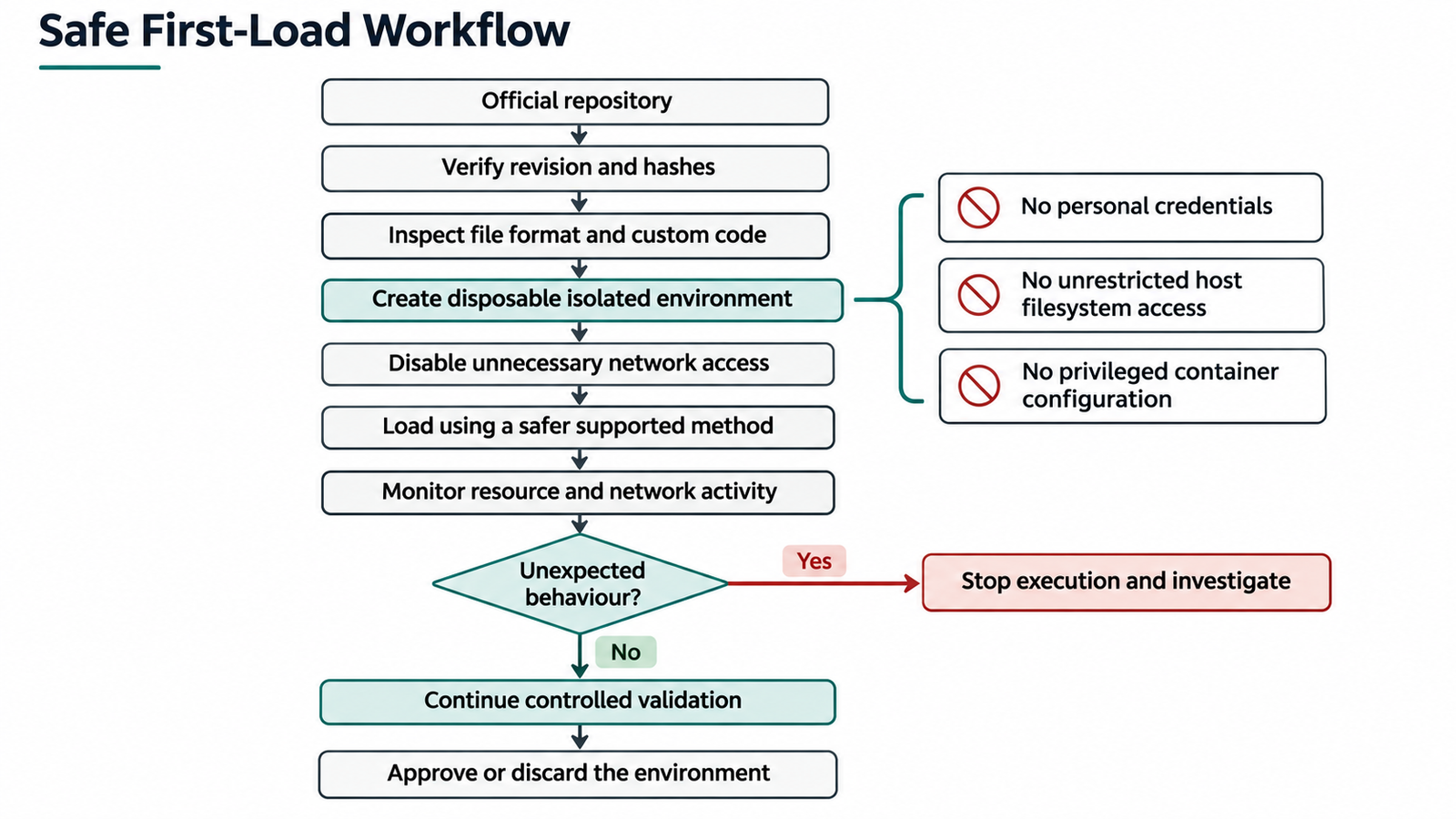
A disposable virtual machine is the strongest everyday option. Containers share the host kernel, so they’re a layer, not a guarantee. If you use one:
- Run as a non-root user and drop capabilities.
- Never use
--privilegedor mount the Docker socket. - Mount the model directory read-only and nothing from your home directory.
- Pass no tokens, keys or cloud credentials.
- Disable networking once files are downloaded.
- Set memory and CPU limits, and log file writes and connection attempts.
docker run --rm --network none --read-only --tmpfs /tmp \
  --user 1000:1000 --cap-drop ALL --security-opt no-new-privileges \
  --memory 32g --cpus 8 \
  -v "$PWD/model:/model:ro" inspect-image python /inspect.py
The image and script names are placeholders for your own inspection setup.
GPU access widens the attack surface, since it exposes the host’s driver. Isolation itself needs testing: UniverseBlend’s look at what real-world AI sandbox escape tests reveal found that “the absence of an observed escape is not a proof of isolation.” Its review of five lab incidents shows why AI sandbox boundaries need independent verification.
The five layers you need to verify model weights
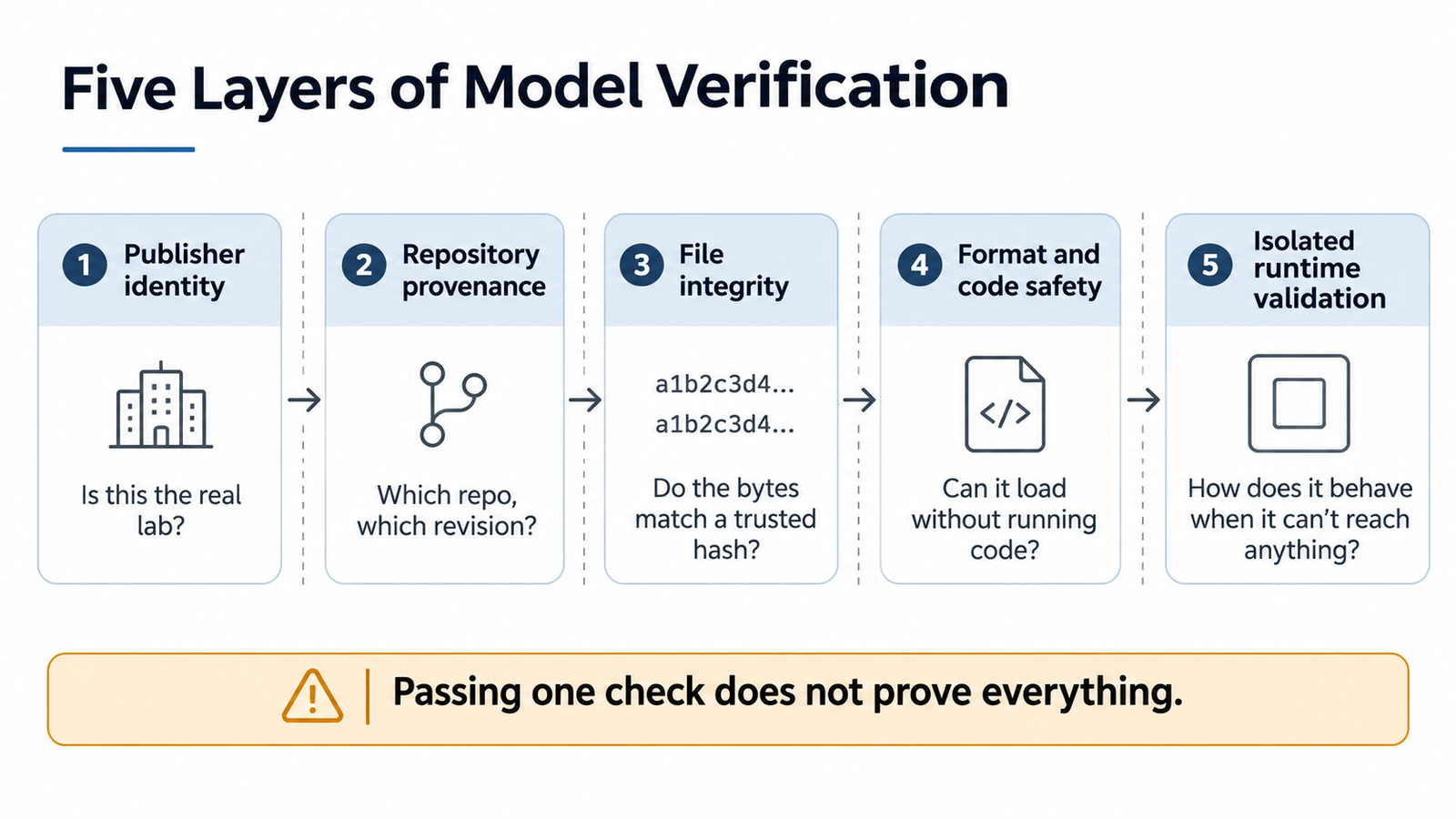
The seven checks fit five layers. Each answers a different question, and passing one doesn’t settle the next.
- Publisher identity: is this the organisation it claims to be?
- Repository provenance: did this repository come from that publisher, at a known revision?
- File integrity: do the bytes match a trusted reference?
- Format and code safety: can the files be read without executing anything, and is any code reviewed?
- Isolated runtime validation: does it behave as expected where it can’t reach anything valuable?
Numbat shows the gaps. It would have passed integrity against its own repository and format safety because it used safetensors. It failed at the first two layers, which nobody could confirm, and the authenticity question that a random-number test answered.
A workflow to verify model weights you can save
- Find the model through the lab’s own announcement.
- Confirm the Hugging Face organisation links to the lab, and the lab to it.
- Note the commit hash and download with
--revision. - Compare hashes with any reference the lab publishes; run
hf cache verify --fail-on-missing-files. - Prefer safetensors; for PyTorch files, keep
weights_only=True. - Check the first bytes of each file type, and the shard count against the index.
- For conversions, trace the base model and revision.
- Read any custom code before enabling
trust_remote_code. - Do the first load in a disposable VM or locked-down container with no credentials or network.
- Watch for unexpected writes, connections or resource use, then keep or discard the environment.
Kimi K3.1 Pro: verify model weights from the official source
Moonshot AI announced Kimi K3.1 Pro on 23 October. Its announcement says: “The full model weights will be released by Nov 4.” It doesn’t name a host, licence, file format or reference hashes, and it doesn’t give a time.
When I checked on 2 November, Moonshot’s Hugging Face organisation listed Kimi-K3 but no K3.1 repository. The weights hadn’t been released.
Big releases create a short window in which unofficial copies, early quantizations and lookalike repositories appear before the official one is easy to find. Most community builds are made in good faith, and many will be useful. Start from Moonshot’s own channels, wait for the organisation’s repository, and check that any conversion links to it and to a specific revision.
When not to download or load a model at all
Stop if any of these apply:
- You can’t trace the files back to the publisher.
- The repository asks you to trust it on its word (“do not DM me asking for the source”).
- Only pickle files are offered, and the publisher can’t be verified.
- It needs
trust_remote_codeand the code hasn’t been read. - The setup instructions download and run scripts.
- The only place you can test it is a machine with your credentials on it.
None of this guarantees safety. It reduces how much you’re trusting by default.
Frequently asked questions
How do you verify model weights before downloading?
Confirm the publisher through the lab’s own announcement, pin a repository revision and check for reference hashes. Then inspect the format and any custom code before the first isolated load.
How do I verify model weights on Hugging Face?
Check that the organisation is the lab’s, using links in both directions. Download a pinned commit and run hf cache verify to catch corrupt or missing files.
Is safetensors enough to verify model weights?
No. It prevents pickle-style code execution but says nothing about who published the weights or whether they’re trained.
Can PyTorch model files execute malicious code?
Yes. Pickle-based files can run code when loaded. Keep weights_only=True, the default since PyTorch 2.6, and don’t load untrusted files.
How do I verify model weights with SHA-256?
Compute each file’s hash and compare it with one from a trusted, independent source. A hash with nothing to compare against proves nothing.
How do I verify model weights from a community quantization?
Trace it to the official base model and revision, check the converter’s identity and method, and pin the commit you use.
Does file size help verify model weights?
Only for spotting errors such as missing shards. A plausible size doesn’t show the weights are trained.
Does a checksum verify model weights are authentic?
No. A checksum shows the file is unchanged from a reference. Authenticity depends on who provided that reference.
Should I use trust_remote_code=True?
Only after reading the code, pinning the revision and confirming the architecture isn’t already supported natively.
How should I safely load an unfamiliar AI model?
In a disposable VM or locked-down container with no credentials, no network and resource limits, while watching what it does.
Keep reading
Here are the latest posts from the blog.
Verify Model Weights: 7 Checks Before You Download

DeepSeek Super-Agent vs Claude Code: The Hidden AI Power Shift

AGI vs Superintelligence: A New Name Isn’t a New Intelligence