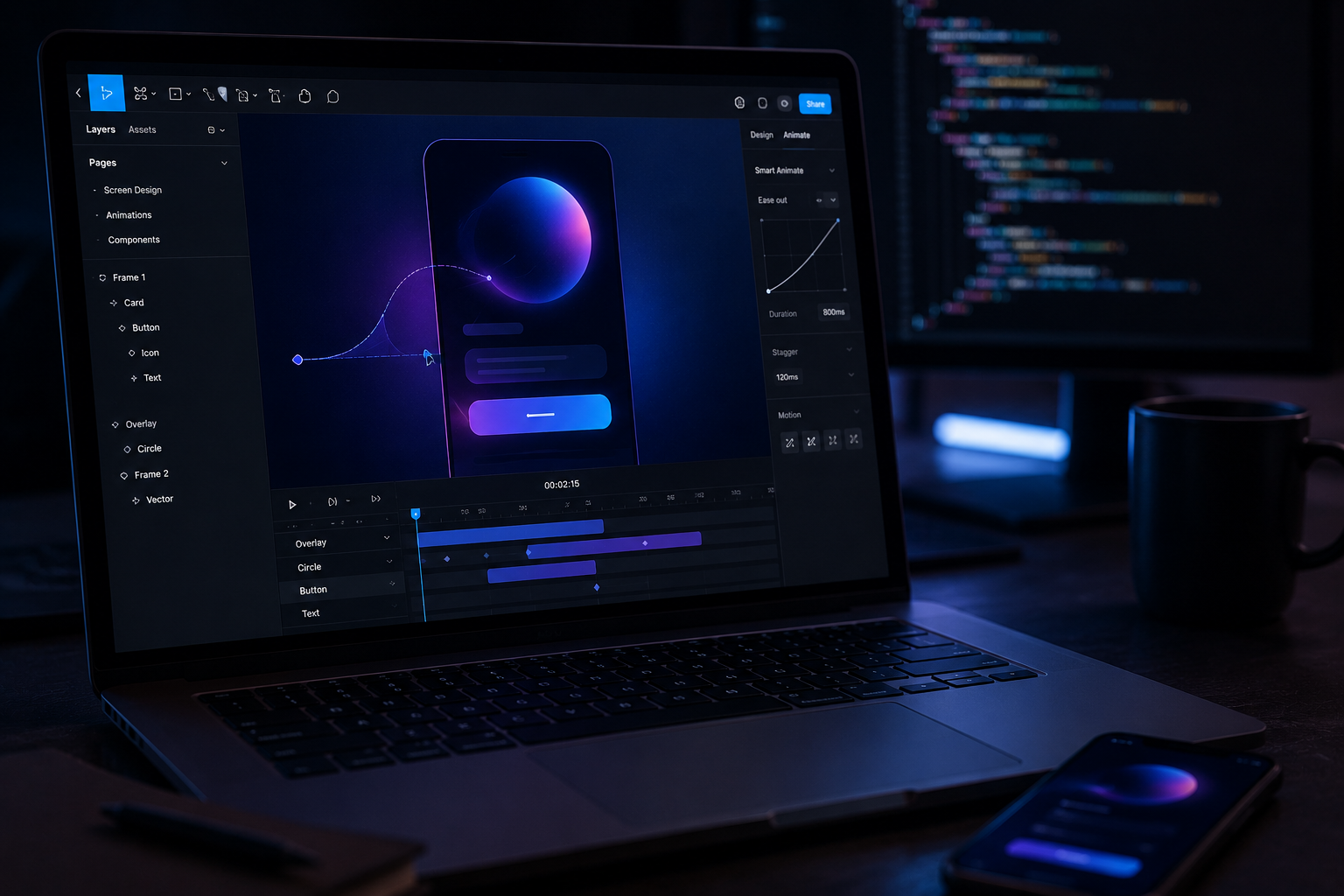
Animation has always been the awkward middle child of the design-to-code handoff.
Designers sketch interactions in their heads, write vague specs in Notion documents nobody reads carefully, and developers do their best to interpret them. The final product rarely matches what anyone imagined — not because of incompetence on either side, but because the tools for communicating motion between disciplines were genuinely terrible.
Announced at Config 2026, Figma Motion addresses this directly. The feature brings generative AI-powered animation natively into Figma’s design canvas, letting designers create, preview, and export production-ready animations without leaving the tool they’re already in. The gap between static mockups and living interfaces just got meaningfully smaller, and I’ve been waiting for something like this for a while.
This isn’t a plugin bolted onto the side of an existing workflow. It’s a structural change to how design and development teams collaborate on interactive experiences — and it signals where the entire design-to-code pipeline is heading.
What Figma Motion Actually Does
At its core, Figma Motion is an AI animation engine built natively into Figma. You select a component, describe the motion you want in plain language, and the AI generates smooth, editable animation curves. No timeline scrubbing. No keyframe guessing. The AI handles the physics and timing, and you adjust from there.
I’ve tested dozens of AI-assisted design tools over the past few years. Most of them make you do most of the work anyway, with the AI contributing something that barely qualifies as a head start. Figma Motion is different — it actually delivers on the promise.
The key capabilities at launch include
- Prompt-based animation generation, where typing “slide in from left with a bounce” produces exactly that, not an approximation that requires significant manual correction.
- Context-aware transitions let the AI read your layout and suggest appropriate entry and exit animations based on what’s actually in the frame.
- Animations export as CSS, Swift, or Kotlin code snippets ready to drop into a real codebase.
- Real-time preview runs animations directly on the canvas without switching tools.
- And collaborative editing lets teams refine animations together the same way they edit designs — same file, same canvas, same version history.
The Config 2026 launch revealed that Figma Motion uses a lightweight inference model built specifically for creative tasks. This matters because it runs fast enough for real-time iteration. Near-instant feedback is what makes it feel like a real design tool rather than a demo — a 5-second wait kills creative momentum in a way that a 5-second wait in a different context simply doesn’t.
Figma’s official blog highlighted that early beta testers cut animation specification time by roughly 60 percent. That’s time previously spent creating detailed motion specs in separate tools, then hoping the developer read them correctly. The math on where that time goes is not subtle.
How Figma Motion Stacks Up Against Existing Tools
Figma Motion enters a crowded market. Several established tools handle animation workflows reasonably well. None of them combine AI generation with native design tool integration in the way Figma Motion does, and that combination is the real differentiator.
| Feature | Figma Motion | Rive | Lottie/After Effects | Framer Motion | Principle |
|---|---|---|---|---|---|
| AI-generated animations | ✅ Yes | ❌ No | ❌ No | ❌ No | ❌ No |
| Native design tool integration | ✅ Built into Figma | ❌ Separate app | ❌ Separate app | ⚠️ Framer only | ❌ Separate app |
| Code export | ✅ CSS, Swift, Kotlin | ✅ Custom runtime | ✅ JSON/Lottie | ✅ React only | ❌ No |
| Real-time collaboration | ✅ Yes | ⚠️ Limited | ❌ No | ✅ Yes | ❌ No |
| Learning curve | Low | Medium | High | Medium | Low |
| Vector animation support | ✅ Yes | ✅ Yes | ✅ Yes | ⚠️ Limited | ✅ Yes |
Rive remains excellent for complex, interactive animations. I’d still reach for it when a project needs a dedicated runtime and fine-grained control over interaction states. The tradeoff is leaving Figma entirely, and that context switch adds real friction to an already complicated handoff process.
LottieFiles and After Effects dominate illustration-heavy animation and character work. They’re unmatched for complex vector sequences, but they weren’t built for UI micro-interactions, and the journey from After Effects to production code is still genuinely painful in 2026.
Framer offers powerful motion capabilities, but it’s tied to Framer’s own ecosystem. If your team designs in Figma, you’re suddenly managing two platforms, two file formats, and two sets of opinions about how things should move.
Figma Motion’s advantage is that it meets designers where they already work. There’s no new app to learn, no file format conversion, no export-import dance. The animation lives alongside the design — same file, same collaborators, same review process.
How the Design-to-Code Pipeline Changes
Figma Motion doesn’t just change animation workflows. It reshapes the entire design-to-code handoff, and the old workflow genuinely deserved to be retired.
Before Figma Motion, the process looked like this:
- designer creates static mockups,
- writes animation specs in a separate document,
- developer interprets those specs — often incorrectly, through no fault of their own — sets up animations using CSS or a framework while guessing at timing and easing,
- designer reviews and requests changes,
- and multiple rounds of back-and-forth follow until everyone’s tired of the animation entirely.
- The final result is usually a compromise that satisfies nobody completely.
After Figma Motion, the workflow compresses:
- designer creates mockups and generates animations directly in Figma,
- Figma exports motion tokens alongside design tokens automatically,
- developer imports tokens into the codebase,
- animations match the design on the first implementation or close enough that one pass fixes it.
Fewer steps. Fewer miscommunications. Faster shipping. The math isn’t complicated.
The code export feature is worth examining closely. Figma Motion doesn’t export abstract animation descriptions that developers still have to translate manually. It generates framework-specific code — React developers get Framer Motion compatible output, iOS developers get SwiftUI animation blocks, Android developers get Jetpack Compose transitions. Most tools still punt on this step. That Figma Motion handles it natively is one of the things that surprised me most when I dug into the Config 2026 documentation.
This also connects to where design systems are heading. Companies already use design tokens for colors, spacing, and typography. Motion tokens are the missing piece — the thing that keeps animation consistent across platforms the same way color tokens keep brand colors consistent. Figma Motion fills that gap natively, without requiring a separate system or a third-party plugin to bridge the gap.
Design system teams can now define canonical animations once. Those animations propagate across platforms through exported tokens, and brand consistency extends beyond visual design into how things actually move and feel. For organizations that have spent years building rigorous design systems, this is the piece that was always missing.
The Technical Decisions That Make It Feel Fast
Understanding why Figma Motion feels so responsive requires a quick look under the hood — and this part is genuinely interesting.
The AI powering Figma Motion isn’t a general-purpose large language model trying to do everything. It’s a specialized model built specifically for motion generation, and that specificity is exactly why it works at design-tool speed.
The animation model is small enough to run partly on-device. Because it processes requests using a combination of edge inference and cloud computation, there’s no full round trip to a distant server on every prompt. The experience feels local even when it isn’t entirely — which is the right tradeoff for a creative workflow where iteration speed matters enormously.
This mirrors broader industry approaches to on-device AI. Google’s MediaPipe demonstrates how specialized models can run efficiently on consumer hardware. Apple’s Core ML does the same for iOS. The principle is consistent — optimize the model for a specific task, deploy it close to the user, and AI stops feeling like a loading spinner and starts feeling like a tool.
The model also understands design context in ways that aren’t obvious until you use Figma Motion in practice. It considers
- Component type — buttons animate differently than modals, and the AI knows this.
- It reads spatial relationships, so elements entering from off-screen move in logical directions relative to the layout.
- It applies platform conventions, because iOS animations carry a different feel than Material Design animations.
- And it respects accessibility requirements: Figma Motion generates prefers-reduced-motion alternatives by default, without being asked.
That last point deserves more attention than it usually gets. Accessibility in animation is one of those things developers are supposed to handle manually, and frequently don’t — not because they don’t care, but because it’s easy to forget a step that isn’t part of the main implementation path. Building it into the AI’s default output is how accessibility tooling should work.
What This Means for Designers, Developers, and Design System Teams
Figma Motion changes daily workflows in concrete ways for everyone involved. Here’s honest preparation for each role — not hype, just what to expect.
For UI/UX designers:
- Start treating motion as a first-class design element rather than something added at the end when there’s time.
- Learn the prompt vocabulary that produces the best results — “ease out” means something specific, and understanding that helps you direct the AI rather than iterate randomly through suggestions.
- Build animation patterns into your design system documentation before someone else does it inconsistently across the product. And don’t abandon animation fundamentals.
- Understanding easing and timing is what helps you evaluate AI output and improve it — not just accept whatever comes out first.
For front-end developers:
- Expect motion tokens arriving alongside your existing design tokens.
- Update your build pipeline to consume animation exports from Figma — this is coming whether you plan for it or not.
- Test exported code thoroughly, because AI-generated code still needs a human review pass before it ships.
- Use the exports as a strong starting point, not a finished product.
- And push for consistent animation patterns across your codebase before every team starts doing their own thing with the new capability.
For design system teams:
- Define motion principles before generating animations, or you’ll end up with dozens of different “slide in” variations that nobody intended to create.
- Build a motion token taxonomy that scales across platforms from day one.
- Set clear rules about which animations are approved for production use.
- Document how motion tokens map to framework-specific implementations so developers aren’t making independent decisions about things that should be centralized.
For product managers:
- Factor reduced animation handoff time into sprint planning — this genuinely changes estimates in ways worth acknowledging upfront.
- Expect higher-fidelity prototypes earlier in the design process, which creates earlier alignment on interaction behavior.
- And consider motion as a competitive differentiator, because the teams you’re competing with are having this exact conversation right now.
A question that comes up regularly about Figma Motion: will designers still need to understand animation principles if AI generates the motion? Yes, absolutely. Understanding why a bounce curve feels playful or why a linear ease feels mechanical is what helps you evaluate AI suggestions intelligently rather than accepting whatever comes out first. Nielsen Norman Group has documented consistently that purposeful animation improves usability while arbitrary motion actively hurts it. Figma Motion can generate technically smooth animations. Deciding which animations serve the user experience still requires human judgment, and that judgment requires knowing something about animation.
The more useful framing: teams that previously skipped motion entirely now have fewer excuses. Figma Motion makes thoughtful animation accessible to teams that previously lacked both the expertise and the time to implement it well. The barrier was real, and it’s been significantly lowered.
Conclusion
The Config 2026 launch of Figma Motion is part of a longer trend worth naming directly: the design-to-code gap has been closing for years, and AI-native features like this are accelerating the pace.
Design tokens already bridge the gap for colors, spacing, and typography. Figma’s Dev Mode brought developers into the design file rather than exporting static specifications. Component libraries created shared vocabulary between design and engineering. Each of these reduced the translation layer between what designers create and what developers build.
Motion tokens are the next logical step in that progression, and Figma Motion is what makes them practical. Without a tool that generates exportable animations natively in the design environment, motion tokens would require too much manual effort to maintain — designers would still be writing prose specifications, and developers would still be interpreting them independently.
With Figma Motion, the animation itself becomes the specification. What you see in the design file is what gets exported as code, with the same timing, the same easing, the same behavior. The interpretation step — which is where most of the friction and miscommunication lived — gets removed from the process.
This also raises the stakes for teams that don’t adopt the workflow. As competitors ship higher-fidelity interfaces with more consistent motion, the gap between products with thoughtful animation and products with afterthought animation will become more visible to users. Motion has always been a differentiator for products that invest in it. Figma Motion makes that investment significantly more accessible.
If you’re ready to start working with Figma Motion, a few practical suggestions based on what the Config 2026 launch documentation and beta feedback suggest.
- Start with micro-interactions before tackling complex page transitions. Buttons, form validation, tooltip appearances — these are low-stakes contexts where you can learn the prompt vocabulary and understand how the AI interprets your design context without risking a high-visibility feature.
- Audit your current animation workflow before adopting Figma Motion wholesale. Identify specifically where handoff causes delays, where specs get misinterpreted, and where animations get simplified or removed entirely because the translation cost is too high. Those are the places where Figma Motion will have the most immediate impact.
- Update your design system documentation to include motion principles alongside your existing visual guidelines. Do this before generating animations at scale, or you’ll spend time later reconciling inconsistent approaches that emerged organically.
- Test accessibility on everything Figma Motion generates before it ships. The tool generates prefers-reduced-motion alternatives by default, but verify that the exported code implements them correctly in your specific framework and that the fallback experience is actually acceptable — not just technically present.
- Establish motion token naming conventions collaboratively between design and development before both sides start doing this independently. The conversation is easier before conventions exist than after they’ve diverged.
FAQ
What is Figma Motion and when was it announced?
Figma Motion is an AI-powered animation generation feature built natively into Figma, announced at Config 2026. It lets designers create, preview, and export production-ready animations using natural language prompts and contextual AI suggestions. Animations export as CSS, Swift, or Kotlin code snippets, making the design-to-development handoff significantly more reliable than the document-and-interpret approach most teams have been using.
Does Figma Motion replace manual animation controls?
No, and that’s an intentional design decision. Figma Motion generates AI-powered starting points that designers can fully customize — easing curves, timing, delays, and sequences are all adjustable by hand after the AI generates its suggestion. Think of it as intelligent autocomplete for motion design. The AI speeds up the process considerably, but designers retain complete creative control over the final result.
How does Figma Motion handle accessibility?
Figma Motion automatically generates prefers-reduced-motion alternatives for every animation it creates. Exported code includes fallbacks for users who have enabled reduced motion in their operating system settings, which aligns with WCAG accessibility guidelines. This saves developers from manually remembering a step that’s easy to overlook — the AI handles it by default.
Can developers use Figma Motion’s exported code in production?
Yes, with the caveat that AI-generated code should be reviewed before production deployment. Figma Motion exports framework-specific code for CSS animations, SwiftUI, Jetpack Compose, and React-compatible motion libraries. Treat the exports as high-quality starting points — developers should verify performance, test edge cases, and ensure the animations integrate cleanly with existing codebases. The exports are much closer to production-ready than what most tools produce, but they’re not a substitute for a review pass.
How does Figma Motion compare to Rive or Lottie?
Figma Motion focuses on UI micro-interactions and transitions within the Figma ecosystem. Rive is still the better choice for complex, interactive animations that need a dedicated runtime and fine-grained control over interaction states. Lottie via After Effects remains best for illustration-heavy, vector-based animations. The key differentiator for Figma Motion is that it requires no context switching — the animation lives in the same file as the design. Its AI generation capability is also unique among these tools; none of the alternatives have it.
Will Figma Motion affect designer job roles?
Figma Motion lowers the barrier to creating quality animations, but it simultaneously raises the importance of motion design thinking. Designers who understand animation principles will write better prompts and make smarter decisions about AI-generated output. The demand for thoughtful, purposeful motion in digital products is growing — Figma Motion doesn’t eliminate the need for animation expertise. It opens animation execution to more designers while raising the bar for motion design strategy. That’s a clear opportunity for designers willing to develop that skill set, not a threat to it.
References
Keep reading
Here are the latest posts from the blog.
There’s a supply chain story unfolding in the semiconductor industry that most people outside it haven’t fully absorbed — and it’s determining who wins the AI hardware race m…

Light moves faster than electrons. It generates less heat. It consumes dramatically less power. Those three facts have been true for decades, but only recently has the engine…
Every robotics team hits the same wall eventually. They need massive amounts of training data, and collecting it the traditional way is brutally expensive — in time, money, a…