Prices verified against official documentation on 10 November 2026. API pricing changes often; check the linked pages before relying on any figure.
Most AI applications send the same thing over and over. A coding agent resends its system prompt and 40 tool definitions on every turn. A support bot attaches the same policy manual to every question. Prompt caching lets the provider reuse the work it already did on that repeated opening section, and bill it at a fraction of the normal input price.
The discount is real. On Claude Opus 5.5, a cached read costs 5% of normal input. But the first request usually costs more than normal, retention windows are short, and a single changed character near the top of a prompt can wipe out the saving. The useful question is when prompt caching lowers your total bill, and how many repeated requests it takes to get there.
Key Takeaways
- Prompt caching reuses processed state, not text. Providers keep the model’s computed KV states for a repeated prefix and skip that work on the next matching request.
- Cached reads cost 90% to 97.5% less than normal input across the models here, from Haiku 5.5’s 90% to Fable’s 97.5%.
- Writes usually cost more than normal input: 1.25x to 2.5x on Anthropic and OpenAI. Kimi’s five-minute write has no premium.
- Break-even is quick when reuse is reliable: two requests for a five-minute or 30-minute cache, three for one-hour or 12-hour retention.
- Hit rates decide the outcome. On Opus 5.5, below about 21% hits (five-minute) or 51% hits (one-hour), caching costs more than not caching.
- Only the cached prefix is discounted. In our 20-request agent example, a 95% read discount produced a 78% total saving.
- On Anthropic, caching also expands throughput, because cache reads don’t count towards ITPM. On OpenAI, they do.
Quick Navigation
- What prompt caching actually reuses
- Prompt caching prices across Claude, GPT, Gemini and Kimi
- Why prompt caching starts with a surcharge
- When does prompt caching break even?
- What prompt caching does not discount
- Why prompt caching hit rates matter more than discounts
- The throughput advantage of prompt caching
- Designing an application around prompt caching
- When prompt caching is not worth it
- FAQ
- What is prompt caching?
- How does prompt caching reduce AI API costs?
- How much cheaper are cached tokens than normal input tokens?
- Does prompt caching have a separate storage cost?
- How many API calls does prompt caching need to pay off?
- What is the difference between a cache write and a cache read?
- Does prompt caching improve rate limits?
- Why do prompt cache hits fail?
- Does prompt caching reduce output-token costs?
- Which AI providers support prompt caching?
What prompt caching actually reuses
A large language model processes a prompt from the first token to the last. For each token, it computes intermediate values called keys and values, and holds them in what engineers call the KV cache. Prompt caching keeps those computed states after the request ends, so the next request with the same opening sequence can skip that work.
What gets reused is the processed state, not your text. OpenAI’s prompt caching guide says its cache stores “key-value (KV) tensors, not the tokens themselves”. Anthropic’s documentation says it keeps KV cache representations and cryptographic hashes in memory, and does not store the raw text of prompts.
This is also why order matters so much. The cache can only reuse a prefix: an unbroken run of tokens from the very start of the prompt. The model still has to process everything after the reused point, including the user’s new question. Change something early, and every token after it has to be computed again.
That makes some content ideal for caching: long system instructions, tool definitions, reference documents, few-shot examples, and the earlier turns of a long conversation. They are large, they change rarely, and they naturally sit at the front.
How each provider implements prompt caching
The four providers covered here use the same underlying idea in different ways.
- Anthropic builds the cacheable prefix in a fixed order: tools, then system instructions, then messages. Developers mark cache breakpoints with a
cache_controlfield, up to four per request. A single top-levelcache_controlturns on automatic caching, which moves the breakpoint forward as a conversation grows. The minimum cacheable prompt is 512 tokens on current models. Each hit refreshes the cache’s lifetime at no extra cost. - OpenAI caches automatically on supported models, with a minimum of 1,024 tokens on GPT-5.6 and later. Requests are routed to machines partly by a hash of the prompt’s opening tokens, and an optional
prompt_cache_keyinfluences that routing. On GPT-5.6 and later, developers can also place explicit breakpoints and choose a 30-minute or 12-hour minimum lifetime in the Responses API. - Google offers two mechanisms. Implicit caching is on by default for Gemini 2.5 and newer models, with a 4,096-token minimum on Gemini 4 Argon. Explicit context caching lets developers create a named cache with a chosen time-to-live, billed partly by the hour. The Gemini caching docs say explicit caching is not supported on Gemini 4 models.
- Moonshot’s Kimi API caches repeated prefixes automatically with a default five-minute lifetime. It offers a one-hour option, and each hit resets the clock.
Prompt caching prices across Claude, GPT, Gemini and Kimi
Here are the published rates as of 10 November 2026, in US dollars per million input tokens. “Discount” is the cached rate relative to normal input.
Table: scroll sideways to view all columns when needed.
| Model | Normal input | Cached read | Short write | Long write | Discount on reads |
|---|---|---|---|---|---|
| Claude Haiku 5.5 (prompts up to 100K tokens) | $0.10 | $0.01 | $0.125 (5 min) | $0.20 (1 hr) | 90% |
| Claude Haiku 5.5 (prompts over 100K tokens) | $0.50 | $0.05 | $0.625 (5 min) | $1.00 (1 hr) | 90% |
| Claude Sonnet 5.5 | $2.00 | $0.10 | $2.50 (5 min) | $4.00 (1 hr) | 95% |
| Claude Opus 5.5 | $4.00 | $0.20 | $5.00 (5 min) | $8.00 (1 hr) | 95% |
| Claude Fable 5.2 | $8.00 | $0.20 | $10.00 (5 min) | $16.00 (1 hr) | 97.5% |
| Claude Fable 5.1 | $10.00 | $0.25 | $12.50 (5 min) | $20.00 (1 hr) | 97.5% |
| GPT-6.1 Terra | $1.00 | $0.05 | $1.25 (30 min) | $2.50 (12 hr) | 95% |
| Gemini 4 Argon (to 30 Nov 2026) | $2.00 | $0.10 | No write price listed (implicit only) | None | 95% |
| Gemini 4 Argon (from 1 Dec 2026) | $4.00 | $0.20 | No write price listed (implicit only) | None | 95% |
| Kimi K3.1 Pro | $2.00 | $0.20 | $2.00 (5 min) | $4.00 (1 hr) | 90% |
| Kimi K3.1 Pro Highspeed | $4.00 | $0.20 | $4.00 (5 min) | $8.00 (1 hr) | 95% |
Sources: Claude API pricing, OpenAI API pricing, Gemini API pricing, Kimi API pricing.
Three details are easy to miss. Claude Fable 5.2 now sits above Fable 5.1 at a lower price, and both remain available. Haiku 5.5’s 100,000-token threshold counts cached tokens too, so a long cached prompt can push a whole request onto the higher rate. And Kimi’s five-minute write costs the same as normal input. There is no premium.
Ranking providers by the cheapest cached token would be misleading. Retention windows, write premiums and how reliably a cache hits differ more than the headline discounts do.
Where Gemini prompt caching differs
Gemini 4 Argon’s implicit caching has no separate storage fee, but Google gives no guarantee of a hit. Its docs say savings are passed on “if your request hits caches”. In multi-turn use, Gemini 4 caches the full previous request only if the new one adds at least 2,050 tokens.
Explicit caching on older models such as Gemini 3.1 Pro Preview works differently. Cached tokens cost $0.20 per million instead of $2.00, but storage is billed at $4.50 per million tokens per hour, and the TTL defaults to one hour. Each read saves $1.80 per million tokens, so a one-million-token cache needs 2.5 reads an hour just to cover its storage. That is a meter running in the background, not a token multiplier, and it needs a different calculation from Anthropic’s or OpenAI’s.
Why prompt caching starts with a surcharge
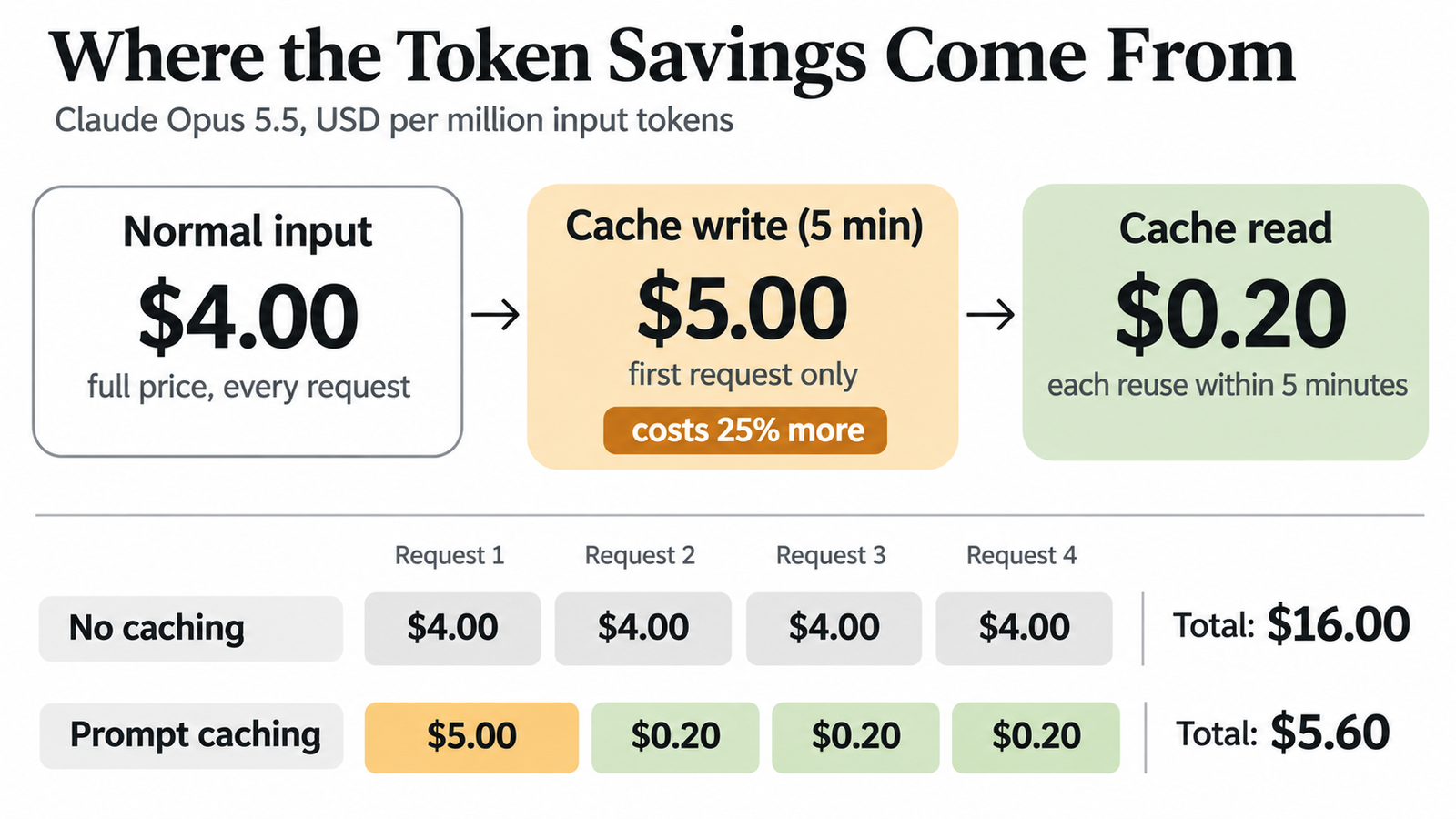
Anthropic and OpenAI don’t charge separately for storage. Instead, they charge more for the tokens on the request that writes the cache.
On Anthropic, a five-minute write costs 1.25 times normal input and a one-hour write costs twice normal input. OpenAI’s GPT-5.6 and later models charge 1.25 times for the 30-minute lifetime and 2.5 times for 12 hours. OpenAI’s guide is explicit that this “is not an additive fee”. Each input token is billed once, at either the uncached, cached-read or cache-write rate.
So the first request in any cached workload costs more than it would without caching. On Opus 5.5, writing a one-million-token prefix for five minutes costs $5.00 instead of $4.00. If nothing reads that cache before it expires, you have paid 25% extra for nothing. Reuse it three times within the window, though, and four requests cost $5.60 instead of $16.00.
When does prompt caching break even?
The worked examples below use Claude Opus 5.5 and make one simplifying assumption: every request reuses the same, fully cacheable one-million-token prefix, and each one arrives within the cache’s lifetime. New input and output are left out for now. They are not discounted, so they don’t change the comparison.
The five-minute cache
Without caching, each request costs $4.00 for the prefix. With caching, the first costs $5.00 to write and each later one costs $0.20 to read.
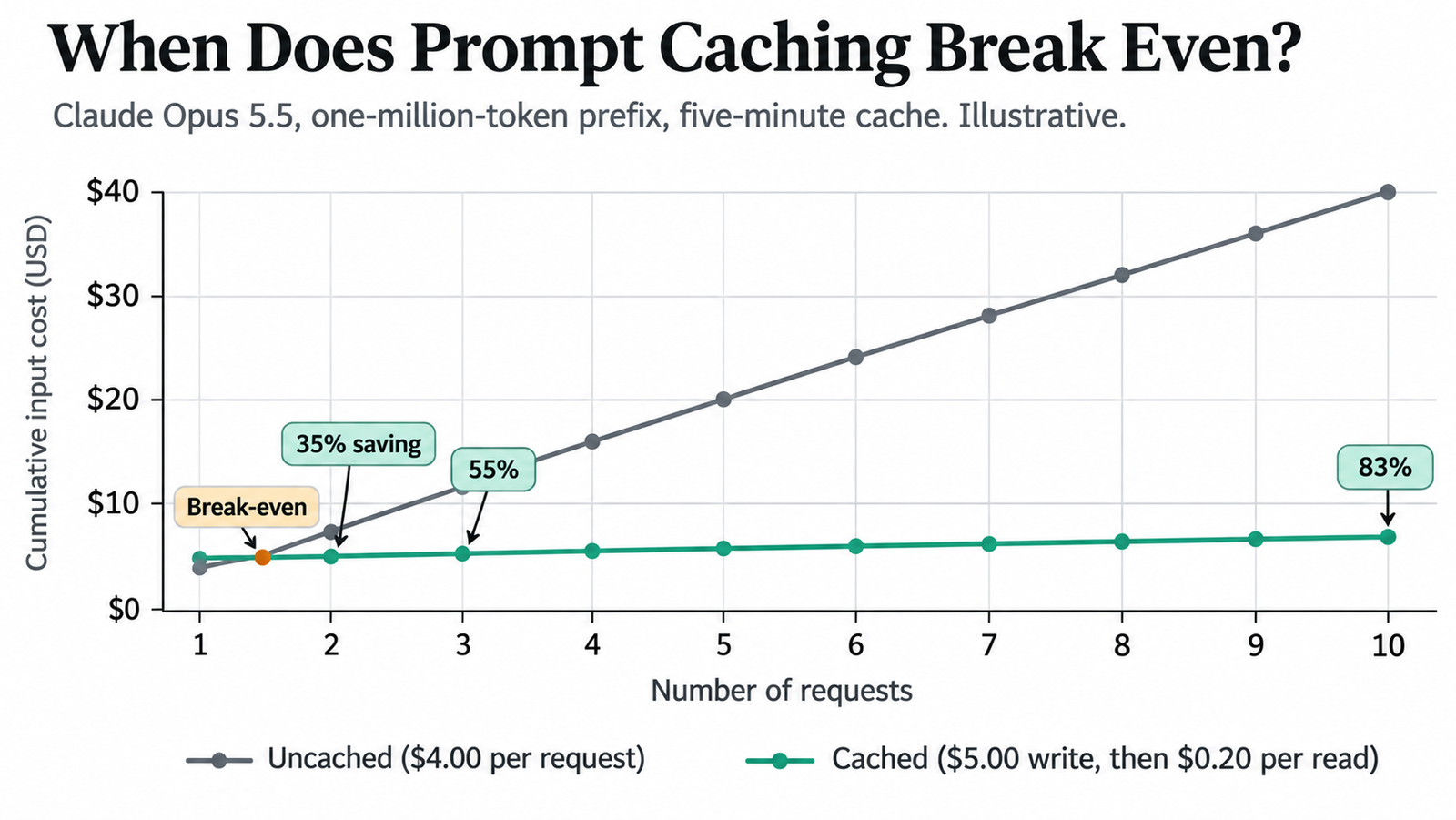
Table: scroll sideways to view all columns when needed.
| Requests | Uncached | Cached (5-min write) | Saving |
|---|---|---|---|
| 1 | $4.00 | $5.00 | −25% |
| 2 | $8.00 | $5.20 | 35% |
| 3 | $12.00 | $5.40 | 55% |
| 10 | $40.00 | $6.80 | 83% |
| 50 | $200.00 | $14.80 | 92.6% |
Two requests are enough. After that, the saving creeps towards 95% but never reaches it, because the write premium is always in the total.
The one-hour cache
The one-hour write costs $8.00, double normal input.
Table: scroll sideways to view all columns when needed.
| Requests | Uncached | Cached (1-hour write) | Saving |
|---|---|---|---|
| 1 | $4.00 | $8.00 | −100% |
| 2 | $8.00 | $8.20 | −2.5% |
| 3 | $12.00 | $8.40 | 30% |
| 10 | $40.00 | $9.80 | 75.5% |
| 50 | $200.00 | $17.80 | 91.1% |
Two requests lose money. Three are needed. The longer window costs more up front, so it takes more reuse to recover. It is worth paying for only when requests are spaced more than five minutes apart but less than an hour, where the five-minute cache would keep expiring.
A break-even formula for prompt caching
The general case fits on one line. Let P be the normal input price, W the cache-write price, R the cache-read price and N the total number of requests, including the first one that writes the cache.
Uncached cost is N × P. Cached cost is W + (N − 1) × R. Caching saves money when:
W + (N − 1) × R < N × P
Rearranged, that means N must be greater than (W − R) ÷ (P − R). In plain terms: divide the extra cost of writing by the amount each read saves.
For Opus 5.5 with a five-minute cache, (5.00 − 0.20) ÷ (4.00 − 0.20) = 1.26, so two requests break even. With a one-hour cache, (8.00 − 0.20) ÷ 3.80 = 2.05, so three are needed. Because the result depends only on the ratios between prices, it works for any provider.
Table: scroll sideways to view all columns when needed.
| Cache option | Write multiple | Read multiple | Requests needed |
|---|---|---|---|
| Anthropic 5-minute (Sonnet 5.5, Opus 5.5) | 1.25× | 0.05× | 2 |
| Anthropic 1-hour (Sonnet 5.5, Opus 5.5) | 2× | 0.05× | 3 |
| Anthropic 5-minute (Haiku 5.5) | 1.25× | 0.1× | 2 |
| OpenAI 30-minute (GPT-6.1 Terra) | 1.25× | 0.05× | 2 |
| OpenAI 12-hour (GPT-6.1 Terra) | 2.5× | 0.05× | 3 |
| Kimi 5-minute (K3.1 Pro) | 1× | 0.1× | Saves from the first hit; never costs more |
| Kimi 1-hour (K3.1 Pro) | 2× | 0.1× | 3 |
What prompt caching does not discount
The 95% discount applies only to the cached prefix. New user input is billed at the full rate, and so is output, which usually costs several times more per token than input.
Consider an illustrative Opus 5.5 agent session of 20 requests, each arriving within five minutes of the last. Each request carries a 50,000-token cached prefix, 2,000 tokens of new input and 1,000 tokens of output, at $20 per million.
Without caching, the session costs $4.56. With a five-minute cache, it costs $1.00: $0.25 for the first write, $0.19 for 19 reads, $0.16 for the new input and $0.40 for output. That is a 78% saving, not 95%, and output is now 40% of the bill. Raise the output to 5,000 tokens a request and the saving falls to 58%.
Haiku 5.5’s threshold creates a second trap. A request with 95,000 cached tokens and 4,000 new ones costs $1.35 in input per thousand requests. Push it to 100,000 cached tokens and 5,000 new ones, and the whole request moves onto the higher rate: $7.50 per thousand, 5.6 times as much. The cache hit doesn’t protect you, because the Claude pricing page counts cache reads and writes towards prompt length.
Our guide to calculating LLM cost per task shows how retries and failed attempts change these figures further.
Why prompt caching hit rates matter more than discounts
Break-even maths assumes the cache hits. In production, it often doesn’t.
A simple way to see the risk is to treat every miss as a fresh write. If a fraction h of requests hit and the rest write, the cached prefix costs less than uncached input only when h is greater than (W − P) ÷ (W − R). On Opus 5.5 that works out to about 21% for the five-minute cache, and 51% for the one-hour cache. On GPT-6.1 Terra’s 12-hour cache, it is 61%. Below those rates, caching costs more than not caching at all. On Kimi’s five-minute cache, a miss costs the same as normal input, so the threshold is zero.
A one-line cache miss
The most common culprit is something dynamic near the top of the prompt. Take a system prompt that begins:
You are a support assistant. Current time: 2026-11-10 14:03:27.
That timestamp changes every second, so no two requests share a prefix beyond the first sentence. Everything after it, including 30,000 tokens of policy documents and tool definitions, is processed from scratch every time. With caching enabled on Anthropic, each request also pays the 1.25x write rate. Move the timestamp into the final user message and the prefix becomes stable again.
Other causes are less obvious. Tool definitions that arrive in a different order invalidate everything on Anthropic, because tools sit at the front of the prefix. Anthropic’s docs also note that changing tool_choice, adding an image or toggling extended thinking can invalidate the message cache. User IDs, request IDs, reordered retrieval results and inconsistent whitespace do the same.
The throughput advantage of prompt caching
Caching also affects capacity, which many teams overlook. Anthropic’s rate-limit documentation says cache reads do not count towards its input-tokens-per-minute (ITPM) limit. Uncached input and cache writes still count.
Anthropic’s own example is a 2,000,000 ITPM limit with an 80% cache-hit rate. Under those assumptions, an application could process about 10 million total input tokens a minute: 2 million uncached plus 8 million read from cache. Opus 5.5’s Start-tier limit is exactly 2 million ITPM.
That is not a lifted rate limit. Output-token and request limits still apply, and every cache write counts in full. OpenAI’s guide takes the opposite approach: “Cached input tokens still count toward tokens-per-minute limits.” For document processing, RAG and coding agents that hit rate limits before budgets, this difference can decide which provider works at scale. Our breakdown of Claude API rate limits and concurrent request capacity covers the tier figures.
Designing an application around prompt caching
Good cache design is mostly about discipline in how prompts are assembled.
Put what never changes first: tool definitions, then system instructions, then reference documents, then the conversation, with the new user turn last. Serialise tool definitions in a fixed order and keep their wording identical between deployments. Keep timestamps, user names and session IDs out of the prefix entirely.
Use breakpoints where content changes at different speeds. On Anthropic, a breakpoint after the tools and system prompt, and another after a large document, lets one cache survive when the other changes. Anthropic checks at most 20 positions back from each breakpoint for a match, so very long conversations may need a second breakpoint.
Then measure. Anthropic reports cache_creation_input_tokens and cache_read_input_tokens on every response. OpenAI reports cached_tokens and cache_write_tokens, and Gemini reports total_cached_tokens. If reads are near zero, caching is costing you money. Don’t pad prompts to reach a minimum length. Prompts below 512 tokens on current Claude models, or 1,024 on recent OpenAI models, can’t be cached at all, and the saving on a short prompt is tiny anyway. Our context engineering guide covers how to structure agent context more generally.
When prompt caching is not worth it
Some workloads gain little. One-off requests can’t amortise a write. Short prompts fall below the minimum, or save fractions of a cent. Batch jobs that run once an hour won’t benefit from a five-minute cache, and an hourly cache only pays off if each prefix is reused at least three times.
Prompts whose early sections change on every request, such as freshly retrieved documents placed before the instructions, will rarely hit. Low-traffic applications face the same problem: if requests are spread thinly across many different prefixes, most caches expire unread.
In those cases, the cheaper options may be a shorter prompt, the Batch API, or a smaller model. Caching rewards repetition. Without it, the write premium is just extra cost.
FAQ
What is prompt caching?
Prompt caching is an API feature that stores the model’s processed state for a repeated prompt prefix, so later requests with the same prefix are cheaper and faster to process.
How does prompt caching reduce AI API costs?
It bills the reused portion of the input at a cached-read rate, typically 5% to 10% of normal input. Output and new input are billed normally.
How much cheaper are cached tokens than normal input tokens?
Between 90% and 97.5% cheaper for the models covered here. GPT-6.1 Terra, for example, charges $0.05 per million cached tokens against $1.00 uncached.
Does prompt caching have a separate storage cost?
Only on some services. Anthropic, OpenAI and Kimi charge through a higher write rate instead. Google’s explicit context caching bills storage by the hour, for example $4.50 per million tokens per hour on Gemini 3.1 Pro Preview.
How many API calls does prompt caching need to pay off?
Two requests within the cache lifetime for Anthropic’s five-minute and OpenAI’s 30-minute caches, assuming a fully reused prefix. One-hour and 12-hour caches need three.
What is the difference between a cache write and a cache read?
A write processes and stores the prefix for the first time, at a premium. A read reuses that stored prefix on a later request, at a steep discount.
Does prompt caching improve rate limits?
On Anthropic, yes: cache reads don’t count towards input-tokens-per-minute limits. On OpenAI, cached tokens still count towards tokens-per-minute limits.
Why do prompt cache hits fail?
Usually because something early in the prompt changed: a timestamp, a reordered tool list, a different image or a new setting. Expired caches and prompts below the minimum length also miss.
Does prompt caching reduce output-token costs?
No. Output tokens are billed at the normal rate whether or not the input was cached.
Which AI providers support prompt caching?
Anthropic, OpenAI, Google and Moonshot’s Kimi API all support it, but with different mechanics, minimum lengths, retention windows and pricing.
Keep reading
Here are the latest posts from the blog.

Your AI API Is Reprocessing the Same Tokens. Stop Paying for It.
Anthropic IPO: The $895 Billion Question Behind Its Valuation
Claude Opus vs Sonnet: What the 2026 Price Gap Actually Buys