Last verified: 6 November 2026. All file sizes come from Hugging Face repository listings. Nothing here was downloaded or benchmarked by UniverseBlend.
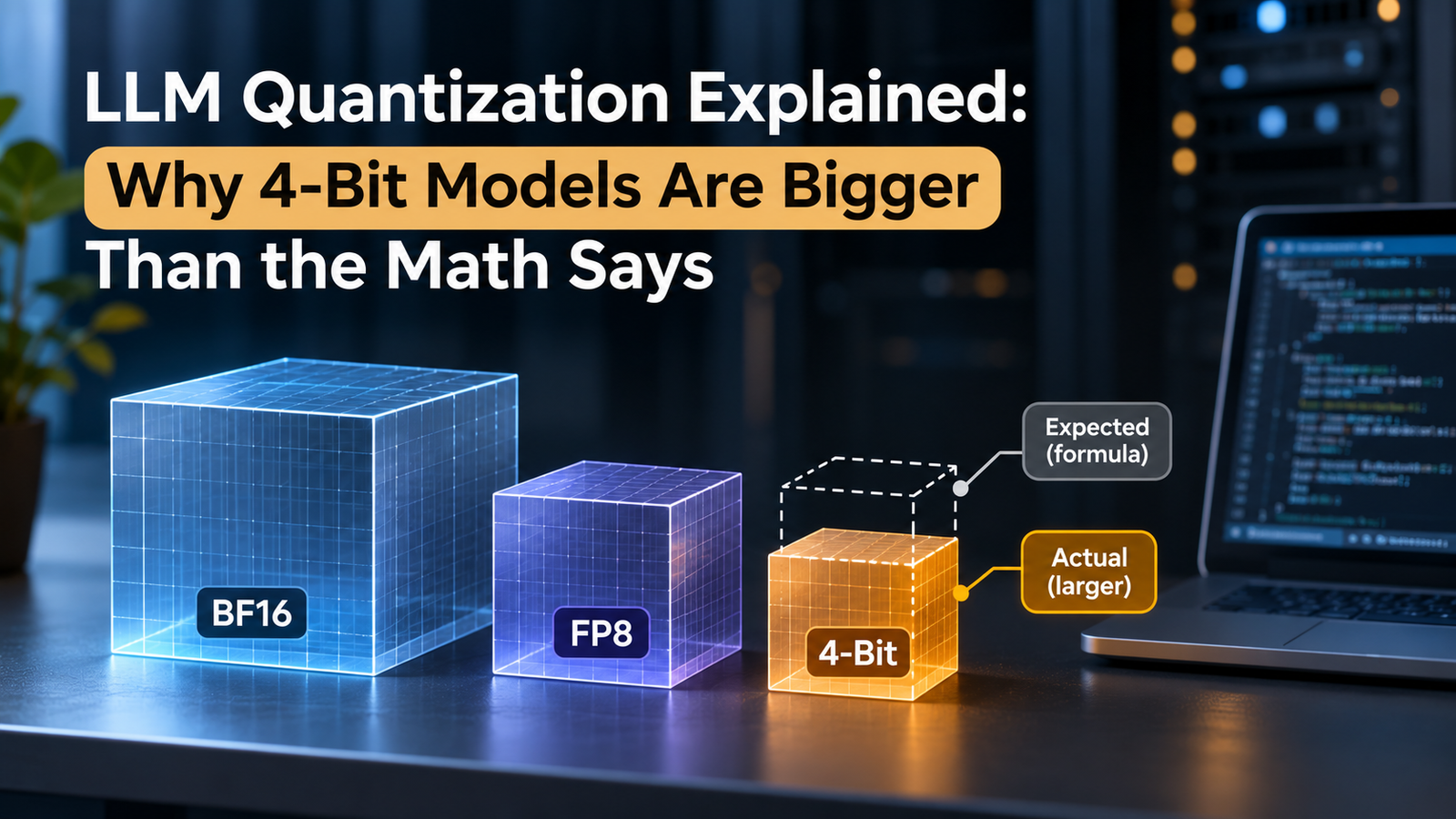
Kimi K3 is a 2.8-trillion-parameter model trained to run at 4 bits. Multiply 2.8 trillion by half a byte and you get 1.4 TB. The official checkpoint on Hugging Face is 1.56 TB, about 161 GB more than the formula promised.
That gap is the part of LLM quantization most guides skip. The arithmetic is right, but a real download carries scaling factors, layers kept at higher precision and sometimes whole components the headline parameter count leaves out. Running the model then needs memory the files never mention.
Key Takeaways
- LLM quantization changes how many bits each weight uses, which shrinks files and memory traffic, but every scheme also stores scales.
- The formula is a floor. Real checkpoints for five models came out 6% to 30% larger than parameters × bits ÷ 8.
- Effective bits per weight is the number to track. Hy4 FP8 averages 8.35, Kimi K3 4-bit 4.49 and DeepSeek’s 2-bit build 2.61.
- Mixed precision is normal. Kimi K3 keeps 57 billion parameters in BF16, adding 114 GB to a 4-bit checkpoint.
- Headline parameter counts can leave things out. Hy4’s MTP layer, DeepSeek’s Engram tables and Gemma’s per-layer embeddings all change the size.
- Checkpoint size isn’t VRAM. KV cache, activations and framework reservation come on top.
- Context length drives runtime memory. Concurrent long requests can need more memory than the weights.
- Read the repository manifest before downloading, and test quality on your own task.
Quick Navigation
- LLM quantization starts with one formula
- What FP8, 4-bit and 2-bit LLM quantization actually change
- LLM quantization in the real world: three large checkpoints
- Why LLM quantization files exceed the formula
- LLM quantization for small models: Gemma 4 E4B and LFM3
- LLM quantization and VRAM: why the download isn't the runtime
- What you lose with more aggressive LLM quantization
- Choosing an LLM quantization format for your workload
- FAQ
- What is LLM quantization?
- What is the difference between FP8 and 4-bit quantization?
- How much smaller does a 4-bit LLM become?
- What is 2-bit quantization?
- Why are LLM quantization files larger than theoretical estimates?
- Does a 4-bit model use exactly 4 bits per parameter?
- Is model file size the same as GPU VRAM usage?
- Does LLM quantization reduce accuracy?
- Which quantization format is best for running LLMs locally?
- How do I calculate the memory needed for LLM quantization?
LLM quantization starts with one formula
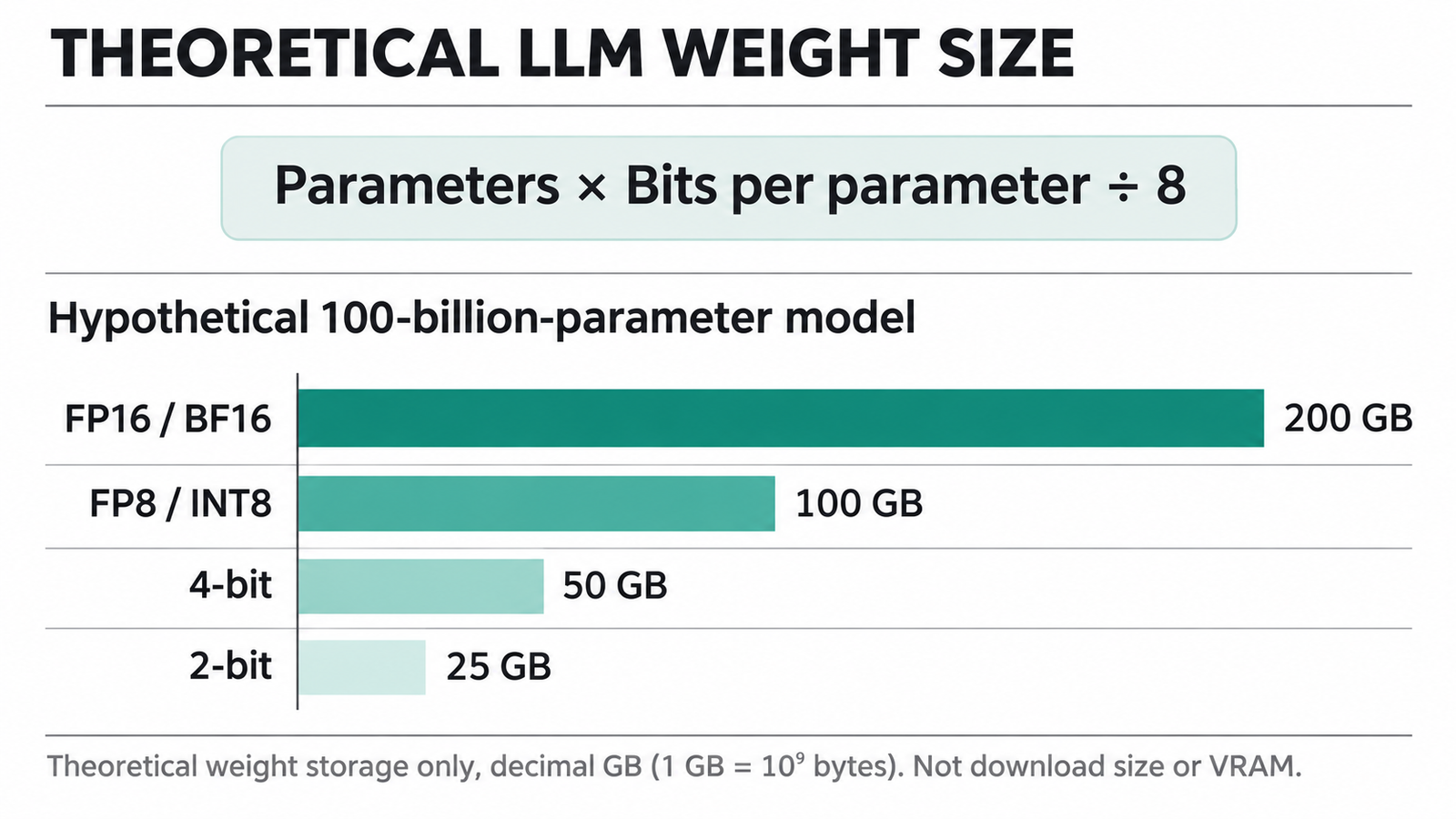
Every sizing estimate begins in the same place:
Theoretical weight size (bytes) = parameter count × bits per parameter ÷ 8
It assumes every parameter uses the same bit width, nothing else is in the file, and the advertised parameter count matches what’s stored. As the examples below show, none of that is reliably true.
Three worked examples, in decimal units:
- A 70-billion-parameter model in BF16: 70 × 10⁹ × 16 ÷ 8 = 140 GB.
- Tencent’s Hy4 at its headline 770 billion parameters in FP8: 770 × 10⁹ × 8 ÷ 8 = 770 GB.
- DeepSeek V4.1 Flash, 763.2 billion parameters, at 2 bits: 763.2 × 10⁹ × 2 ÷ 8 = 190.8 GB.
Table: scroll sideways to view all columns when needed.
| Precision | Bits per parameter | Theoretical storage per billion parameters |
|---|---|---|
| FP32 | 32 | 4 GB |
| FP16 / BF16 | 16 | 2 GB |
| FP8 / INT8 | 8 | 1 GB |
| 4-bit | 4 | 0.5 GB |
| 2-bit | 2 | 0.25 GB |
These are floor estimates for weights alone, not download sizes and not memory requirements.
Units matter too. Hugging Face and most model cards use decimal gigabytes, where 1 GB is 1,000,000,000 bytes. Operating systems and GPU tools often report binary gibibytes, where 1 GiB is 1,073,741,824 bytes, about 7.4% larger. So Hy4’s 813.78 GB repository shows up as 757.9 GiB on disk, and Kimi K3’s 1.561 TB is 1.420 TiB. When two tools disagree about whether a file fits, check the units first.
What FP8, 4-bit and 2-bit LLM quantization actually change
Models are trained in floating point because weights and activations span a huge range of values. BF16 keeps FP32’s 8-bit exponent but cuts the mantissa to 7 bits. FP16 trades some of that range for more precision.
FP8 halves that again. NVIDIA’s FP8 primer describes two variants: E4M3, with more precision and a maximum of ±448, and E5M2, with more range and less precision. FP8 values are paired with scaling factors. MXFP8, which Hy4 uses, stores one 8-bit power-of-two scale for every block of 32 values, a detail worth 23.6 GB in Hy4’s checkpoint.
INT8, 4-bit and 2-bit formats map weights onto a small set of integer levels, again with scales. A 4-bit weight can take only 16 values, and a 2-bit weight only four. It works because most weights tolerate the lost precision. A small set of outliers and salient channels don’t, and that’s where most of the quality loss comes from. The AWQ paper found that protecting just 1% of salient weights greatly reduces quantization error.
The name of a format tells you less than you’d think. “4-bit” covers very different schemes:
Table: scroll sideways to view all columns when needed.
| Format | What it is | Where it runs | Effective bits |
|---|---|---|---|
| FP8 (E4M3, MXFP8) | 8-bit floating point with per-tensor or per-block scales | Hopper and Blackwell GPUs, vLLM, SGLang | About 8.25 with MX scales |
| INT8 | 8-bit integer weights, often with 8-bit activations | Broad GPU and CPU support | About 8 plus scales |
| GPTQ | Post-training method that quantizes weights using second-order error correction | GPU servers through Transformers and vLLM | 3 to 4 nominal, plus group scales |
| AWQ | Post-training 4-bit method that rescales salient channels before quantizing | GPU servers through vLLM and Transformers | 4 nominal, plus group scales |
| NF4 | 4-bit “normal float” levels used by bitsandbytes for on-the-fly loading and QLoRA | GPUs through Transformers | 4 nominal, plus block scales |
| GGUF Q4_0 | llama.cpp file with a 16-bit scale per block of 32 weights | CPUs, Apple Silicon, consumer GPUs | 4.5 per quantized block |
| GGUF Q4_K_M | llama.cpp k-quant mixing 4-bit and higher-precision tensors | Same as above | 4.89 on Llama 3.1 8B |
| GGUF Q2_K / IQ2_XXS | llama.cpp 2-bit quants, IQ variants built with an importance matrix | Same as above | 3.16 and 2.38 on Llama 3.1 8B |
The effective-bit figures for the GGUF formats come from llama.cpp’s quantize documentation, measured on Llama 3.1 8B. Scales and higher-precision tensors push them all above the nominal number: Q2_K averages 3.16 bits, not 2.
Fewer bits doesn’t mean proportionally faster inference either. Token generation is mostly limited by memory bandwidth, so smaller weights help, but only if the hardware and engine have fast kernels for that format. NVIDIA’s own documentation lists FP8 as a Hopper feature and MXFP8 and NVFP4 as Blackwell additions. A format your GPU can’t compute natively has to be unpacked first, and that costs time.
LLM quantization in the real world: three large checkpoints
Here’s what the formula predicts against what’s actually published. Every size comes from the repository’s own file listing.
Tencent Hy4: an FP8 checkpoint 44 GB over the estimate
The Hy4-preview-FP8 model card gives 770 billion backbone parameters, 49 billion active per token, plus a 10-billion-parameter multi-token prediction (MTP) layer that isn’t in the headline figure. The repository holds 130 safetensors shards totalling 813.77 GB.
At the headline 770 billion parameters, FP8 predicts 770 GB. Hugging Face’s per-dtype tensor counts show where the extra 43.8 GB comes from:
- 770.3 billion FP8 weights: 770.3 GB
- 23.6 billion U8 values, about one for every 33 FP8 weights, which matches MXFP8’s one-byte scale per block of 32: 23.6 GB
- 9.6 billion parameters kept in BF16 at two bytes each: 19.3 GB
- 31 million FP32 values: 0.1 GB
- safetensors headers: about 0.5 GB
The config’s exclusion list explains the BF16 part: embeddings, output head, router gates and some attention projections stay unquantized. Together the tensors account for 813.25 GB of the 813.77 GB.
Hugging Face’s header lists the model at “804B params”, because it counts the 23.6 billion scale bytes as parameters. The real count is 780 billion: the 770-billion backbone plus the MTP layer.
DeepSeek V4.1 Flash: the 2-bit build that isn’t all 2-bit
The official DeepSeek-V4.1-Flash-1017 checkpoint is a mixed FP8 and FP4 release: 48 shards, 510.30 GB. The popular way to run it at home is ISTA-DASLab’s GSQ-RCO GGUF build, whose IQ2_XXS version is described as 2 bits per weight.
At 763.2 billion parameters, 2 bits predicts 190.8 GB. The card lists the IQ2_XXS build at 248.84 GB, 30% more. This time the gap is a specific component, not overhead.
The card splits the model into a 551.9-billion-parameter backbone and 196.6 billion parameters of Engram tables, lookup data the model reads a few rows at a time. Only the backbone is quantized to 2 bits: its files total 138.24 GB, which is 2.00 bits per weight. The Engram tables are stored separately in IQ4_NL at 4.50 bits per weight, adding 110.60 GB. Vision support needs a further 0.97 GB projector file.
So the “2-bit” build averages 2.6 bits per parameter. The card says the Engram file stays memory-mapped on disk and needs no VRAM or RAM, which is why it recommends an SSD. Our guide to running DeepSeek V4.1 Flash on a 12 GB GPU covers what that means for RAM and disk speed.
One caution: the card says the file layout changed on 27 October 2026, from four shards plus a separate Engram file to six shards per build. Check which revision you’re downloading.
Kimi K3: native 4-bit LLM quantization at 1.56 TB
Kimi K3 was trained with quantization-aware training, so its MXFP4 weights are the official release, not a post-hoc compression. The repository has 96 safetensors shards totalling 1,560.94 GB, or 1.561 TB.
The formula, at 2.8 trillion parameters and 4 bits, gives 1.40 TB. Hugging Face’s tensor counts again explain the difference. Assuming the standard MXFP4 layout, with two weights per byte and an 8-bit scale per 32 weights, the counts work out like this:
- 2,722.7 billion 4-bit weights: 1,361.4 GB
- their block scales: 85.1 GB
- 57.2 billion BF16 parameters: 114.4 GB
- FP32 tensors: 0.04 GB
That totals 1,560.86 GB, within 0.1 GB of the actual shards.
A figure of 1.63 TB has circulated for this download. We couldn’t match it to the repository manifest, which totals 1.56 TB (1.42 TiB). Our Kimi K3.1 Pro hardware guide shows the newer model’s 1.56 TB checkpoint lands in almost the same place.
Why LLM quantization files exceed the formula
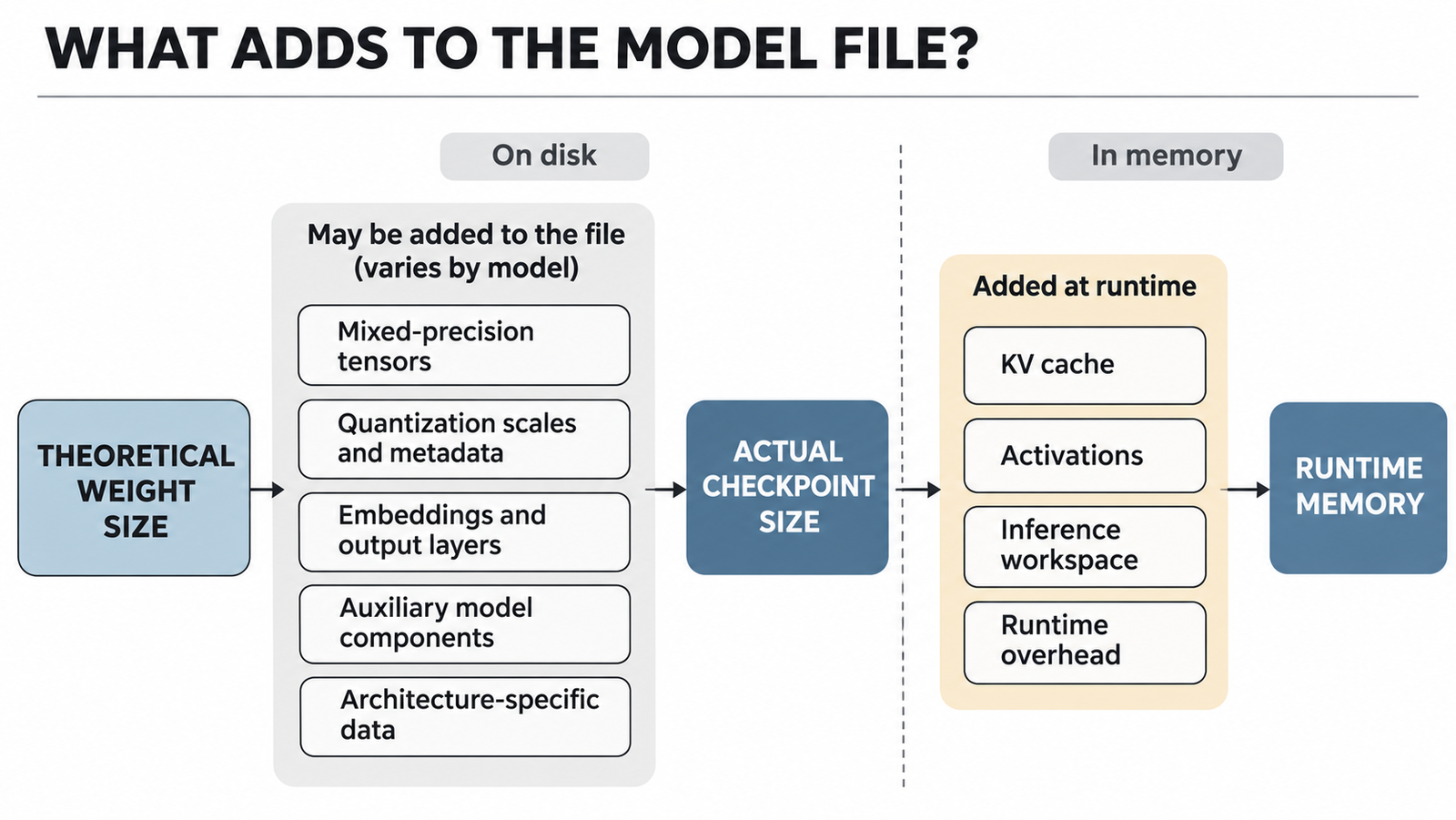
The cases point to a short list of causes. Not every model has all of them, so there’s no fixed overhead to apply:
- Quantization scales and metadata. Every block-scaled format stores extra numbers. They added 23.6 GB to Hy4 and 85.1 GB to Kimi K3.
- Tensors kept at higher precision. Embeddings, output heads, router gates and normalisation layers are often left in BF16 because they’re sensitive or small. That was 19.3 GB for Hy4 and 114.4 GB for Kimi K3.
- Components outside the headline count. Hy4’s MTP layer adds 10 billion parameters the “770B” figure leaves out.
- Architecture-specific data at a different bit width. DeepSeek’s Engram tables are 44% of the 2-bit build.
- Separate files you may need. Vision projectors, tokenizers and chat templates. Usually small, but Gemma’s projector is nearly 1 GB.
The useful number to calculate is effective bits per weight: actual file bytes × 8 ÷ parameter count. Hy4’s FP8 checkpoint works out at 8.35, Kimi K3’s 4-bit release at 4.49, and DeepSeek’s 2-bit build at 2.61. Use a format’s real effective rate, not its name, for your next estimate.
LLM quantization for small models: Gemma 4 E4B and LFM3
The same gaps matter more at the small end, where a few hundred megabytes decide whether a model fits on a phone.
Gemma 4 E4B: 4.5 billion effective, 8 billion stored
Google’s Gemma 4 E4B is marketed by its effective parameter count: 4.5 billion. With embeddings it’s 8 billion, and that’s what the files hold. Per-Layer Embeddings give each decoder layer its own lookup table, adding stored weights without much compute.
So which number goes into the formula? At 4 bits, 4.5 billion predicts 2.25 GB and 8 billion predicts 4.0 GB. Google’s official Q4_0 GGUF is 5.15 GB, plus a 0.99 GB projector for image and audio input. That’s 5.16 effective bits per weight across all 8 billion parameters.
Google’s memory table adds a third set of numbers: about 4.5 GB to load the Q4_0 model, 2.5 GB for its mobile build and 2.2 GB for mobile text-only, using LiteRT-LM. Those are loading-memory estimates, not file sizes, and Google says they exclude the KV cache. Even the 4.5 GB Q4_0 figure is below the 5.15 GB Q4_0 file, and the page doesn’t explain why. Its own notes also disagree on whether a 20% loading overhead is included. A 5 GB download and a 2.2 GB phone footprint can both be quoted for the same model.
LFM3-1.7B: where “about 1 GB” depends on the unit
Liquid AI’s LFM3-1.7B is a 1.73-billion-parameter text model built from 13 gated short-convolution layers, 5 sliding-window attention layers and 6 global attention layers. The card says that at 4-bit precision it takes about 1 GB of memory.
The formula gives 0.86 GB. The official GGUF repository has a Q4_0 file of 1,049,615,680 bytes and a Q4_K_M file of 1.10 GB. In decimal units that Q4_0 file is slightly over 1 GB. In binary units it’s 0.978 GiB, comfortably under.
A model this size fits in a phone’s or a low-end laptop’s memory with room left for context. The hybrid design helps: convolution layers don’t build up a KV cache the way global attention does, so long prompts cost less memory.
Table: scroll sideways to view all columns when needed.
| Model and build | Parameters counted | Theoretical weight size | Actual weight file(s) | Effective bits | What explains the gap |
|---|---|---|---|---|---|
| Hy4-preview-FP8 | 770B (780B with MTP) | 770 GB | 813.77 GB | 8.35 | MXFP8 scales, BF16 layers, MTP |
| DeepSeek V4.1 Flash, ISTA IQ2_XXS GGUF | 763.2B | 190.8 GB | 248.84 GB | 2.61 | Engram tables at 4.5 bits |
| Kimi K3, native MXFP4 | 2.8T | 1,400 GB | 1,560.94 GB | 4.49 | MXFP4 scales, 57B BF16 parameters |
| Gemma 4 E4B, official Q4_0 GGUF | 8.0B (4.5B effective) | 4.0 GB | 5.15 GB (+0.99 GB projector) | 5.16 | Higher-precision tensors, PLE tables |
| LFM3-1.7B, official Q4_0 GGUF | 1.73B | 0.86 GB | 1.05 GB | 4.86 | Q4_0 block scales, higher-precision tensors |
All sizes are decimal GB from Hugging Face file listings, read 6 November 2026. Effective bits are our calculation from file bytes and parameter counts.
LLM quantization and VRAM: why the download isn’t the runtime
A checkpoint tells you how much space the weights need, not how much memory the model needs to run. On top of the weights, an inference engine needs:
- KV cache, which stores attention keys and values for every token in context. It grows with context length and with the number of requests running at once.
- Activations and workspace, the temporary buffers used while computing each layer.
- Framework reservation. Engines such as vLLM reserve a fixed share of GPU memory up front, so the memory you see in use isn’t the minimum the model needs.
- Fragmentation and multi-GPU copies. Allocators leave gaps, and some tensors may be replicated on every GPU, depending on how the model is split.
Here’s an illustrative example with stated assumptions. Take a hypothetical dense model with a 10 GB 4-bit checkpoint, 32 layers, 8 key-value heads of dimension 128 and an FP16 KV cache. Each token needs 2 × 32 × 8 × 128 × 2 bytes = 131,072 bytes of cache. At a 32,768-token context that’s 4.3 GB for one request. Serve four such requests at once and it’s 17.2 GB, which is more than the weights themselves. Before activations or framework overhead, the 10 GB model now needs about 27 GB.
Offloading changes the picture again. DeepSeek’s 2-bit build runs on a 12 GB GPU only because most of its 248.8 GB sits in system RAM and on an SSD, with the GPU handling a slice of each step. Every token then depends on RAM and disk bandwidth as much as on the GPU.
What you lose with more aggressive LLM quantization
FP8 is usually the safe step. Tencent publishes an official FP8 Hy4 checkpoint alongside the BF16 one, DeepSeek’s official release is itself FP8 and FP4, and most serving stacks support FP8 directly on current GPUs.
At 4 bits, results depend heavily on how the model got there. Kimi K3 and Gemma’s Q4_0 builds use quantization-aware training, so the model learned to work at low precision. Post-training methods such as GPTQ and AWQ compress a model after the fact. The GPTQ paper reported 3 to 4 bits per weight with little accuracy loss on a 175-billion-parameter model, but results vary by architecture and task.
At 2 bits, the evidence is thinner and mostly comes from the people making the quants. ISTA-DASLab reports that its IQ2_XXS DeepSeek build matched the base model on AIME25, GPQA-Diamond and LiveCodeBench v6 at reasoning effort 50, a 100% task recovery. Its 1.75-bit IQ1_M build recovered 98.7%. That’s three benchmarks at one setting, published by the quantizer, not an independent evaluation.
The pattern practitioners commonly report: larger models usually tolerate aggressive quantization better than small ones, reasoning and code tasks tend to show losses before chat does, and output can become less consistent between runs. Test the quantized model on your own workload before you commit hardware to it.
Choosing an LLM quantization format for your workload
Table: scroll sideways to view all columns when needed.
| Situation | Start with | Why | Check first |
|---|---|---|---|
| Production serving on Hopper or Blackwell GPUs | FP8 (or the official release format) | Near-original quality, native hardware support | Your engine supports the model’s FP8 variant |
| A model released natively in 4 bits | The official checkpoint | Trained for that precision, no extra loss | Total shard size and BF16 share |
| Fitting a model onto fewer GPUs | AWQ or GPTQ 4-bit | Mature GPU kernels | Accuracy on your own evaluation set |
| Local use on a Mac, CPU or single consumer GPU | GGUF Q4_K_M or Q4_0 | Broad runtime support, good size-quality balance | Effective file size and context memory |
| A very large model on modest hardware | 2-bit GGUF with offloading | Makes the model runnable at all | RAM, SSD speed and task quality |
| Fine-tuning or high-stakes outputs | BF16 or FP8 | Keeps the most precision | Whether the budget allows it |
Before downloading any checkpoint, read the repository’s file list as well as the model card. Add up the shards you actually need, note any projector or auxiliary files, and confirm the publisher. A popular model attracts unofficial copies, and our guide on how to verify model weights before you download covers the checks.
To estimate memory, start from the real file size, add the KV cache for your context length and concurrency, and leave headroom for activations and overhead. If it doesn’t fit, a shorter context or fewer concurrent requests may cost less quality than a smaller quant.
LLM quantization is still the most effective way to fit a large model on hardware you can afford. Plan from the files, not the formula.
FAQ
What is LLM quantization?
LLM quantization stores a model’s weights, and sometimes its activations, in fewer bits than it was trained with, such as 8, 4 or 2 instead of 16. That cuts file size and memory traffic, at some risk to quality.
What is the difference between FP8 and 4-bit quantization?
FP8 uses 8-bit floating-point numbers and usually keeps quality close to the original. 4-bit formats halve the size again but have only 16 levels per weight, so the quantization method matters much more.
How much smaller does a 4-bit LLM become?
In theory, a quarter of its BF16 size. In practice, scales and higher-precision layers push real files to roughly 4.5 to 5.2 bits per weight in the examples here.
What is 2-bit quantization?
It stores most weights with just four possible values, cutting size to about an eighth of BF16. It usually relies on importance-weighted methods and keeps sensitive tensors at higher precision.
Why are LLM quantization files larger than theoretical estimates?
Because the formula ignores scaling factors, tensors kept in BF16, and components outside the headline parameter count. For DeepSeek V4.1 Flash, 4.5-bit Engram tables alone add 110.6 GB.
Does a 4-bit model use exactly 4 bits per parameter?
No. Kimi K3’s 4-bit checkpoint averages 4.49 bits, and llama.cpp’s Q4_K_M averages 4.89 bits on Llama 3.1 8B.
Is model file size the same as GPU VRAM usage?
No. VRAM also has to hold the KV cache, activations and the inference engine’s own reservation, and the KV cache grows with context length.
Does LLM quantization reduce accuracy?
It can, and the loss usually grows as bits fall. FP8 is typically close to the original, while 4-bit and 2-bit results depend on the method, the model and the task.
Which quantization format is best for running LLMs locally?
GGUF Q4_K_M or Q4_0 is the common starting point for llama.cpp, Ollama and LM Studio. Use the model publisher’s own GGUF when one exists.
How do I calculate the memory needed for LLM quantization?
Start from the actual file size, then add KV cache: 2 × layers × KV heads × head dimension × bytes per value × tokens × concurrent requests. Leave headroom for activations and framework overhead.
Keep reading
Here are the latest posts from the blog.
LLM Quantization Explained: Why 4-Bit Models Are Bigger Than the Math Says

OpenAI Found 948 Linux Kernel Flaws. Who Will Fix Them?
NeurIPS 2026 Camera-Ready and Code Requirements