Pricing checked on official vendor pages on 1 November 2026. All USD. Cost scenarios are illustrative and labelled as such.
On 28 October, TechCrunch published a number from Jellyfish, the engineering analytics company, that should interest any finance team: spending on Claude Code and other Anthropic-powered coding tools has grown 10x since the start of the year and now equals about 2% of total engineering cost. “Even if you’re saying 2% is still small,” Jellyfish chief scientist Nicholas Arcolano told the publication, “that 10x growth is growth that most CFOs didn’t plan for.”
That invoice line is the visible part of AI coding agent cost. The rest shows up in review queues, rework and the hours senior engineers spend supervising agents. The tools now bill like utilities, but their output still has to pass through people. What it costs to generate code and what it costs to deliver accepted software are two different numbers.
Key Takeaways
- Jellyfish’s figures measure proposed changes and spend, not delivery. Anthropic-powered tools account for nearly a third of proposed changes, and spending on them is up 10x this year to about 2% of engineering cost.
- Seat prices are floors. Claude Code, Codex and Copilot all bill heavier use at token-based rates, so heavy users cost similar amounts whichever tool they use.
- Per-developer spend has a long tail. Jellyfish’s May 2026 mean was $248 a month, and the 99th percentile was $2,452.
- Model choice drives cost more than product choice, because tokens are priced at each model’s rate once allowances run out.
- Review time can exceed the tool bill, but it’s an opportunity cost on existing salaries, and more generated code adds little delivered software if review capacity stays fixed.
- Budgets work best with a central floor, pooled team allowances and visible review capacity.
Quick Navigation
- What Jellyfish's data says about AI coding agent cost
- Why the seat price is only the floor of AI coding agent cost
- Claude Code, Codex and Copilot: three billing models
- An AI coding agent cost model for one developer
- Generated code is not delivered software
- The hidden AI coding agent cost: review, supervision and rework
- How to budget for AI coding agent cost
- What to measure before scaling up
- Frequently asked questions
- How much does an AI coding agent cost per developer in 2026?
- Is Claude Code more expensive than GitHub Copilot?
- How does OpenAI Codex charge for usage?
- What is the difference between AI coding subscriptions and API pricing?
- Why does AI coding agent cost rise so quickly with heavy use?
- How can engineering teams control AI coding agent cost?
- Does AI-generated code reduce engineering costs?
- How should companies budget for AI coding agent cost?
What Jellyfish’s data says about AI coding agent cost
Each Jellyfish figure in the TechCrunch report measures something different. First, Claude Code and other tools built on Anthropic’s models were responsible for “nearly a third of all proposed code changes submitted for review.” The denominator is proposed changes, essentially pull requests opened, not merged code or completed work. Second, spending on those tools rose 10x since January, which is a growth rate, not a level. Third, that spending equals about 2% of total engineering cost, which includes salaries. TechCrunch describes the base as 276,000 of Jellyfish’s customers. Jellyfish’s own September release describes its dataset as more than 275,000 software engineers at over 1,000 companies, so the figure most likely counts individual engineers rather than companies.
The same report captured a shift between vendors. “It took a long time for us to see Codex really pop in our data at all,” said Nikolas Albarran, Jellyfish’s AI product lead, “and it has come up with Astra,” OpenAI’s GPT-6 model. He added that for teams standardised on Anthropic, “there’s not a big enough reason to switch.”
Jellyfish’s State of AI in Software Engineering report for the first half of 2026 fills in the per-person picture. At the median company, the typical user’s monthly AI coding spend rose from $5 in August 2025 to $81 in May 2026. The mean across users in May was $248. The 99th percentile was $2,452. More than half of users spent under $100.
An average per-developer number hides a long tail, and the tail is where budgets break.
Why the seat price is only the floor of AI coding agent cost
A year ago, most coding assistants were priced like software, with a fixed monthly seat. In 2026, all three major tools charge a seat fee that includes a usage allowance, then bill heavier use by the tokens consumed.
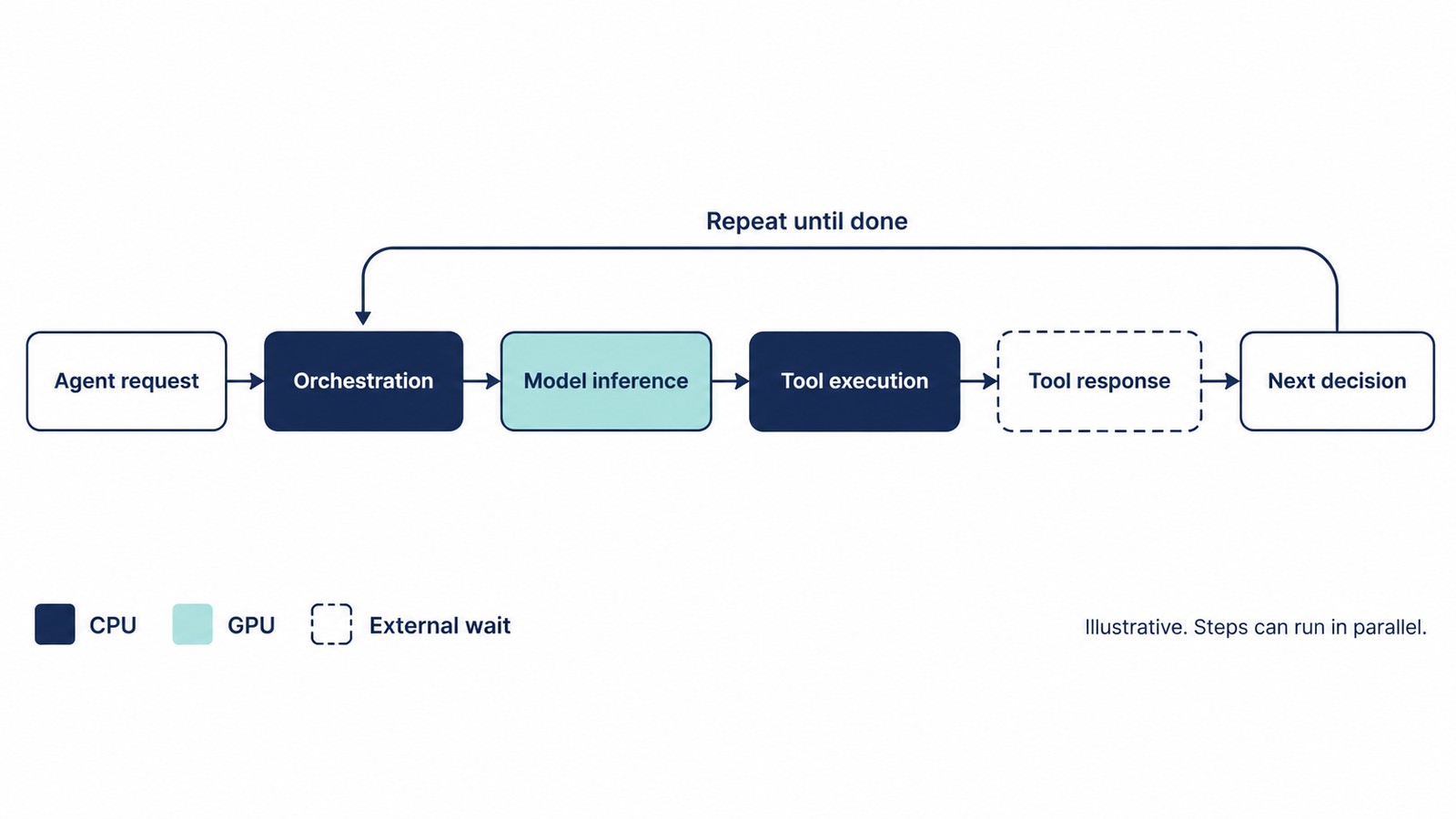
Tokens are the units models read and write, roughly three-quarters of a word each. An agent’s token use grows quickly because every step carries context: files read, project instructions, tool results and the conversation so far. Anthropic’s Claude Code cost documentation puts it plainly: “Token costs scale with context size.” It also notes that each Claude Code turn carries file contents, tool calls and multi-step reasoning, “so one debugging session can consume more than a day of chat.”
So the seat price works as a floor. Light users stay inside it. Heavy users pass through it, and from there the model’s token rate sets the marginal cost. Our analysis of cost per completed task explains why the finished task, not the token, is the useful unit.
Claude Code, Codex and Copilot: three billing models
The three products reach similar economics by different routes. The table compares business plans, because that’s where most team spending sits.
| Claude Code (Anthropic) | Codex (OpenAI) | GitHub Copilot | |
|---|---|---|---|
| Individual plans | Pro $20/month ($17 annual), Max $100, Ultra $200 | Plus $20/month; Pro from $100 (also $200, $500) | Pro $10, Pro+ $39, Max $100 |
| Team or business seat | Team: $25/month standard ($20 annual); premium $125 ($100 annual) with 5x usage | Business: $25/user/month ($20 annual), 2+ users | Business: $19/user/month |
| Enterprise | $20/seat/month (annual, 20-seat minimum) plus usage at API rates | Contact sales | Enterprise: $39/user/month |
| What the seat includes | Usage allowance on five-hour and weekly windows | Message limits per five-hour window that vary by model | AI credits equal to the seat price (1,900 for Business, 3,900 for Enterprise; 1 credit = $0.01), pooled across the organisation |
| Beyond the allowance | Usage credits at standard API rates | Credits priced per million tokens; dollar rate per credit set by plan or agreement | Additional credits at model API rates, enabled by default |
| Admin spend controls | User, group and org spend limits; pooled group budgets on Enterprise | Workspace credits; usage and cost review for admins | Budgets at user, cost-centre, org and enterprise level |
Sources: Claude pricing, Codex pricing and GitHub’s usage-based billing documentation, all checked on 1 November 2026.
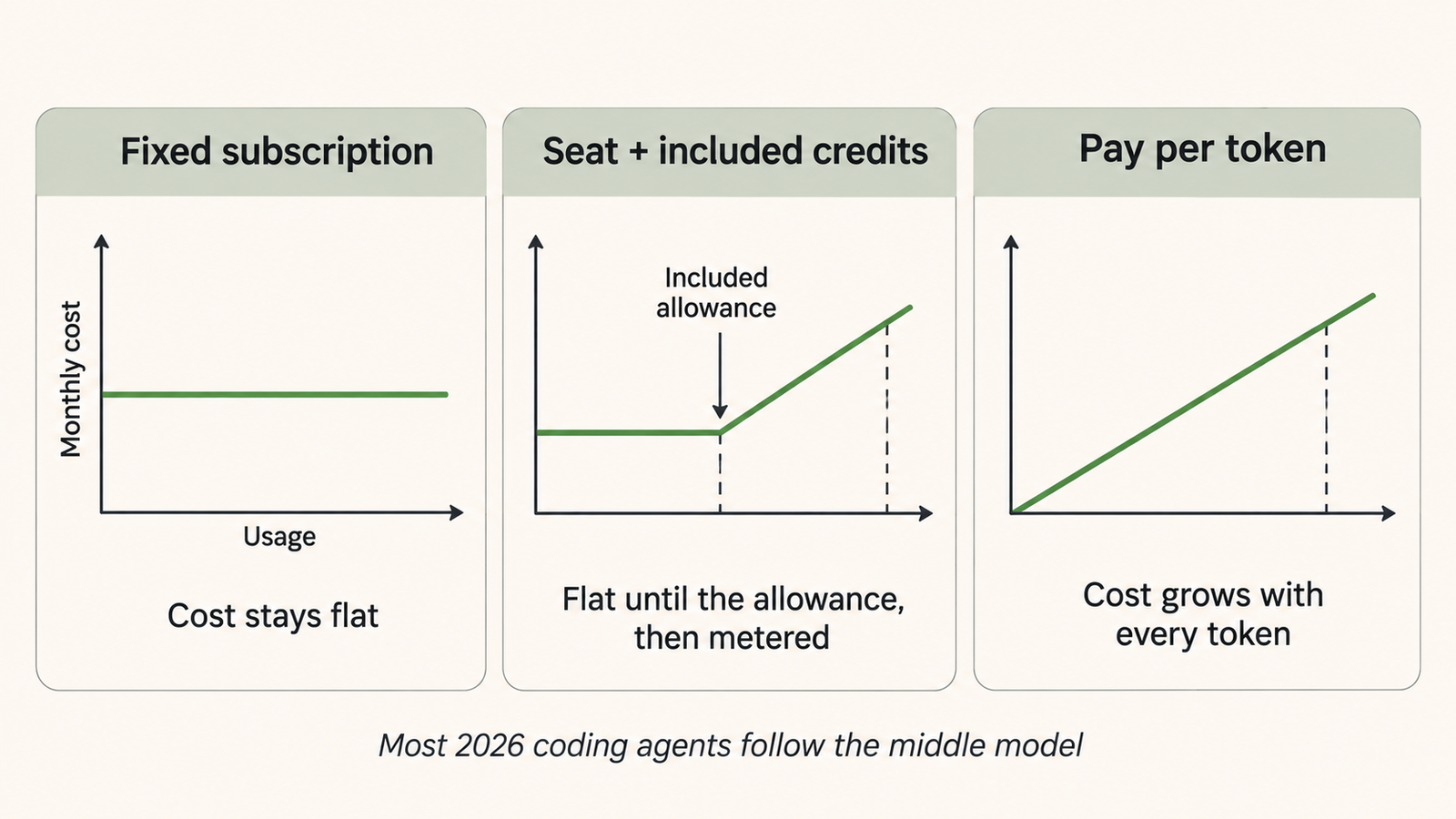
Some details change the arithmetic. GitHub moved Copilot to token-based AI credits on 1 June, with annual individual subscribers switching at renewal. Completions and next-edit suggestions aren’t billed, but chat, the CLI and agents are. Business and Enterprise customers had promotional allowances of $30 and $70 a month until 1 September, so included usage fell this autumn.
OpenAI’s Codex page lists credit rates per million tokens for each model, but not a dollar price per credit, which “depend[s] on your plan or agreement.” Model choice matters a lot: on Plus or standard Business, the page estimates 5 to 45 local messages per five hours on GPT-6 Astra, against 350 to 3,000 on GPT-6 Luna. Anthropic’s Enterprise plan is the plainest version of the structure: a $20 seat, then usage at API rates that “scales with model and task.”
None of these seat prices is comparable to an API price list on its own, because a seat buys an allowance measured in usage windows or credits, not tokens. Per-token rates are in our API pricing comparison.
An AI coding agent cost model for one developer
The model below uses three illustrative usage levels. They aren’t measured data for any company. They’re anchored to two published figures: Anthropic’s statement that enterprise Claude Code deployments average “around $13 per developer per active day and $150-250 per developer per month,” with 90% of users below $30 per active day, and Jellyfish’s May 2026 median-company figure of $81 a month.
Assumptions
- Usage is metered spend at list API rates, which applies to any tool billing beyond its allowance at those rates.
- Light: 10 active days at $8, for short tasks and occasional agent sessions.
- Typical: 15 active days at $13, for daily assistance, debugging and tests.
- Heavy: 21 active days at $30, for long sessions, large codebases and parallel agents.
- Seat examples: Claude Enterprise ($20 plus usage) and Copilot Business ($19 including $19 of credits).
- Review and supervision time: 2, 6 and 15 extra hours a month, valued at an illustrative fully loaded engineering cost of $100 an hour.
| Per developer, per month | Light | Typical | Heavy |
|---|---|---|---|
| Metered usage at API rates | $80 | $195 | $630 |
| Claude Enterprise (seat + usage) | $100 | $215 | $650 |
| Copilot Business (seat covers first $19) | $80 | $195 | $630 |
| Extra review and supervision time | 2 h = $200 | 6 h = $600 | 15 h = $1,500 |
| Total attributable cost (Claude example) | $300 | $815 | $2,150 |
The method is simple: tool cost = seat + max(0, usage − included credit). Review cost = extra hours × hourly cost. Codex isn’t in the table because OpenAI doesn’t publish a dollar price per credit. For API-key use, Codex follows standard API pricing, so the usage row applies.
Once usage exceeds the allowance, the products converge, because they all charge for tokens at model rates. The model a team runs, and how long its sessions last, matters more than the product.
The review row is larger than the tool row at every level. Those hours aren’t new spending: they come out of salaries the company already pays, so they’re an opportunity cost, not an invoice. Treating them as cash would double-count labour. The model also excludes time the agent saves, which may exceed these hours. It measures gross attributable cost, not net return.
Generated code is not delivered software
Jellyfish’s August analysis of about 16.9 million pull requests found total volume grew 37.6% between January and July. The same study found merge rates for high-impact changes broadly similar across tools: 88.3% for pure-human work, 89.5% for Copilot and 86.7% for Claude Code. Its author cautions that merge rate measures organisational acceptance, not correctness, and that the results are correlational.
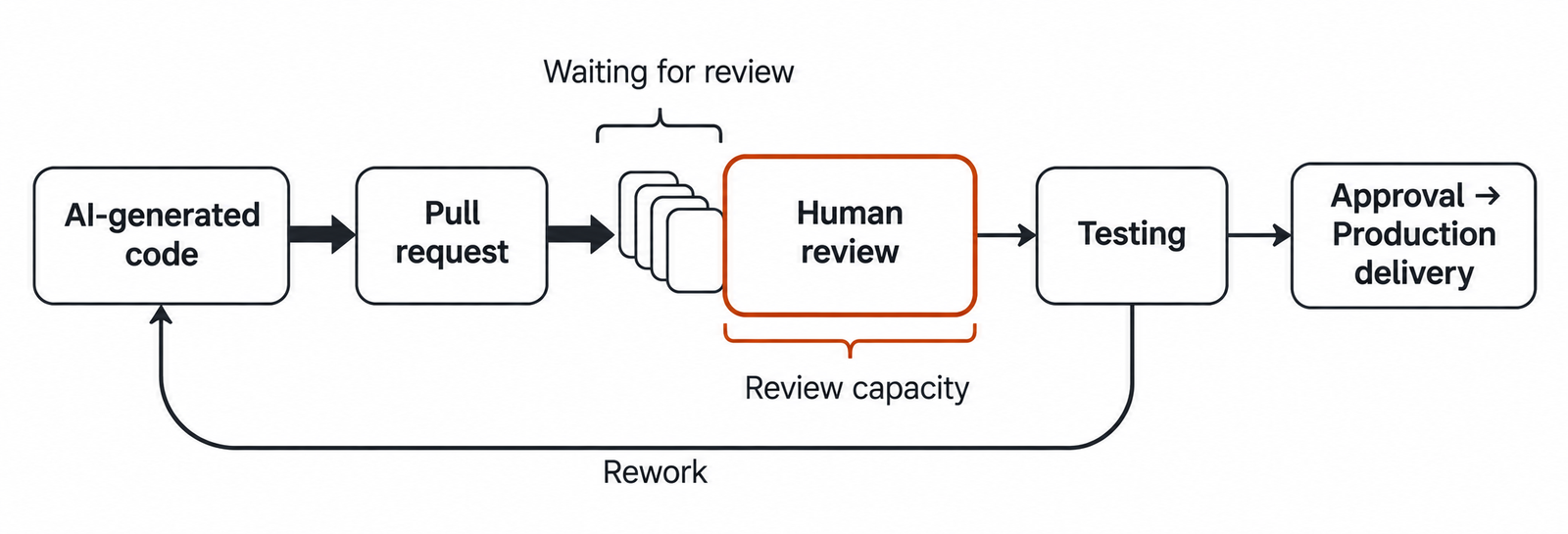
Faros AI, which sells engineering analytics, reports a sharper picture in its Q2 2026 telemetry from 22,000 developers. Comparing high and low AI adoption within the same organisations, it found task throughput up 33.7% and PR size up 51%. Median review time rose fivefold, bugs per developer rose 54%, and deployments per week fell 11.7%. These are vendor-reported correlations, not causal estimates, but they point at the same constraint.
Here’s an illustrative example of how that constraint plays out. A ten-person team opens 50 pull requests a week, each taking 45 minutes to review, and has 40 hours a week of review capacity. The 37.5 hours it needs fit. The team adopts coding agents at the typical level: ten seats at $215, or about $2,150 a month. Pull requests rise to 70 a week, and each is 51% larger. If review time scales with size, the team now needs about 79 review hours a week, roughly double its capacity.
Unless engineers move time from building to reviewing, about 35 of those larger PRs get reviewed each week. Measured in units of work, generated output has roughly doubled while reviewed output has risen about 6%. The company pays more, generates twice the code and delivers only slightly more software.
The hidden AI coding agent cost: review, supervision and rework
Review capacity is the obvious bottleneck. Several other costs sit around it.
- Context switching. A reviewer reading an agent’s 600-line change has to rebuild reasoning the agent never wrote down.
- Test validation. Someone has to check that agent-written tests test the right thing.
- Security review. Generated dependencies and infrastructure changes still need human sign-off.
- Rejected changes. A PR closed unmerged still consumed tokens and review time.
- Rework. Higher bug rates mean follow-up work that lands weeks later, under another ticket.
- Maintenance. Every merged line becomes code someone owns.
Supervision is the least visible. Jellyfish found the longest Claude Code sessions, the top 0.1%, ran past 94 minutes, and that low-supervision long runs produced about 11 times the net lines of heavily supervised runs of the same length. More lines with less oversight is efficient if the lines are right and costly if they aren’t. Multi-agent setups multiply the effect: Anthropic’s documentation says agent teams use about seven times the tokens of a standard session when teammates run in plan mode, a pattern our piece on multi-agent token cost examines.
Controlled evidence is thinner. METR’s randomised study of 16 experienced open-source developers, published in July 2025, found early-2025 AI tools made them 19% slower, though they believed they were 20% faster. In February 2026, METR said a follow-up couldn’t produce reliable results, partly because developers wouldn’t work without AI. Neither settles whether today’s agents raise productivity, but both show how easily perceived speed and measured delivery diverge.
How to budget for AI coding agent cost
Large organisations are already finding the shape of this. In October, 404 Media reported, and Forbes followed up, that Accenture centrally funds $29 per employee per month for Claude usage from 1 October. Spending above that is charged to an approved project or team budget. Some employees had reportedly been spending $500 to $1,000 a month. Accenture said reporting that it had “put a firm limit” on access was “incorrect.” The figure, it said, describes one part of its funding approach.
The structure, a central floor with spending above it charged to whoever benefits, is more useful than the number. A consulting firm has billable projects to charge; a product company may not.
Vendors are building the controls. On 28 October, Anthropic made pooled group budgets generally available for Claude Enterprise. Teams share a monthly budget with individual limits as guardrails, and billing admins get alerts at 50%, 75%, 95% and 100%. GitHub pools Copilot credits across an organisation, allows budgets per user, cost centre or organisation, and leaves additional usage on by default, so a heavy month gets billed unless someone turns that off.
A workable budget usually has four parts:
- A per-seat baseline for light and typical users.
- A pooled allowance for heavy users, owned by a team lead.
- Model defaults: the cheaper model for routine work, the frontier model for hard problems.
- A review budget in hours, so leaders can see where generated work is waiting.
What to measure before scaling up
Before expanding seats or raising caps, measure these:
- Spend per developer at the mean, 90th and 99th percentiles.
- The share of AI-assisted PRs that merge, and how long they wait for review compared with other PRs.
- Review hours per merged change, before and after adoption.
- Reverts, escaped defects and incidents linked to AI-assisted changes.
- Cycle time from first commit to production.
- Which models are used for which tasks, and what each costs per merged PR.
If tool spend rises while cycle time and review backlog stay flat or worsen, the constraint is review, and more tokens won’t help.
Frequently asked questions
How much does an AI coding agent cost per developer in 2026?
Usually around $100 to $250 a month in tool spend, with a long tail above. Anthropic reports $150 to $250 for enterprise Claude Code users; Jellyfish measured a $248 mean in May 2026.
Is Claude Code more expensive than GitHub Copilot?
At the seat level, Copilot Business is cheaper ($19 against Claude Team’s $25 monthly standard seat). For heavy agent use, both bill tokens at model rates beyond the allowance, so the model used matters more than the product.
How does OpenAI Codex charge for usage?
Codex is included in ChatGPT plans with message limits per five-hour window that vary by model. Extra usage is bought as credits priced per million tokens. Used with an API key, Codex is billed at standard API rates.
What is the difference between AI coding subscriptions and API pricing?
A subscription buys an allowance measured in usage windows or credits. API pricing charges per token with no allowance, so comparing them needs usage assumptions.
Why does AI coding agent cost rise so quickly with heavy use?
Agents resend context on every step, and long sessions, large codebases and parallel agents multiply it. Thinking tokens bill as output.
How can engineering teams control AI coding agent cost?
Set per-user and pooled budgets, default to cheaper models for routine work, clear sessions between tasks, and track spend at the 90th and 99th percentiles.
Does AI-generated code reduce engineering costs?
The evidence is mixed: telemetry shows higher throughput alongside longer reviews and more bugs, and a 2025 randomised study found experienced developers slower. Measure merged work and cycle time in your own team.
How should companies budget for AI coding agent cost?
Combine a per-seat baseline, a pooled allowance for heavy users, model defaults and an explicit review-capacity budget. Treat examples such as Accenture’s $29 central funding as structures, not benchmarks.
Keep reading
Here are the latest posts from the blog.

Types of AI Models in 2026: A Field Guide From LLMs to World Models

AI Coding Agents Are Getting Expensive. Who’s Paying for the Tokens?

Generative AI Architecture: The 7 Layers That Are Hard to Undo