Published 29 October 2026. Checked against ISTA-DASLab’s model card (updated 27 October), Strata’s documentation for version 0.2.7 and llama.cpp release b11870.
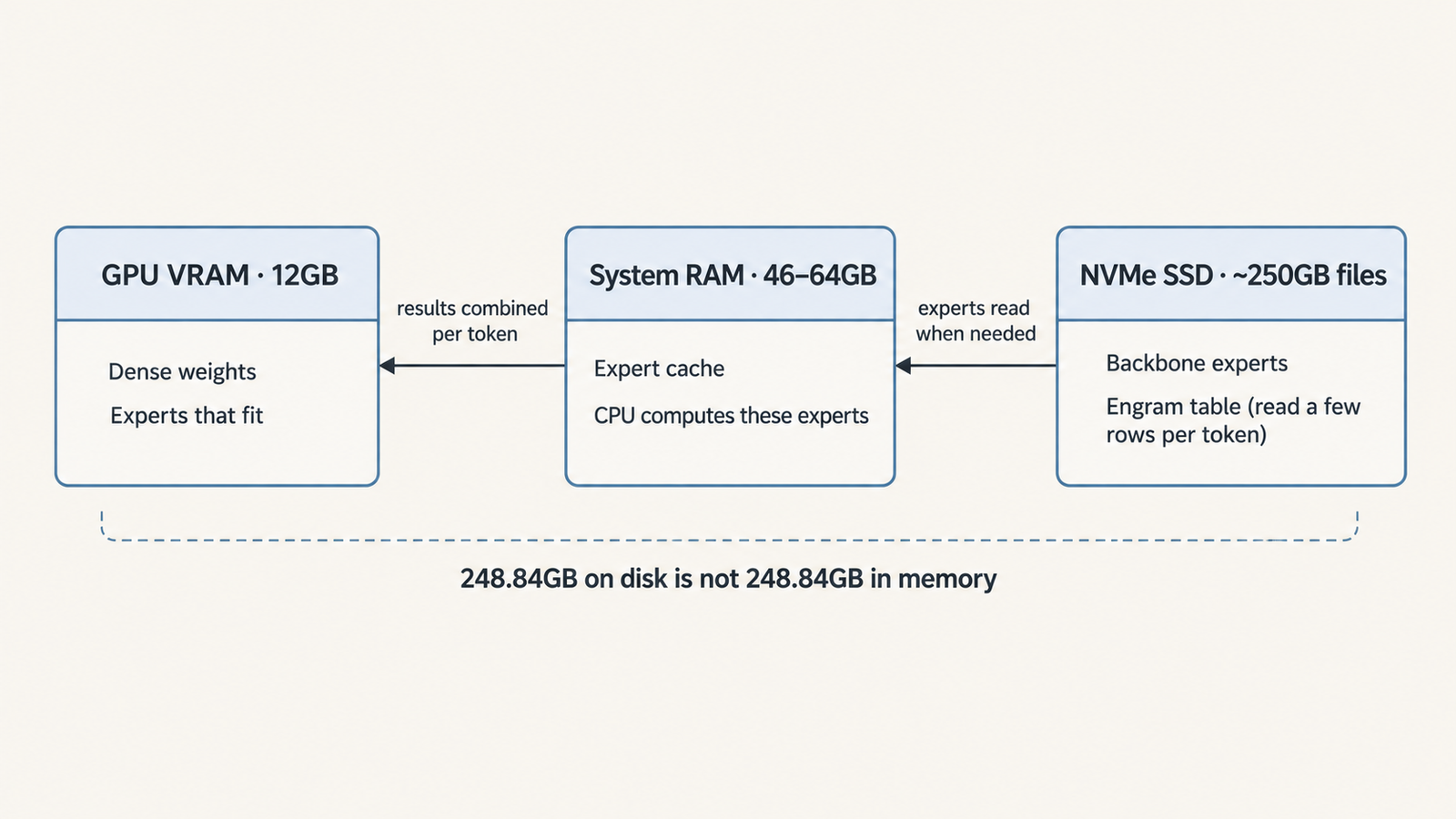
The 2-bit build of DeepSeek V4.1 Flash that runs on a 12GB graphics card is a 248.84GB set of files. That’s twenty times the card’s memory, and it is not a contradiction. You can run DeepSeek V4.1 Flash locally on a 12GB GPU because the card never holds the model. The GPU does part of the arithmetic, system RAM caches the experts used most often, and an NVMe SSD supplies the rest.
So the question worth asking isn’t whether 12GB of VRAM is enough. It’s whether the rest of the computer is. Strata, the open-source runtime behind the 12GB claim, documents a working setup with 46GB of system RAM and calls 64GB comfortable. Its developer measured between 4 and 11 tokens per second on 12GB cards, depending on the machine.
Quick answer
- Can it run? Yes, through Strata, on NVIDIA RTX 30, 40 or 50 series cards with 12GB or more, under Windows or Linux.
- What else you need: about 46GB of system RAM at minimum (64GB is Strata’s tested comfortable size), an NVMe SSD with roughly 245GB to 280GB free, and a modern CPU that will do much of the expert computation.
- Package size: 231.32GB to 265.83GB for the three ISTA-DASLab builds. Strata’s downloads are 239GB to 274GB because they add an 8GB draft model.
- The main limit: data movement. On 12GB cards, most of each token’s time goes to waiting on the SSD and CPU.
- Who should try it: people who want a frontier-scale open model offline, can accept a few tokens per second, and already own a machine with the RAM and disk.
Key Takeaways
- 763 billion parameters isn’t the working size. Most of it is a 552-billion-parameter backbone and 196 billion parameters of Engram lookup tables, read a few rows at a time.
- 248.84GB is a disk total, not a RAM requirement: a 138.24GB backbone plus a shared 110.60GB Engram file.
- System RAM and the SSD matter as much as the GPU. Strata’s RAM expert cache ran about twice as fast as memory-mapping the files on the developer’s RTX 5070 machine.
- “100% recovery” covers three benchmarks. Strata’s own test found the same build’s perplexity 15.5% higher on general text.
- Strata’s 12GB default isn’t the full model. It routes each token to five of the model’s six experts unless you choose “Full quality”.
- llama.cpp supports the model from release b11870.
Quick Navigation
- What it takes to run DeepSeek V4.1 Flash locally on a 12GB GPU
- The files you need to run DeepSeek V4.1 Flash locally
- How Strata splits the model across GPU, RAM and SSD
- How fast DeepSeek V4.1 Flash runs locally
- Can your desktop run DeepSeek V4.1 Flash locally?
- Why the three-benchmark result needs context
- Running DeepSeek V4.1 Flash locally with llama.cpp
- Is it worth the effort to run DeepSeek V4.1 Flash locally?
- What the 12GB claim really tells us
- Frequently asked questions
- Can you run DeepSeek V4.1 Flash on a 12GB GPU?
- How much RAM do you need to run DeepSeek V4.1 Flash locally?
- Does the 248.84GB model size mean you need 248.84GB of RAM?
- Can DeepSeek V4.1 Flash run with standard llama.cpp?
- What is the difference between IQ1_M, IQ2_XXS and IQ2_XS?
- Does the 2-bit quantized model retain 100% of the original model's performance?
- Will DeepSeek V4.1 Flash run quickly on an ordinary desktop?
- Is running DeepSeek locally better than using an API?
What it takes to run DeepSeek V4.1 Flash locally on a 12GB GPU
Three numbers are easy to blur here, and they answer different questions.
Package size on disk is how much storage the files take: 248.84GB for the recommended IQ2_XXS build. Memory in use is what has to sit in VRAM and RAM while the model generates. Bandwidth is how fast the weights a token needs can reach whatever is computing it. A setup can pass the first two tests and still be slow on the third.
The architecture is what makes this possible. DeepSeek’s model card describes a mixture-of-experts (MoE) design: each MoE layer has 384 routed experts, small feed-forward networks, plus one shared expert. A router sends each token to six of the 384. DeepSeek puts the active parameters at 8 billion per token during prefill and 16 billion during decoding, out of 552 billion in the backbone. Most of the model sits idle for any given token.
The Engram component works differently again. It is 196 billion parameters of what DeepSeek calls “conditional memory”, accessed by token-based lookup rather than matrix multiplication. ISTA-DASLab’s card says the table is read one row per token. That’s why 110.60GB of it can stay on an SSD without hurting speed much.
The 763-billion headline figure comes from the Hugging Face metadata for the 1017 revision. The backbone and Engram add up to about 748 billion, and neither DeepSeek nor ISTA-DASLab explains the remaining 15 billion.
The files you need to run DeepSeek V4.1 Flash locally
ISTA-DASLab, the Distributed Algorithms and Systems lab at the Institute of Science and Technology Austria, published three GGUF builds of DeepSeek-V4.1-Flash-1017, the 17 October revision. The method has two parts. GSQ chooses how each weight is rounded. RCO decides which quantization type each tensor gets so the total fits a size budget. Routed experts get between roughly 1.5 and 3.5 bits per weight. Dense tensors keep between about 5.5 and 8.5.
| Build | Bits per weight | Backbone | Engram file | Card total | Strata download | Reported quality |
|---|---|---|---|---|---|---|
| IQ1_M | 1.75 | 120.72GB | 110.60GB | 231.32GB | 239GB | 98.7% of base task average (ISTA); perplexity +21% (Strata) |
| IQ2_XXS | 2.00 | 138.24GB | 110.60GB | 248.84GB | 257GB | 100% of base task average (ISTA); perplexity +15.5% (Strata) |
| IQ2_XS | 2.25 | 155.23GB | 110.60GB | 265.83GB | 274GB | 99.8% of base task average (ISTA); perplexity +7.3% (Strata) |
The card total is the backbone plus the shared Engram file, in decimal gigabytes (10⁹ bytes). It excludes a 0.97GB vision projector. Strata’s download adds an 8GB draft model used for speculative decoding. Neither number is a measured runtime requirement.
The Engram file, stored in a 4.5-bit format called IQ4_NL, is identical across builds, so comparing them doesn’t mean downloading it twice. Strata recommends IQ2_XS for coding and agent work if disk allows: half the perplexity gap of IQ2_XXS, for 17GB more storage and slightly slower generation.
How Strata splits the model across GPU, RAM and SSD
Strata is an MIT-licensed local runtime maintained by a developer publishing as Niko1221. It added DeepSeek V4.1 Flash in version 0.2.4 on 24 October and was at 0.2.7 when this was written. Its DeepSeek engine, strata-dsv41, is a separate package ported from Project Maya’s MIT-licensed maya-ds4.
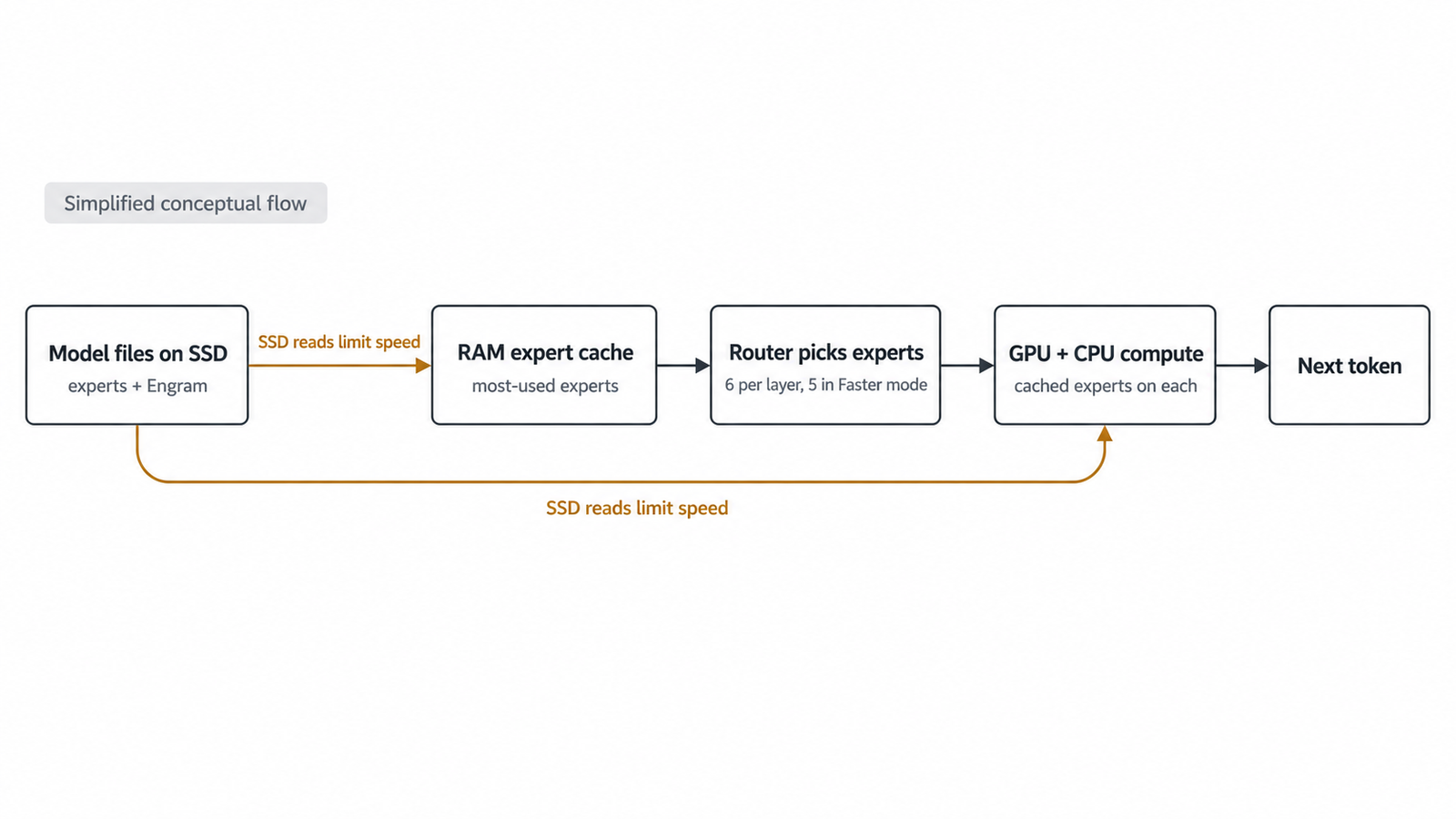
According to Strata’s DeepSeek guide and release notes, the work is split three ways. The GPU holds the dense weights and as many routed experts as fit, and computes them. A RAM expert store, which sizes itself to free memory when the engine starts, keeps the most-used experts in system RAM, and the CPU computes those. Experts that fit in neither are read from the model files on the SSD as they’re needed. A hot-expert profile ships with the engine, so the caches don’t start empty.
The Engram table is read “from RAM or SSD”. With 46GB to 64GB of RAM against a 138GB backbone, some disk reads during generation are unavoidable on a 12GB machine.
Strata’s 0.2.4 release notes compare this design with plain memory-mapping, where the operating system pages file data in on demand. On an RTX 5070 with 64GB of RAM, the expert store produced 4.3 to 4.9 tokens per second, against 1.8 to 2.2 for memory-mapping.
Two defaults matter for quality. The guide says context is set to 8,192 tokens, “the size it was checked at”, and --context raises it. On machines whose GPUs total 16GB or less, a “Faster” mode routes each token to five experts instead of the model’s six. The guide describes the quality change as “usually not noticeable”. Neither ISTA-DASLab’s benchmarks nor Strata’s perplexity figures say they used that mode, so “Full quality” (--experts 6, engine 0.1.50 or newer) is the setting that matches the published evidence.
How fast DeepSeek V4.1 Flash runs locally
Strata’s README reports these figures, measured by its developer on version 0.2.5. UniverseBlend hasn’t reproduced them.
| Machine | System RAM | Output speed | Prompt processing |
|---|---|---|---|
| RTX 5070 12GB, Ryzen 5 7600, 3.6GB/s NVMe | 64GB | 4–6 tokens/s | 231 tokens/s at 8K (0.2.4 notes) |
| RTX 3060 12GB | 46GB | 9–11 tokens/s | 149 tokens/s at 8K (0.2.4.1 notes) |
The older RTX 3060 beating the RTX 5070 is a reminder that the GPU isn’t the main variable here. The project doesn’t explain the gap, and CPU, SSD and RAM configuration all differ between the two machines.
A back-of-envelope figure shows why storage dominates. If all 16 billion active parameters came off the SSD at about 2 bits each, every token would need roughly 4GB read. At 3.6GB per second, that’s about one token per second. That’s a pessimistic bound, because the dense weights stay on the GPU. Strata’s 4 to 11 tokens per second means caching is doing most of the work. A slower SSD, less RAM or a different mix of topics, which changes which experts are hot, pushes the system back toward that floor. Our earlier piece on the memory-bandwidth limits of AI chips explains the same constraint at data-centre scale.
Reasoning length matters as much as raw speed. Strata’s default thinking budget is 32,768 tokens. At 5 tokens per second, a fully used budget is about 1 hour 49 minutes before the answer starts. A 2,000-token reply alone takes about 6.7 minutes. Strata describes 4 to 8 tokens per second as usable for chat but slow for long agent runs, which is a fair summary.
Can your desktop run DeepSeek V4.1 Flash locally?
Work through these in order. The first failure tells you what to upgrade.
- GPU: an NVIDIA RTX 30, 40 or 50 series card with at least 12GB, on Windows or Linux. AMD support covers the Radeon AI PRO R9700 on Linux, and Strata’s README adds Ryzen AI Max “Strix Halo” on Windows. Macs aren’t supported.
- System RAM: 46GB is the smallest configuration Strata reports working, and 64GB is its tested comfortable size. The guide calls anything under about 40GB “untested and slow”. Setup warns if RAM is short but doesn’t stop.
- Free SSD space: 245GB to 280GB, depending on the build, on one drive.
- Storage type: NVMe. Strata’s test machine used a 3.6GB/s drive, and the guide warns that a slow disk “slows every word”. Avoid SATA SSDs and hard drives.
- CPU: a recent desktop processor, since it computes the experts that don’t fit on the GPU. Strata uses AVX-512 on Zen 4 and Zen 5.
- Power and cooling: GPU, CPU and SSD stay busy together for long stretches, and an NVMe drive without a heatsink may throttle.
- Patience: a 250GB download, a load of several minutes, and replies measured in minutes.
These are the configurations Strata’s developer reports testing, not universal minimums.
Why the three-benchmark result needs context
ISTA-DASLab reports that IQ2_XXS matches the FP8/FP4 base model on all three tasks it measured, at reasoning effort 50:
| Variant | AIME25 | GPQA-Diamond | LiveCodeBench v6 | Task average |
|---|---|---|---|---|
| Base model | 100.00 | 90.91 | 89.71 | 93.54 |
| IQ2_XXS (2.00 bpw) | 100.00 | 90.91 | 89.71 | 93.54 |
The result comes from the team that made the quantization, on competition maths, graduate science and coding problems. “100% recovery” means those three scores were identical, not that the 2-bit build keeps every capability. Nothing here tests long-context recall, multilingual writing, tool use or image input. And with the base model already at 100 on AIME25, that benchmark can only register a loss.
Strata’s own measurement shows why that matters. On 4,995 text positions, the IQ2_XXS build’s perplexity, a measure of how well a model predicts text, was 15.5% higher than the original’s. That’s a different test from ISTA-DASLab’s, and it isn’t evidence that answers are 15.5% worse. It does show that a build can match on three reasoning benchmarks and still differ measurably elsewhere. The IQ1_M build’s perplexity on plain English prose was 53% higher.
For an independent view of the full model, Artificial Analysis gives DeepSeek V4.1 Flash 1017 at maximum reasoning effort a score of 32 on its Intelligence Index v5.0, which combines nine evaluations. That number is on v5.0’s scale and can’t be compared with scores from the older v4 index. It also measures DeepSeek’s hosted model, not a 2-bit local build. Epoch AI’s Capabilities Index is a separate evaluation: it lists 156 for the original September release. As we’ve argued in why benchmark scores don’t transfer to your workload, the useful test is your own tasks on your own build.
Running DeepSeek V4.1 Flash locally with llama.cpp
Standard llama.cpp support arrived recently. Release b11870, published as a pre-release on 25 October, adds the deepseek41 architecture and Engram handling. ISTA-DASLab’s card says its files have used the current layout since 27 October. Copies downloaded before then need a local conversion with the convert_ds41_upstream.py script.
The card also notes that llama.cpp’s default lazy mode memory-maps tensors over 4GiB, so the Engram file needs neither VRAM nor RAM. Strata’s RAM expert store and hot-expert profiles are its own additions, and in Strata’s comparison plain memory-mapping ran at roughly half the speed. On a 12GB card, expect llama.cpp to work but not to match Strata’s figures without tuning. We found no published like-for-like comparison of the two.
Is it worth the effort to run DeepSeek V4.1 Flash locally?
That depends on what you need the model for.
- The case for local: offline use, data that can’t leave the machine, and experimenting with a frontier-scale open model at no per-token cost. The base model and ISTA-DASLab’s files are MIT-licensed, which permits commercial use.
- The case for the API: price and speed. Artificial Analysis lists DeepSeek’s API at $0.30 per million input tokens and $1.20 per million output tokens, at about 184 output tokens per second. Generating one million output tokens locally at 5 tokens per second takes more than 55 hours of continuous running, a job the API would bill at $1.20.
Local isn’t automatically private either: downloads, engine updates and connected tools still touch the network. For coding agents, the API wins on throughput. For occasional private questions on hardware you already own, local is a reasonable choice. Our comparison of Chinese open-weight models covers the licensing terms and the US federal restrictions on DeepSeek products.
What the 12GB claim really tells us
A 12GB card is the cheapest part of this setup. What lets you run DeepSeek V4.1 Flash locally is a runtime that treats VRAM, RAM and an NVMe drive as one memory hierarchy, plus the 46GB to 64GB of RAM and 250GB of fast storage that hierarchy needs.
The headline is accurate, and it measures the wrong part of the computer. Check your RAM and your SSD first. Then decide whether a few tokens per second fits the work you have in mind.
Frequently asked questions
Can you run DeepSeek V4.1 Flash on a 12GB GPU?
Yes, with Strata, on an NVIDIA RTX 30, 40 or 50 series card with at least 12GB, under Windows or Linux. The GPU holds only part of the model. The rest is cached in system RAM and read from an NVMe SSD, so the card alone doesn’t decide whether the setup works.
How much RAM do you need to run DeepSeek V4.1 Flash locally?
Strata reports a working setup with 46GB and calls 64GB its tested comfortable size. Below about 40GB is untested and, in the developer’s words, slow. More RAM lets Strata keep more experts cached, which reduces SSD reads and raises speed.
Does the 248.84GB model size mean you need 248.84GB of RAM?
No. 248.84GB is the disk size of the IQ2_XXS build: a 138.24GB backbone plus a 110.60GB Engram lookup file. The Engram file is read a row at a time, and Strata caches only the most-used experts in RAM. The rest stays on the SSD until needed.
Can DeepSeek V4.1 Flash run with standard llama.cpp?
Yes, from release b11870 (25 October 2026), which adds the deepseek41 architecture. ISTA-DASLab’s files have matched that layout since 27 October; earlier downloads need converting first. By default llama.cpp memory-maps large tensors, and Strata measured memory-mapping at roughly half the speed of its own RAM expert store.
What is the difference between IQ1_M, IQ2_XXS and IQ2_XS?
They are 1.75, 2.00 and 2.25 bits per weight on average, with backbones of 120.72GB, 138.24GB and 155.23GB, sharing one 110.60GB Engram file. More bits mean better fidelity: Strata measured perplexity increases of 21%, 15.5% and 7.3% over the original. Smaller builds suit tight disks.
Does the 2-bit quantized model retain 100% of the original model’s performance?
Only on the three benchmarks its makers report: AIME25, GPQA-Diamond and LiveCodeBench v6, where IQ2_XXS matched the base model’s scores. Strata’s perplexity test found a 15.5% gap on general text. Treat “100% recovery” as a statement about those three tasks.
Will DeepSeek V4.1 Flash run quickly on an ordinary desktop?
Not by API standards. Strata’s developer measured 4 to 6 tokens per second on an RTX 5070 with 64GB of RAM, and 9 to 11 on an RTX 3060 with 46GB. That’s workable for chat, but long reasoning traces and agent loops can take many minutes per answer.
Is running DeepSeek locally better than using an API?
For offline work or restricted data on hardware you already own, it can be. For throughput, DeepSeek’s API is far faster, at about 184 tokens per second, and it charges $1.20 per million output tokens. Local use also isn’t automatically private: setup, updates and connected tools still use the network.
Keep reading
Here are the latest posts from the blog.

DeepSeek V4.1 Flash on a 12GB GPU
LLM Cost per Task: How to Calculate the Real API Cost
SpaceX’s $40B GPU Lease: The Customer Sets the Price