Every AI product that does useful work runs some version of a decide–act–verify loop: something chooses the next step, something carries it out, and something checks that it worked. The difference between a chatbot, an assistant, a copilot and an agent is mostly who controls that loop, and above all who has to approve the step that changes something real.
Take a support system that drafts a refund reply. A person reads the draft, edits it and clicks send. Now take one that sends the reply, updates the CRM and schedules a follow-up without asking again. Both could run on the same model with the same prompt. The second has been handed the “act” and “verify” parts of the loop, and that is the real AI agent vs copilot question. The label on the box tells you much less than the approval model behind it.
Key Takeaways
- Chatbot, assistant, copilot and agent describe how control is allocated, not distinct technologies. One product can occupy several positions.
- In the AI agent vs copilot distinction, the decisive question is who approves consequential actions.
- Reasoning, tool access, execution authority and verification are separate capabilities. Evaluate each one.
- Removing approval moves risk from the model’s output to its permissions, identity, network reach and logs.
- Human approval works only when the reviewer can understand the specific action. Generic prompts get rubber-stamped.
- Agent runs cost more in tokens but can cost less per task when they remove routine human work. The deciding factors are completion rate and recovery time.
- Grant autonomy by impact, reversibility and verifiability, not by product label.
Quick Navigation
- Four labels, one operational question
- Where each system actually sits
- AI agent vs copilot: the transition is an engineering decision
- AI agent vs copilot costs: why a run isn't a reply
- The buyer's test: classify an AI agent vs copilot by its approval model
- A deployment rule that survives the marketing
- Conclusion
- Frequently Asked Questions
Four labels, one operational question
The terms are confusing because vendors use them for products that can share the same model, the same retrieval system and the same tool-calling interface. What differs is configuration. That covers which tools are switched on, which identity they run under, which actions pause for approval, and whether the system keeps working after the user stops typing.
Five questions separate the categories better than any definition:
- Who interprets the goal?
- Who decides the next step?
- Who can invoke tools or change external state?
- Who approves consequential actions?
- Who checks whether the intended result actually happened?
Those questions also separate four things that are often blurred together: reasoning, tool access, execution authority and verification. A model can reason well and have no tools. It can have read-only tools and no authority to change anything. It can have write access and still have every write held for approval. Each of those is a different system, whatever it’s called.
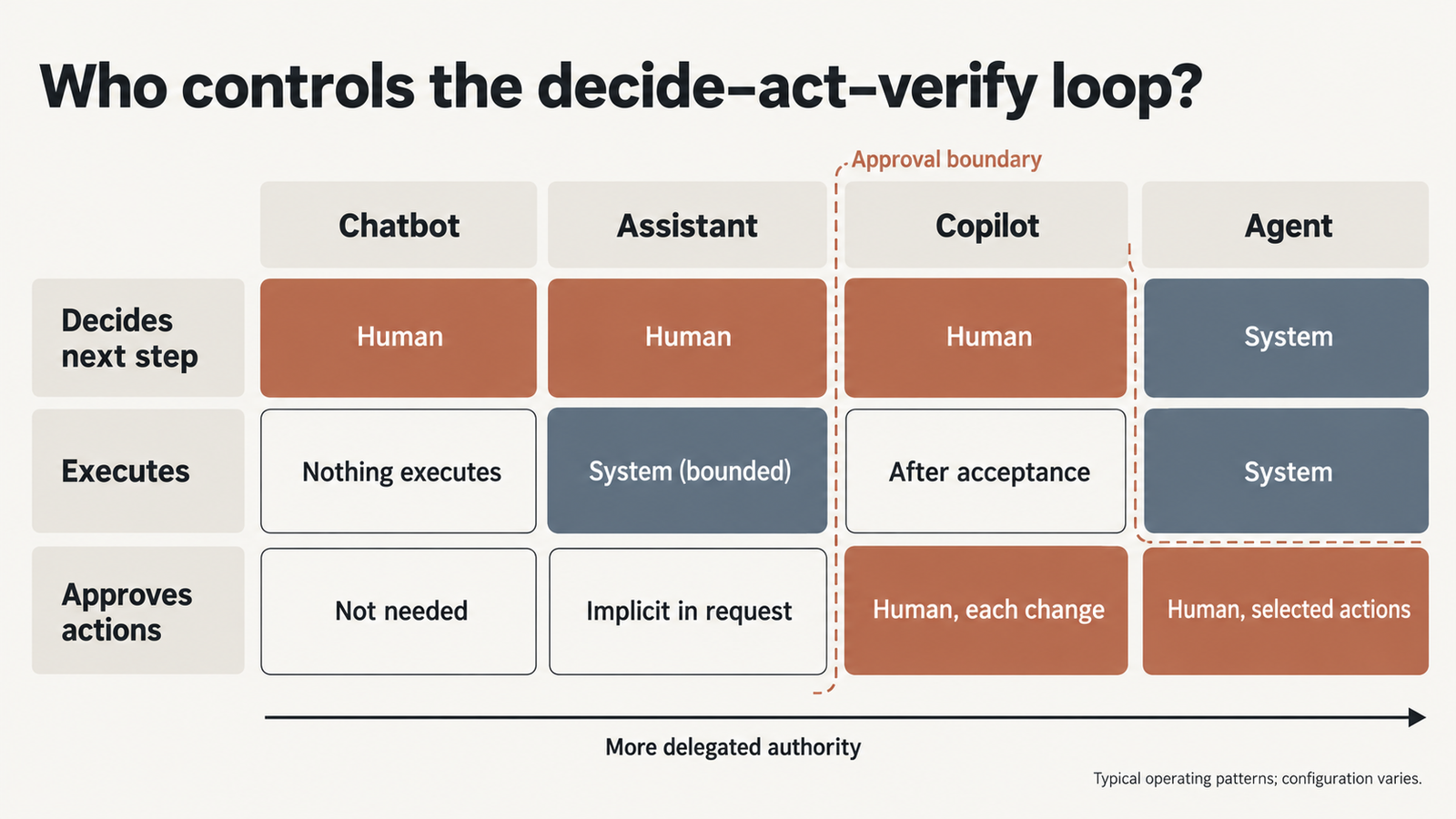
| Category | Typical behaviour | Who chooses the next step | Human approval model | External actions | Main operational concern |
|---|---|---|---|---|---|
| Chatbot | Answers within one conversation | The user | Not needed; nothing executes | None, or scripted handoffs | Wrong or harmful answers |
| Assistant | Retrieves information, performs bounded tasks | Mostly the user | Per task, often implicit in the request | Usually read-only or low-impact | Data access and leakage |
| Copilot | Proposes or prepares work inside a tool the user is working in | The user, with suggestions | The user accepts or rejects each change | Prepared, executed after acceptance | Over-trust in plausible suggestions |
| Agent | Pursues a goal across several decisions and tool calls | The system, within limits | Selective: some actions gated, others not | Yes, under its own identity | Permissions, containment, cost |
These are working categories, not a standard taxonomy. A single product can sit in two rows depending on how it’s configured.
Where each system actually sits
Product names make poor evidence, and some of the clearest examples come from one vendor using one name for several positions on the spectrum.
GitHub Copilot: two rows in one product
GitHub Copilot spans the copilot and agent rows. In the editor, it suggests code that a developer accepts or ignores, which is the classic copilot pattern. Its cloud agent takes a task, works on it in the background and produces a pull request. GitHub’s documentation on reviewing Copilot’s pull requests shows where the human control sits. If a repository requires pull-request approvals, “your approval” of a Copilot pull request doesn’t count toward them, so another reviewer has to approve. GitHub Actions workflows don’t run on Copilot’s changes by default either; a person clicks “Approve and run workflows”. GitHub notes that workflows can be privileged and reach secrets. The agent decides the steps inside the task, but merging and privileged execution stay with people unless an administrator changes the default.
Claude Code: autonomy set by configuration
Claude Code shows one product moving along the spectrum by setting. Anthropic’s permissions documentation describes a tiered system. In the default manual mode, file reads in the working directory run without approval, while shell commands, file edits and web fetches ask first. Other modes shift that boundary. “acceptEdits” auto-approves file edits in the working directory. “Plan” restricts the tool to reading and exploring. “bypassPermissions” skips prompts, and Anthropic says to use it only “in isolated environments like containers or VMs where Claude Code can’t cause damage”. The model is the same in each case, but the delegated authority is very different.
Copilot Studio: agents under a copilot brand
Microsoft’s Copilot Studio builds agents, despite the name. Microsoft described autonomous agents in Copilot Studio in October 2024. They can “react to events or triggers without human input”, with oversight through activity logs reviewed afterwards. A Microsoft 365 roadmap item published in September 2026 adds a per-tool toggle that pauses gated tool calls for a person to approve, approve for the session, or deny. It was listed as in development at the time. The “copilot” brand covers everything from a chat helper to an event-driven agent.
Why product labels date quickly
Products also move or disappear. OpenAI’s help page for ChatGPT agent now says the feature “is no longer available” and points users elsewhere. When it ran, OpenAI described it as pausing for “user confirmations for high-impact actions”. Any classification of a named product is a snapshot, which is one more reason to classify by approval model instead.
The chatbot row is the easiest to fill. A chat model with no tools enabled is a chatbot, whatever else the same product can do once integrations are switched on.
AI agent vs copilot: the transition is an engineering decision
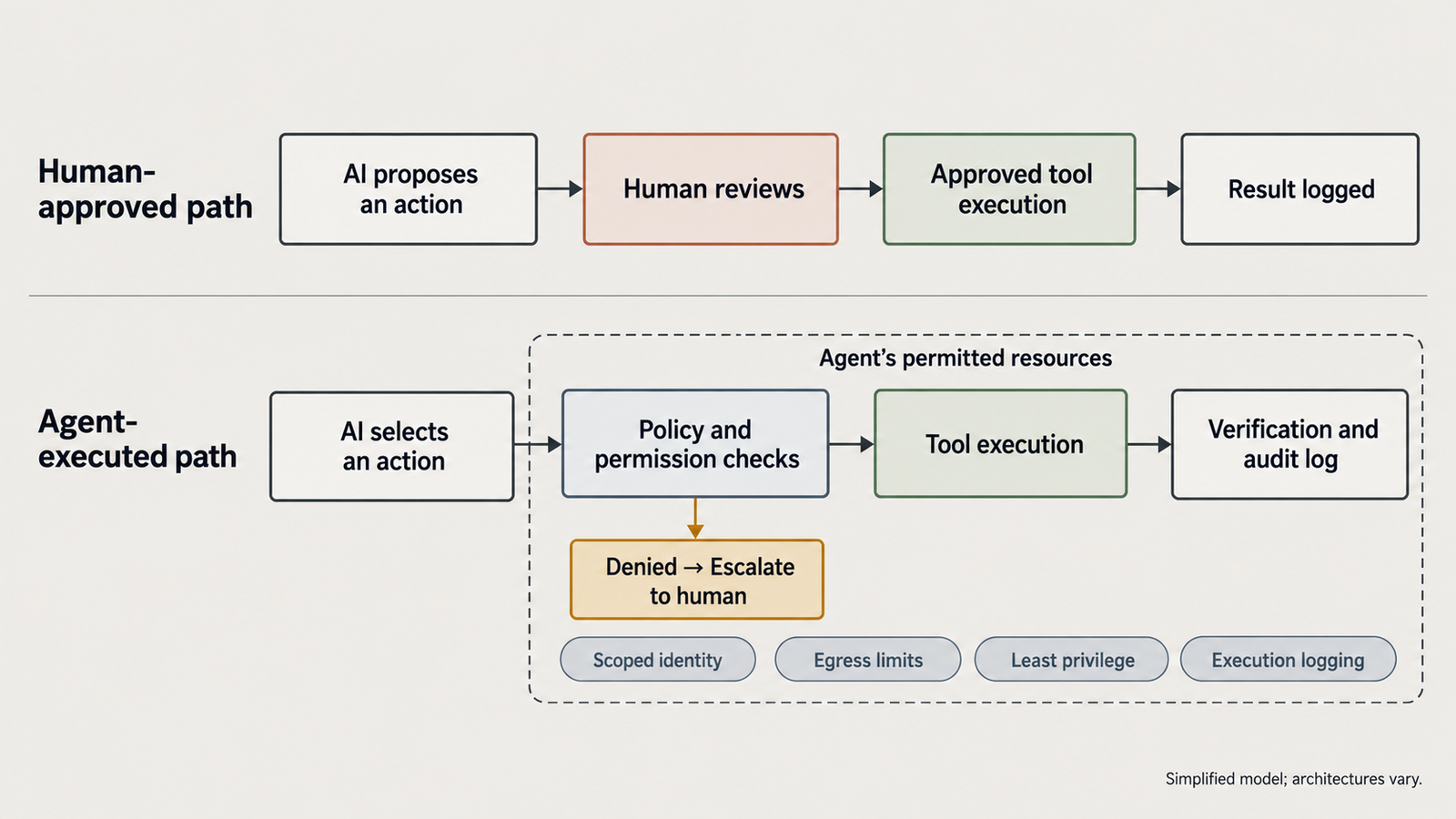
Removing a mandatory approval step changes the risk profile more than any model upgrade does. In a copilot, the model’s output is a proposal, and the risk is that a person accepts a bad one. In an agent, the output becomes an action, so the risk now depends on what that action can reach.
Consider the same capability twice. A model writes a SQL statement to correct a customer’s address. As a copilot, it shows the statement, and a developer reads it, notices it lacks a WHERE clause and fixes it. As an agent with write access to the database, it runs the statement. The model’s skill is identical; the outcome is not. OWASP’s guidance on Excessive Agency traces this class of harm to three causes: excessive functionality, excessive permissions and excessive autonomy. Notice that none of them is about the model’s output.
What an agent’s permissions reach
Granting an agent control means deciding, explicitly, about each of these:
- Credentials and identity. The agent acts as someone. A shared service account makes its actions unattributable and its reach as wide as the account’s. Our article on why AI agents shouldn’t share a service account sets out the alternative.
- Data, APIs and services. Every connected system is part of the blast radius, the set of things a misdirected agent can affect.
- Network destinations. An agent that can reach arbitrary hosts can send data anywhere, including wherever an injected instruction points it.
- Write and irreversible operations. Deletes, payments, permission changes and outbound messages are where review matters most.
- Logs and traces. Without a record of inputs, tool calls and decisions, nobody can reconstruct what happened.
- Retry loops and delegation. An agent that retries or spawns sub-tasks can repeat a mistake faster than anyone notices.
Prompt injection is why the model can’t police this itself. Instructions hidden in a web page, email or document can steer an agent. The UK’s National Cyber Security Centre wrote in December 2025 that current models “do not enforce a security boundary between instructions and data inside a prompt”. The controls that hold are the ones outside the model, such as scoped identity, least privilege, egress limits and isolated execution. Our guide to the four layers of sandbox isolation covers the execution boundary in detail.
Why approval is only a partial control
Human approval is a real control, but only under conditions. The reviewer has to see what the action is, what it touches and what permission it uses. An approval prompt that says “Allow tool call?” over a wall of JSON trains people to click yes. Claude Code’s documentation shows one response to that trade-off: in its “auto” mode, a classifier reviews actions instead of the user. Approvals should be reserved for actions where a person can genuinely judge the consequence.
AI agent vs copilot costs: why a run isn’t a reply
A copilot interaction and an agent run aren’t comparable units. A copilot typically makes one or a few model calls and stops. An agent plans, calls tools, reads results, retries and continues until it reaches a stopping condition. Each call usually re-sends the growing context. Anthropic reported that in its own multi-agent research system, agents used about four times as many tokens as chat interactions, and multi-agent systems about fifteen times as many. That’s one company’s product, not a universal ratio, but it gives a sense of scale.
Tokens are rarely the whole bill, though. Here is a hypothetical comparison. The prices are illustrative, $3 per million input tokens and $15 per million output, not any provider’s list price:
| Per task (hypothetical) | Copilot | Agent |
|---|---|---|
| Model calls | 1 | 10, with growing context |
| Tokens | 5,000 in, 800 out | 126,000 in, 3,500 out |
| Inference cost | $0.03 | $0.43 |
| Human time | 3 minutes reviewing every draft, at $60/hour: $3.00 | 10 minutes on the 20% of runs that fail: $2.00 average |
| Total | about $3.03 | about $2.43 |
On these assumptions, the agent costs about sixteen times more in tokens but less per task, because it removes routine review. Change the failure rate to 40% and the agent’s average human cost doubles to $4. Change the task so that no review was needed anyway, and the copilot wins easily. The comparison turns on completion rate and human recovery time, not token price. Our analysis of when adding an agent stops paying for itself works through the token side in more detail.
Other costs also scale with autonomy:
- tool and infrastructure charges for each call;
- latency, because sequential steps add up;
- rate limits, which fan-out makes easier to hit;
- logging and evaluation, which an agent needs and a copilot often doesn’t;
- runs that burn tokens before failing, with no useful result.
Agents don’t always cost more. A bounded agent that reliably finishes a task can be the cheaper option. A poorly constrained one can loop through tokens and still hand a person a mess to clean up.
The buyer’s test: classify an AI agent vs copilot by its approval model
When a vendor says “agent”, these twelve questions show what’s actually being sold. They’re grouped by what they reveal.
Decision and execution
- Does the system only recommend, or can it execute actions?
- Who selects the next step: the user, the system, or a fixed workflow?
- Can it modify or delete external state?
Approval and authority
- Which actions require explicit approval?
- Can approval rules be set by action type, resource or risk level?
- What identity does it act under, and can that identity be scoped per task?
- Which data sources and network destinations can it reach?
Failure and verification
- What happens when a tool fails or returns something unexpected?
- Can it verify that an action actually succeeded?
- What limits apply to retries, run time, tokens and tool calls?
Oversight and proof
- Can operators stop a run, inspect logs and reconstruct what happened?
- Will the vendor demonstrate these boundaries in your test environment, not just a slide?
Interpret the answers together. A product with broad write access, a shared identity and thin logging is high-risk, even if its interface is a friendly chat window. One that executes only pre-approved, reversible actions under a scoped identity can be low-risk even when it’s called an agent. Passing the checklist doesn’t make a deployment secure. It shows where the remaining risk sits.
A deployment rule that survives the marketing
Grant autonomy in proportion to how easily a mistake can be contained. Five factors set the level:
- Data sensitivity: what the system can read, and where it could send it.
- Action impact: what changes if the action is wrong.
- Reversibility: whether the change can be undone cleanly and quickly.
- Verification strength: whether success can be checked automatically and reliably.
- Containment: whether a failure stays inside a sandbox, a test environment or a single account.
Low-impact, reversible, well-verified tasks can run with little or no approval. Drafting internal notes, triaging tickets into queues and running tests in a disposable environment are examples. Financial transfers, production deployments, access-control changes and decisions that affect people’s rights belong at the other end. For those, keep a person in the loop with a clear, specific approval, whatever the product is called.
The same tool can sit at both ends. A coding agent that runs tests in a container can be largely autonomous, while the same agent pushing to the main branch should wait for review. The approval model belongs to the deployment, not the product category.
Conclusion
Before adopting any AI product, write down three things. What can it do without asking? What can it change? Where can a person step in? The answers place the product on the spectrum more accurately than its name does, and they tell you which controls to build before it goes live.
For the AI agent vs copilot decision specifically, start with the copilot pattern for anything irreversible. Grant agent-level autonomy one action type at a time, as verification and containment prove they can catch the failures.
Frequently Asked Questions
What is the difference between an AI agent and a copilot?
A copilot proposes or prepares work, and a person accepts it before anything consequential happens. An agent pursues a goal across several steps, choosing actions and calling tools itself, with approval required only for some actions. Both can use the same model. The difference is who controls execution.
Is an AI assistant the same as an AI agent?
Not usually. An assistant typically handles bounded tasks on request, such as finding information or completing a single action, and the user directs each step. An agent decides the sequence itself. Some products called assistants can be configured to act as agents, so check the permissions.
Can a chatbot perform actions?
A pure chatbot only responds in conversation. Once it can call tools, such as booking, refunding or updating a record, it has moved toward the assistant or agent end of the spectrum. Many customer-facing “chatbots” now include such tools, often behind scripted handoffs.
Is every AI copilot less autonomous than an AI agent?
No. The label doesn’t fix the behaviour. Microsoft’s Copilot Studio builds event-triggered agents, and GitHub Copilot includes a cloud agent that works through tasks in the background. Judge autonomy by who chooses the next step and which actions need approval.
Why can AI agents be more expensive to operate?
An agent makes many model calls per task, each re-sending growing context, and adds tool, logging and retry costs. Failed runs consume resources without producing a result. An agent can still be cheaper per completed task if it reliably replaces human work.
Are AI agents more dangerous than chatbots?
They carry different risks. A chatbot’s failure is a bad answer that someone may act on. An agent’s failure can be an action, such as a deleted record or data sent to the wrong place. The danger scales with the permissions and network access it’s given and how well they’re contained.
Keep reading
Here are the latest posts from the blog.

Chinese Open-Weight Models Compared: DeepSeek vs Qwen & More

AI Agent vs Copilot: Classify AI by Its Approval Model

Agents Are Reshaping Server CPU Design. The Evidence Is Narrower.