How we compared: this is a documentation-based comparison. We did not test these products. Every capability below comes from the maker’s own documentation or announcements, or from independent research, and is labelled that way. Prices were checked on 24 November 2026.
Asking an AI to summarise a web page is old news. Asking it to sign in to a supplier portal, find last month’s invoice and fill in a refund form is a different job, with different risks. Browser agents are the products built for the second job, and OpenAI, Anthropic, Google, Microsoft and Perplexity all sell one.
Their makers describe them alike, but they differ. Some run in your own browser with your saved logins, others on a computer in the cloud. Some stop before anything that costs money; others act on their own unless you change a setting.
This comparison covers five browser agents available to consumers in November 2026: OpenAI’s ChatGPT Work, Anthropic’s Claude in Chrome, Perplexity’s Comet, Google’s Gemini auto browse and Microsoft’s Browse with Copilot. It asks what each can do, what it can reach, what it costs and what happens when a web page tries to give it orders.
Key Takeaways
- Browser agents take actions. They click, type and fill forms with real accounts, which makes them more useful and riskier than chat assistants.
- Reading and finishing are different skills. All five products document interaction; independent data on error recovery does not yet exist for any of them.
- Where an agent runs matters. Agents in your own browser use your logins; ChatGPT’s cloud browser holds separate logins on OpenAI’s servers.
- Approval defaults differ. Gemini makes you press buy yourself; Claude in Chrome starts in automatic approval; ChatGPT asks before submitting, buying or deleting.
- Prompt injection is the central risk. In one October 2026 study, an undefended agent was hijacked in 73 of 73 attack runs, while a check outside the model stopped every attack.
- Prices do not compare cleanly. Entry plans cluster around $20 a month, but agent limits are mostly unpublished.
- Vendor claims are not test results. Your own repeated tests are the only reliable measure for your work.
Quick Navigation
- What counts as a browser agent in 2026
- Three levels of browser agent capability
- How the five products approach the job
- What browser agents can access and control
- Browser agent pricing: subscriptions, credits and limits
- Browser agent privacy and prompt injection
- Why browser agents still struggle with real websites
- Which browser agent fits which work
- Frequently Asked Questions
- What are browser agents?
- How are browser agents different from AI assistants?
- Can browser agents interact with websites?
- Which browser agents are available in 2026?
- Can browser agents complete multi-step tasks?
- Are browser agents safe to use?
- Can browser agents access logged-in websites?
- How much do browser agents cost?
- What are the limitations of AI browser agents?
- Can browser agents replace traditional browser automation?
What counts as a browser agent in 2026
A browser agent is software that uses an AI model to operate a web browser for you: it reads pages, then clicks, types and moves between sites to finish a task. The word “agent” is used loosely, though, and several different products share it.
Table: scroll sideways to view all columns when needed.
| Type | What it does | Example |
|---|---|---|
| Browser with a built-in agent | The browser itself can act on pages | Perplexity Comet |
| Agent added to an existing browser | A feature or extension acts inside your browser | Claude in Chrome, Gemini auto browse, Browse with Copilot |
| Cloud browser agent | Runs a browser on the vendor’s servers, away from your device | ChatGPT Work’s cloud browser |
| Computer-use agent | Operates a whole desktop through screenshots, browsers included | Computer use in the ChatGPT and Claude desktop apps |
| Developer framework | Code that connects a model to a browser | Browser Use, an open-source library |
| Research agent | Browses and reads, but does not act on sites | Deep research features |
The distinction matters because the risks differ. A research agent that only reads can mislead you. An agent that holds your signed-in session can act for you, including in ways you never asked for. We covered the wider split between AI that writes and AI that acts in Agentic AI vs Generative AI: What’s the Difference?
Three levels of browser agent capability
To compare products fairly, this article uses a simple framework of our own. It is an editorial tool, not an industry standard.
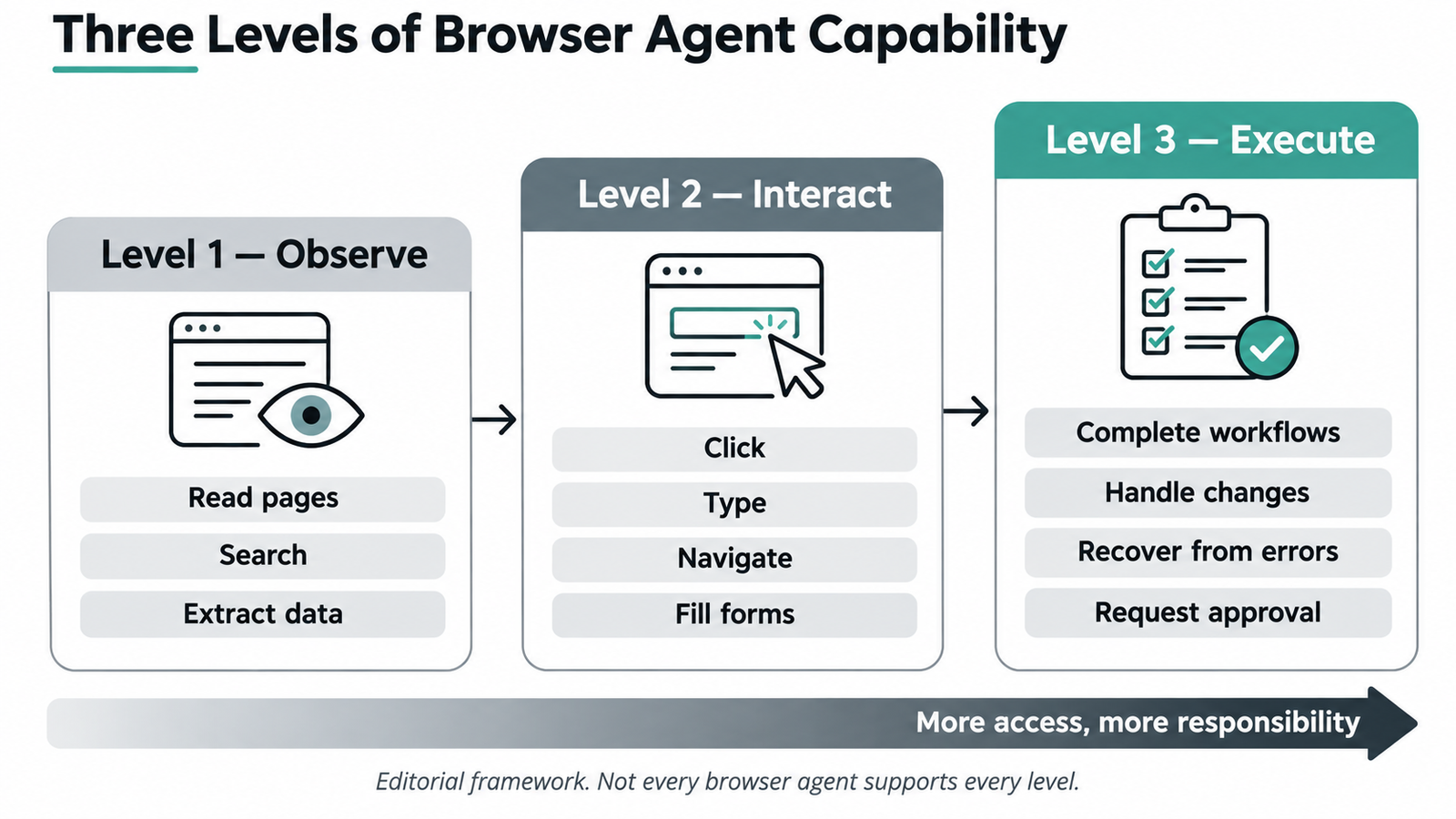
Level 1, observe: read pages, search, extract facts and summarise. Almost every AI assistant can do this now.
Level 2, interact: click, type, scroll, move between pages and fill in forms. This is what makes a product a browser agent rather than a chatbot with web access.
Level 3, execute workflows: carry a multi-step task through to the end, keep going when a page changes, recover from errors and stop for approval before consequential steps.
All five products below document Level 2 abilities. They differ mostly at Level 3, which is also where the evidence is thinnest: vendors document scheduled tasks and background runs, but none has published independent data on how often its agent recovers from an error without help.
How the five products approach the job
Table: scroll sideways to view all columns when needed.
| Browser agent | Where it runs | Documented abilities | Available to |
|---|---|---|---|
| ChatGPT Work (OpenAI) | Cloud browser, a built-in desktop browser, or your own tabs through an extension | Opens pages, clicks, types, checks its own results; cloud tasks continue after you close your laptop | Plus and above for the cloud browser; limited desktop access on Free and Go |
| Claude in Chrome (Anthropic) | Extension in your own Chrome | Reads and types on pages, clicks, navigates, fills forms, uses your existing logins; scheduled tasks | Paid Claude plans |
| Comet (Perplexity) | Its own browser | Assistant answers questions about pages; the agent navigates sites, fills forms and runs multi-step tasks | Browser free; agent use limited by plan |
| Gemini auto browse (Google) | Chrome on desktop and Android | Scrolls, clicks and enters text in a new tab; works in the background | Google AI Pro and AI Ultra, US only |
| Browse with Copilot (Microsoft) | Edge on desktop | Acts on web pages; few details published | Microsoft 365 Premium, US only |
Capabilities come from each maker’s documentation; plan details for ChatGPT and Comet come from third-party summaries of official pages.
ChatGPT Work replaced OpenAI’s Atlas browser. OpenAI launched Work on 9 July 2026, and Atlas stopped working on 9 August. Its browser documentation describes three options: a cloud browser, a built-in browser in the desktop app with its own separate profile, and an extension that works in your own Chrome, Edge, Brave, Opera or Vivaldi tabs.
Claude in Chrome became generally available on 26 August 2026. It works only in Google Chrome, not in other Chromium browsers or on mobile, according to Anthropic’s support page. Tasks can be scheduled daily, weekly, monthly or yearly.
Comet is a full browser that Perplexity made free in October 2025. Its help centre says Max subscribers get the highest weekly limit on agent queries, without giving numbers.
Gemini auto browse began rolling out on desktop on 28 January 2026, 9to5Google reported, and Google extended it to Android in the US on 18 August. A daily limit applies to agentic actions.
Browse with Copilot replaced Copilot Actions when Microsoft retired Copilot Mode in Edge on 13 May 2026. Microsoft has published little about how it works.
What browser agents can access and control
The most important question about any browser agent is not what it can click. It is whose session it clicks with.
Your own browser, your own logins. Claude in Chrome, Comet, Gemini auto browse and ChatGPT’s extension act inside a browser you are already signed in to. That makes them useful for internal dashboards and vendor portals, and it means a mistake happens with your full account permissions.
A separate browser. ChatGPT’s cloud browser does not use your personal browser’s signed-in sessions. Plus and Pro users sign in to sites through a secure form, and OpenAI says the model does not see the password. The login then persists on OpenAI’s servers across sessions, according to OpenAI’s developer documentation as quoted by TFTC. You can clear it per site in settings.
Passwords. Gemini can fill credentials from Google Password Manager only after you authorise it, and Google says the model has no direct access to stored passwords. Claude in Chrome supports 1Password, in beta on macOS, so Claude never sees the password or one-time code.
Approvals. Here the defaults differ most.
Table: scroll sideways to view all columns when needed.
| Browser agent | Documented approval rules |
|---|---|
| ChatGPT Work | Asks before submitting information, purchases, changing permissions or deleting data; per-site permissions in settings |
| Claude in Chrome | Starts in “Automatically approve” mode, reviewing each action and pausing when it needs approval; can be switched to approve each action manually |
| Gemini auto browse | You press the buy or post button yourself; sensitive sites such as banking need confirmation; you can take over at any time |
| Comet | Not publicly documented in the sources we found |
| Browse with Copilot | Works “with your permission”; no further detail published |
On business plans, admins can limit Claude in Chrome to approved sites, and ChatGPT admins can restrict browser origins, uploads and downloads.
Browser agent pricing: subscriptions, credits and limits
Browser agents are sold inside wider subscriptions, so their prices cannot be compared like for like. A $20 plan from one company and a $20 plan from another buy different amounts of agent use, and most vendors do not publish exact limits.
Table: scroll sideways to view all columns when needed.
| Browser agent | Entry plan with agent access | Higher tiers | How use is metered |
|---|---|---|---|
| ChatGPT Work | Plus, $20 a month | Pro at $100, $200 or $500 a month | Work and Codex share a usage allowance; Plus has five-hour windows |
| Claude in Chrome | Pro, $20 a month ($17 billed annually) | Max $100, Ultra $200; Team from $20 a seat | Five-hour and weekly limits |
| Comet | Free browser; Pro, $20 a month | Max, $200 a month | Weekly agent limits by plan; Max adds 10,000 Computer credits a month |
| Gemini auto browse | Google AI Pro, $19.99 a month | AI Ultra from $99.99 | Daily limit on agentic actions |
| Browse with Copilot | Microsoft 365 Premium, $19.99 a month at launch | Not applicable | Usage limits, not specified |
Prices are US list prices as of 24 November 2026. Sources: Claude pricing, Perplexity Max help page, Microsoft, and, for ChatGPT, Comet Pro and Google, third-party summaries of official pages (Tech Insider, eesel, The Decoder).
A subscription is also not an API price, and the two should not be compared as if they bought the same work. Without published limits, the only way to know whether a plan covers your workload is to run your own tasks on it.
Browser agent privacy and prompt injection
The defining security risk for browser agents is prompt injection: text on a web page, often hidden, that tries to give the agent new instructions. A browser agent has to read pages to do its job, and it acts with whatever access you have given it. If it treats a page’s text as an order rather than as information, the page can redirect it.
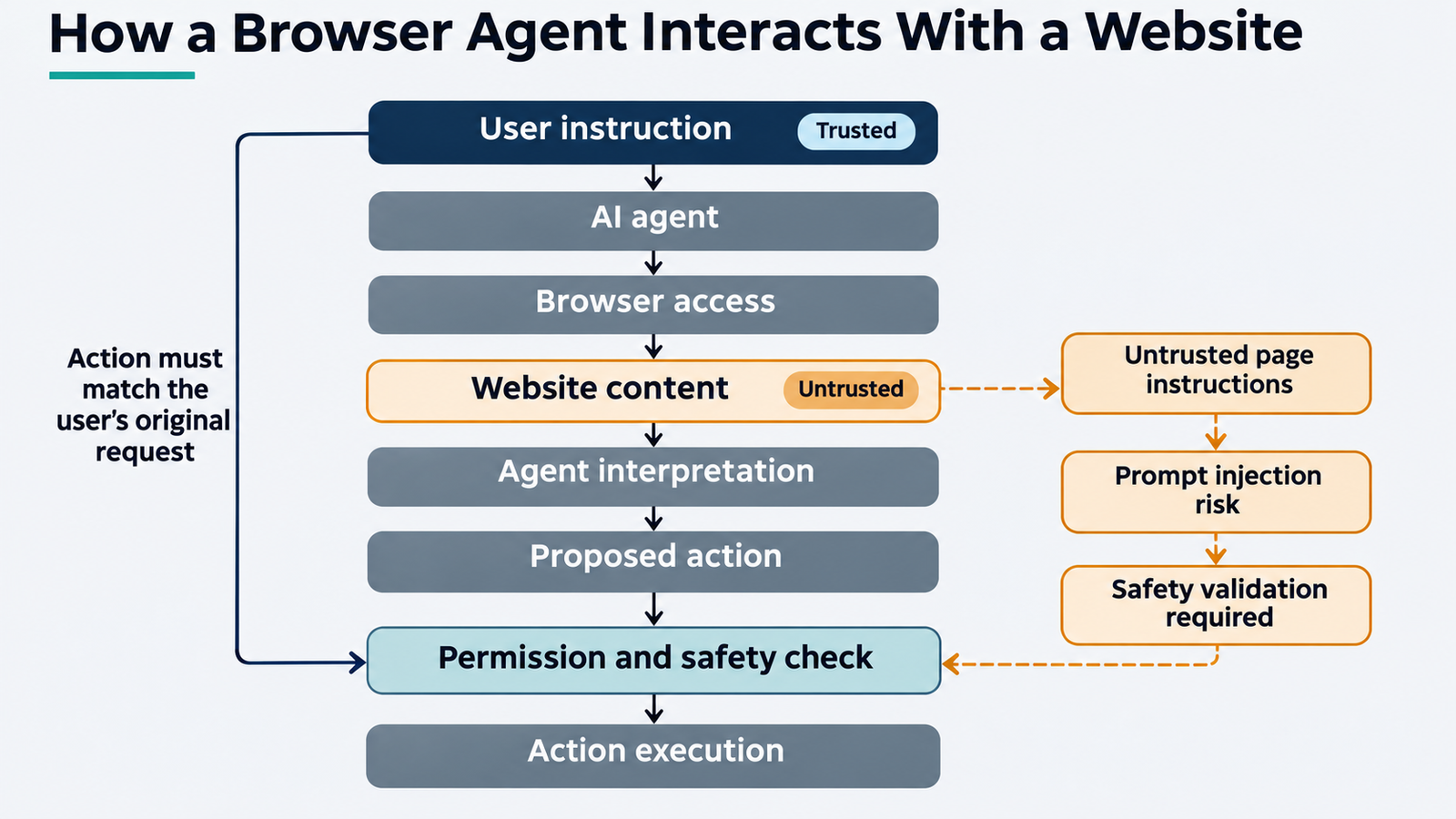
This is not theoretical. Before Comet launched, Perplexity commissioned Trail of Bits to attack it. The audit found four injection techniques and built five proof-of-concept exploits, each designed to make the assistant send Gmail contents to an attacker when a user asked it to summarise a malicious page. Perplexity says the gaps were closed before launch.
An academic study published in October 2026 went further. Using the open-source Browser Use framework with Claude Haiku 4.5 and GPT-5.5, it planted a two-sentence note on a page the agent was asked to read. With no defence, the agent approved an unrequested access grant or registered an attacker’s webhook in all 73 of 73 attack runs. A written policy in the prompt still left 7 of 10 consent attacks succeeding on some page versions. A check at the receiving service, comparing each request with what the user’s task named, blocked every attack.
The vendors describe similar layered defences, with checks that sit outside the main model.
- Google runs a separate model, the User Alignment Critic, that vetoes actions not serving the user’s goal, plus an injection classifier and limits on which sites the agent may act on, according to its security post.
- Anthropic says a classifier checks each Claude in Chrome action against the original request. On its own current evaluation, it reports attack success of 0% for its Sonnet 5, Opus 5 and Mythos 5 models and 0.3% for Fable 5 with all safeguards on. These are vendor-reported figures.
- OpenAI’s documentation tells users to treat page content as untrusted, and notes that giving ChatGPT permission for a site does not make its content trustworthy.
None of these is an independently audited guarantee, and Anthropic, Google and OpenAI all say prompt injection is not solved. We explain how to test agents against it in Agent Prompt Injection Testing.
On data, the documentation is thin. Claude in Chrome saves side-panel sessions to your account history, and ChatGPT’s cloud browser keeps your site logins until you clear them. None of the pages we read gives a retention period for screenshots or page content an agent has seen, so check each privacy policy before using an agent with sensitive accounts.
Why browser agents still struggle with real websites
Websites are built for people. They change layouts, hide buttons behind menus and add CAPTCHAs and cookie banners. An agent that worked on Monday can fail on Tuesday after a redesign, and none of the five vendors publishes how often its agent fails or recovers.
The best independent signal comes from shopping. Visa’s Agentic Commerce Benchmark, published on 5 November 2026, gave 22 AI models from 12 labs 15 shopping tasks with three attempts each. Of all runs, 42.8% failed, and models passed all three attempts only 34.2% of the time. About 54% of failed runs still ended in a purchase. The benchmark tests models rather than finished browser products, and it did not cover checkout or payment, but it shows why an approval step before buying matters.
Visa also found that models which asked more clarifying questions passed far more often. And the October study found agents often reported a blocked approval as progress, so an agent’s own summary of its work is not proof.
Which browser agent fits which work
The right choice depends less on which model is smartest and more on where the work lives.
- Research and comparison across public sites: any of the five, or a research agent. Observe-level work carries the least risk.
- Tasks in accounts you are already signed in to: an agent in your own browser, such as Claude in Chrome, Comet or Gemini auto browse, or ChatGPT’s extension. Limit it to the sites the task needs.
- Long tasks that should run while you are away: ChatGPT’s cloud browser, which keeps working after you close your laptop, or scheduled tasks in Claude in Chrome.
- Shopping: Gemini auto browse documents the clearest rule here, because you press the buy button yourself.
- Microsoft 365 households: Browse with Copilot, though it is the least documented.
Before trusting any browser agent with real work, check which sessions it can use, which actions it asks about first, whether you can limit it to specific sites, how it handles passwords and what its maker says it keeps. Then run your own task three times before relying on it.
Frequently Asked Questions
What are browser agents?
Browser agents are AI tools that operate a web browser for you, reading pages and then clicking, typing and filling forms to complete a task.
How are browser agents different from AI assistants?
An AI assistant answers questions, while a browser agent takes actions on websites, often with your signed-in accounts.
Can browser agents interact with websites?
Yes. All five products compared here document clicking, typing and navigating, though each limits some actions or asks for approval first.
Which browser agents are available in 2026?
The main consumer options are ChatGPT Work, Claude in Chrome, Perplexity Comet, Gemini auto browse in Chrome and Browse with Copilot in Edge.
Can browser agents complete multi-step tasks?
They are designed to, and some can run scheduled or background tasks, but no vendor publishes independent data on how often they finish.
Are browser agents safe to use?
They carry real risk. Prompt injection on web pages can redirect them, and the largest vendors say the problem is not fully solved, so limit them to the sites a task needs.
Can browser agents access logged-in websites?
Yes. Agents in your own browser use your existing logins, while ChatGPT’s cloud browser asks you to sign in separately.
How much do browser agents cost?
Most entry plans with agent access cost about $20 a month in the US, and higher tiers run from about $100 to $500.
What are the limitations of AI browser agents?
They can fail when websites change, cannot be relied on to recover from errors, and operate under usage limits most vendors do not publish.
Can browser agents replace traditional browser automation?
Not for stable, repeated processes, where scripted automation is cheaper and more predictable. Browser agents suit tasks that change too often to script.
Keep reading
Here are the latest posts from the blog.

Browser Agents Compared: What Can They Actually Do in 2026?

UBTECH Walker S2: The Humanoid Robot Built for Factory Work

AGI vs Superintelligence: A New Name Isn’t a New Intelligence