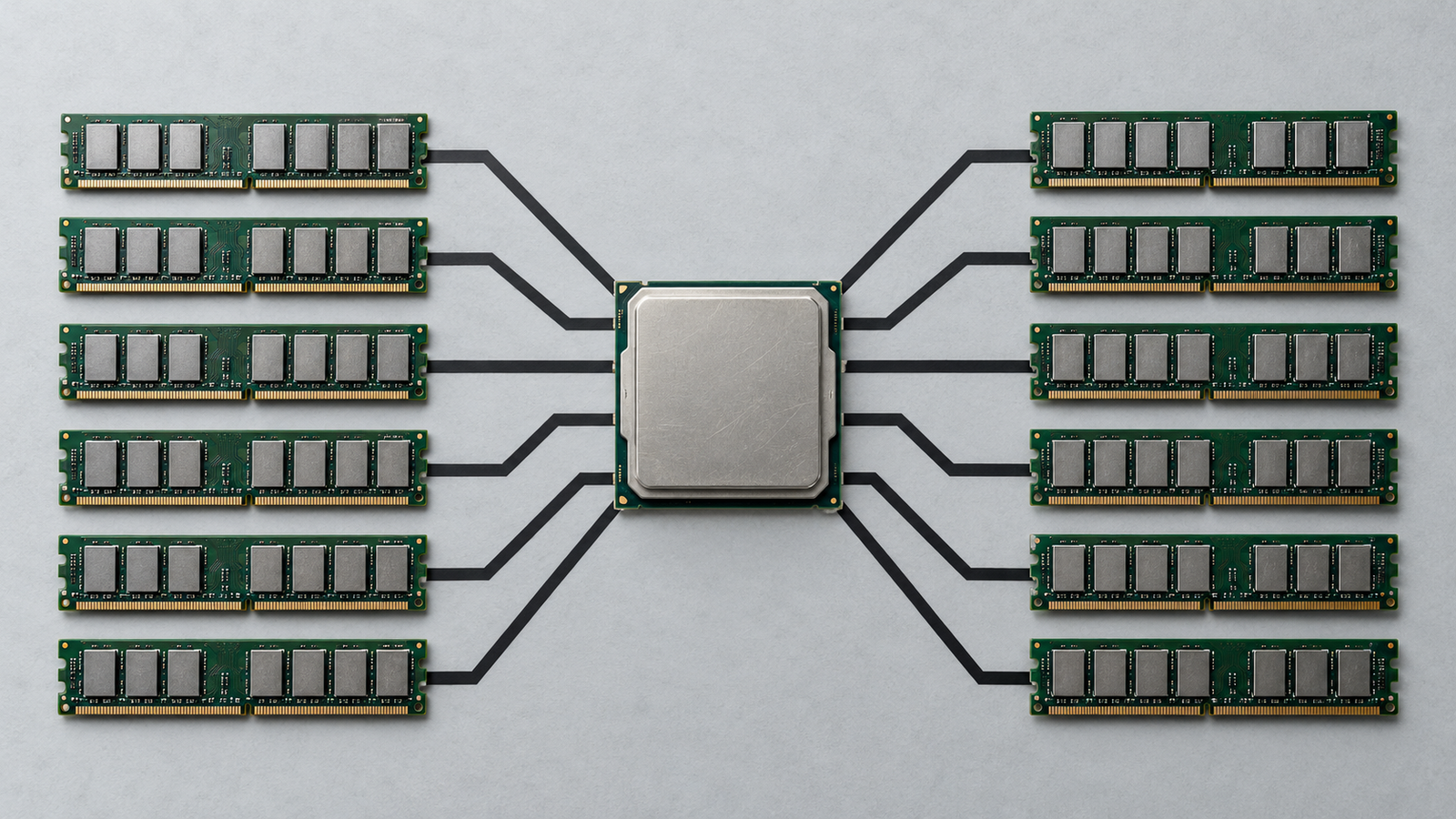
Connecting a language model to a company’s issue tracker used to mean writing a small integration layer by hand. Someone had to describe each operation to the model, handle authentication, map the model’s chosen action onto the right API call and turn the response back into text. Then the same work started again for the next model or the next application, because none of it was portable. With five AI applications and twenty internal systems, that is up to a hundred bespoke connectors, each with its own bugs and its own way of handling credentials.
The Model Context Protocol (MCP) is an attempt to collapse that grid. It defines one way for an AI application to discover what an external system offers and to call it. Anthropic described the problem in its November 2024 announcement: “Every new data source requires its own custom implementation.” MCP makes the connection standard. It does not make what sits on the other end of the connection trustworthy, and much of what follows is about the difference between the two.
Key Takeaways
- The Model Context Protocol standardises how AI applications discover and call external capabilities. It replaces per-application integration code, not security design.
- Hosts, clients and servers have distinct roles. The host sits between model and server, which makes it the natural place for policy.
- Listing a tool and executing it are separate steps. Visibility through
tools/listgrants nothing, and execution is a host decision. - Tool descriptions and tool outputs are both untrusted inputs to the model. The specification says so, and tool-poisoning research has demonstrated the consequences.
- The 2026-07-28 revision made MCP stateless and deprecated sampling, roots and logging. Check which version a server implements before relying on older documentation.
- MCP provides interoperability, OAuth-based authentication for HTTP servers and consent guidance. Least privilege, isolation, validation and logging must be built around it.
Quick Navigation
- What the Model Context Protocol actually is
- Model Context Protocol architecture: hosts, clients and servers
- Tools, resources and prompts are different things
- What the Model Context Protocol opens up in real applications
- The trust boundary hiding inside the tool description
- What the Model Context Protocol does not guarantee
- Before connecting a Model Context Protocol server: a checklist
- The engineering decision the Model Context Protocol leaves
- FAQ
What the Model Context Protocol actually is
The Model Context Protocol is an open specification for how AI applications exchange context and capabilities with external programs. In the words of the current specification, it gives applications a standard way to “share contextual information with language models” and “expose tools and capabilities to AI systems.” Its designers say it takes inspiration from the Language Server Protocol, which let one language server work with many code editors.
Several things it is often confused with are worth separating:
- MCP is not a model. It doesn’t make a model smarter or better at choosing tools. That still depends on the model and the application.
- MCP is not an agent framework. The architecture documentation says plainly that it “does not dictate how AI applications use LLMs or manage the provided context.”
- MCP is not an API in the usual sense. A REST API defines one service’s operations. MCP defines how any service can describe its operations to any compatible AI application.
- An MCP server is not the protocol. A server is one program that speaks MCP, written by anyone, with whatever quality and permissions its author chose.
Anthropic released the protocol in November 2024, along with SDKs and a set of open-source servers. In December 2025 it donated MCP to the Agentic AI Foundation, a fund under the Linux Foundation co-founded with Block and OpenAI. The existing maintainers kept control of its technical direction. The specification changes regularly. The current revision, dated 28 July 2026, made substantial changes, covered below.
Model Context Protocol architecture: hosts, clients and servers
MCP has three participants, and their responsibilities differ in ways that matter later.
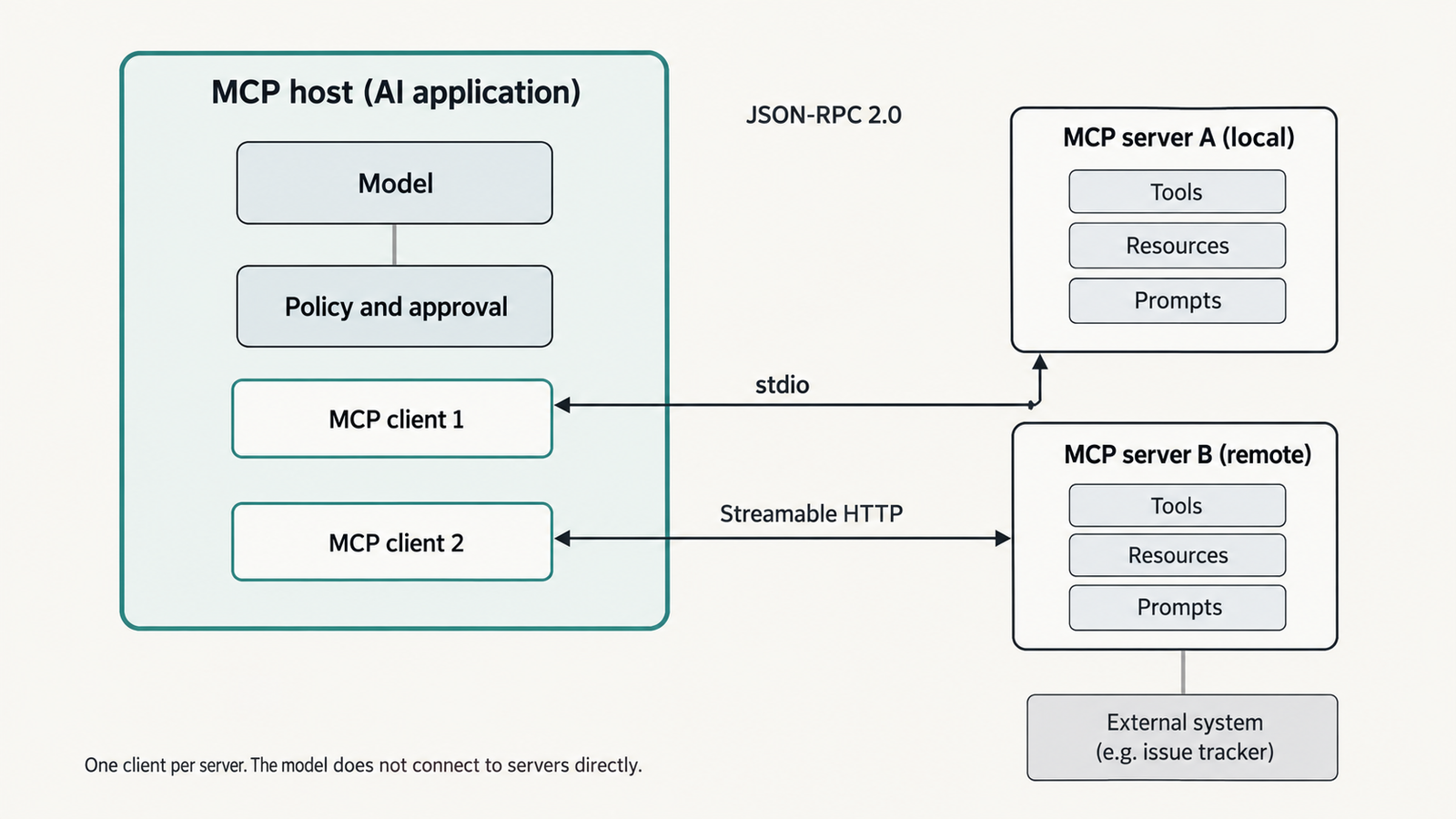
- The host is the AI application the user works in, such as a desktop chat app, an IDE or an agent runtime. It owns the conversation, the model and the user interface.
- A client is a connector inside the host. The host creates one client for each server it connects to, and each client keeps a dedicated connection to its server.
- A server is a program that provides context and capabilities: a filesystem server, a database server, an issue tracker’s server.
The model never talks to a server directly. When a model wants to use a tool, the host receives that request, decides whether to allow it, and has the relevant client send the call. The architecture documentation describes this step: the host “intercepts the tool call, routes it to the appropriate MCP server, executes it, and returns the results back to the LLM.” That interception point is where an application can enforce policy. Whether it does is up to the application.
Messages and transports
Clients and servers exchange JSON-RPC 2.0 messages, a simple request-and-response format. MCP defines two standard transports:
- stdio, where the host launches the server as a local process and talks to it over standard input and output;
- Streamable HTTP, where the server runs remotely and the client sends HTTP POST requests, optionally receiving streamed responses.
A local filesystem server typically uses stdio. A hosted service, such as the remote server Sentry operates, uses Streamable HTTP.
The 2026-07-28 revision made the protocol stateless. Earlier versions opened each connection with an initialize handshake that negotiated capabilities once per session. Now every request carries its protocol version and the client’s capabilities in its own metadata. Clients can call a new server/discover method to learn what a server supports. Servers that need state across calls must hand out explicit identifiers as ordinary tool arguments. The same revision deprecated sampling, which let servers ask the host’s model for completions, along with roots and logging. Articles written before mid-2026 describe the older design, so check which version a server implements.
Tools, resources and prompts are different things
A server can offer three kinds of capability, and the MCP documentation is explicit about who is meant to control each.
Table: scroll sideways to view all columns when needed.
| Capability | What it is | Who typically controls it | Example |
|---|---|---|---|
| Tools | Functions the model can call; they may read data or change it | The model, with the host’s permission | create_issue, run_query, send_message |
| Resources | Read-only data identified by a URI | The application, which decides what to include as context | A file, a database schema, a calendar |
| Prompts | Reusable templates for a task | The user, who invokes them explicitly | A slash command such as /summarise-incident |
The server concepts page uses this split: tools are model-controlled, resources application-controlled and prompts user-controlled. Servers declare which of these they support, and a client may use only some of them.
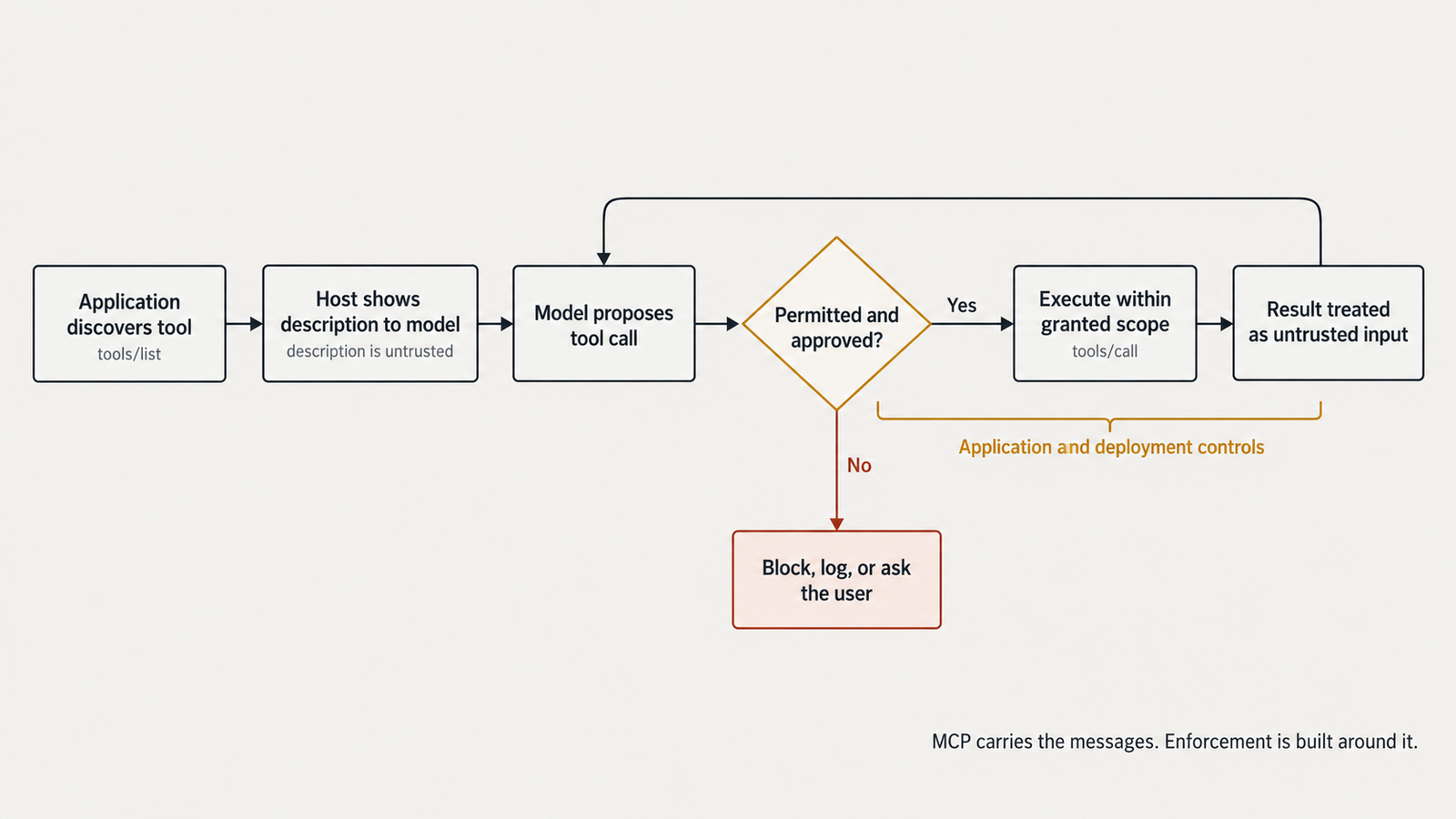
Discovery and execution are separate steps, and the gap between them matters. A client calls tools/list and receives each tool’s name, description and JSON Schema for its inputs. The host passes some or all of these to the model. Later, if the model asks for one, the client sends tools/call with arguments. Seeing a tool in a list grants nothing by itself. Execution is a second, distinct decision that the host makes.
What the Model Context Protocol opens up in real applications
Three patterns show what the protocol standardises and what it leaves to the application.
Querying documents or a database
A database server might expose its schema as a resource and a query function as a tool, and a filesystem server exposes file reading and searching. The official filesystem server is one of the project’s reference implementations. MCP standardises how the assistant finds those capabilities and calls them. The host still decides which directories or databases the server is configured for, and whether a query runs automatically or waits for approval. The integration needs read access to the data, and nothing more if it only answers questions.
Working with a code repository
GitHub’s official MCP server is a demonstrated case. It can run remotely, hosted by GitHub, or locally in Docker. It groups tools into toolsets, such as repositories, issues and pull requests. A --read-only flag skips write tools even when they’re explicitly requested. MCP standardises the interface, so a developer assistant in an IDE can list issues or open a pull request. The permissions come from the GitHub token or OAuth grant behind the server, and which toolsets are switched on is a deployment choice.
Retrieval combined with an action
This example is illustrative. An assistant reads a customer’s recent support tickets through one server, drafts a reply, and sends it through an email server. MCP lets both servers plug into the same host. Nothing in the protocol decides whether sending should happen without a person reviewing the draft. The integration needs read access to tickets and send access to email. That second permission turns a summarising assistant into one that acts on a customer.
The trust boundary hiding inside the tool description
A tool description is text written by the server’s author, and the model reads it to decide when and how to use the tool. That makes it an input to the model’s reasoning. If the author is careful and honest, the description helps the model choose correctly. If the author is careless, or the server is malicious, the description can push the model toward something the user never asked for.
The specification acknowledges this. It says descriptions of tool behaviour, including annotations, “should be considered untrusted, unless obtained from a trusted server.” In April 2025, Invariant Labs demonstrated “tool poisoning”. In its experiment, a tool presented as a simple add function carried hidden instructions in its description. Those instructions led the Cursor agent to read a configuration file and a private SSH key and pass them out through a tool argument. The confirmation dialog didn’t show the full arguments. Invariant also described “rug pulls”, where a server changes a description after the user has approved it. It showed a malicious server’s description altering how the agent used a different, trusted server’s email tool.
Tool outputs carry the same risk from the other direction. A tool that fetches a web page or reads an email returns text the model then reads, and that text may contain instructions. Our guide to the eight classes of prompt injection treats tool metadata and tool output as two of them.
Four layers, one of them yours
It helps to keep four layers distinct:
- Metadata: what the server claims a tool does.
- Model interpretation: what the model decides to do after reading it.
- Execution: what the server actually does when called, with whatever credentials it holds.
- Enforcement: what the host or surrounding infrastructure allows, regardless of the first three.
Only the fourth layer is under the deploying team’s direct control. Here is an illustrative example. A team connects a “project notes” server that also exposes a shell tool its author added for convenience, running with the developer’s own permissions. A poisoned page fetched by another tool now has a path to arbitrary commands. MCP carried every message correctly. The failure lay in what the host exposed and allowed.
The deeper threat model, covering token passthrough, cross-server shadowing, CVEs and supply-chain incidents, is in our analysis of where the model-to-tool boundary fails in MCP security. This article stays with what the protocol is.
What the Model Context Protocol does not guarantee
Several common assumptions don’t survive a reading of the specification.
- Interoperability is not semantic compatibility. Two servers can both speak MCP and still describe similar operations differently. A host that connects both may present the model with two
searchtools. The specification tells clients aggregating many servers to handle name collisions, for example by prefixing tool names with a server identifier. - Authentication is not authorisation. For HTTP servers, the authorisation specification builds on OAuth 2.1. Servers must validate that tokens were issued specifically for them, and must not pass tokens through to other services. That proves who is calling. Which actions that caller may take inside the server is the server’s own access-control logic. Authorisation is also optional in the protocol, and stdio servers are told to take credentials from their environment instead.
- A successful response is not a trustworthy result. A tool result marked complete means the server answered. It doesn’t mean the answer is correct, safe to show the model, or free of injected instructions. The specification asks clients to “validate tool results before passing to LLM”, but how is left to them.
- Human approval is not a complete boundary. The specification says there “SHOULD always be a human in the loop with the ability to deny tool invocations.” Invariant’s experiment shows an approval prompt is only as good as what it displays. A user approving a call they can’t fully see isn’t exercising much control.
Who is responsible for what
The specification is candid about where its responsibility ends: “MCP itself cannot enforce these security principles at the protocol level.” The work divides roughly as follows:
- Server implementers validate inputs, enforce access control, rate-limit and sanitise outputs.
- Host developers build consent flows, display tool calls accurately, validate results and log usage.
- Deployment owners choose which servers to trust, with what credentials, inside what isolation.
- Users decide what to approve, which works only if they’re shown enough to decide.
Before connecting a Model Context Protocol server: a checklist
These are the checks that change outcomes. The MCP security best practices cover the authorisation-level attacks in more depth.
- Identity and provenance. Know who publishes the server, pin its version, and record a hash of its tool descriptions so a changed description is noticed.
- Least privilege. Enable only the tools the task needs. Use read-only modes where they exist, as GitHub’s server offers.
- Credentials. Give each server its own scoped, short-lived credential. Never share a broad personal token across several servers.
- Scope of tools and resources. Restrict directories, repositories and databases at the server’s configuration, not in the prompt.
- Approval for consequential actions. Gate writes, sends, deletes and payments. Make sure the approval shows the full arguments.
- Isolation. Run local servers with limited filesystem and network access. The MCP best practices recommend sandboxing local servers, which run with the client’s privileges. Our guide to the four layers of sandbox isolation covers the options.
- Validation. Check tool arguments against the schema before calling. Treat returned content as untrusted input to the model.
- Logging. Record every tool call, its arguments, the result and the approving user, with a correlation ID.
- Updates and configuration review. Re-review a server when its tool list changes. Updates can add tools.
- Adversarial testing. Feed the integration poisoned documents and malicious tool outputs before production. Confirm the enforcement layer holds when the model is misled.
None of these removes prompt injection. Together they limit what a misled model can reach.
The engineering decision the Model Context Protocol leaves
MCP solves a real problem well. Connecting a new tool to a compatible host is now configuration rather than a project, and the same server can serve an IDE, a chat app and an agent runtime. The 2026 move to a stateless design also makes remote servers easier to scale behind ordinary HTTP infrastructure.
What MCP doesn’t decide is whether a given server deserves the access it asks for. Every server you connect adds a party whose text your model reads and whose code runs with credentials you granted. The question to ask of each integration is the same one you would ask of any third-party code with production access: what can it reach, and what stops it when it’s wrong?
FAQ
What is the Model Context Protocol?
It’s an open protocol that standardises how AI applications connect to external tools and data. A host application uses MCP clients to discover what an MCP server offers (tools, resources and prompts) and to call it. It doesn’t define how the model reasons or which tools are safe.
How does an MCP client communicate with an MCP server?
Through JSON-RPC 2.0 messages, over stdio for local servers or Streamable HTTP for remote ones. Since the 2026-07-28 revision, each request carries its own protocol version and capabilities. There’s no session handshake, and a client can call server/discover to learn what a server supports.
What is the difference between MCP and an API?
An API defines one service’s operations. MCP defines a common way for many services to describe their operations to AI applications. An MCP server often wraps an existing API, translating it into tools and resources that any MCP-compatible host can discover and call.
Is MCP secure?
The protocol includes OAuth-based authorisation for HTTP servers and security requirements for implementers. But the specification states that MCP “cannot enforce these security principles at the protocol level.” Security depends on which servers you trust, the permissions they hold, and the controls your host and infrastructure enforce.
When should a team use MCP?
When several AI applications need the same external capabilities, or when you want to use servers others maintain. For one application calling one internal API, a direct integration may be simpler. Either way, the same permission and isolation decisions apply.
Keep reading
Here are the latest posts from the blog.

What the Model Context Protocol Actually Is, and What It Opens Up

Chinese Open-Weight Models Compared: DeepSeek vs Qwen & More

AI Agent vs Copilot: Classify AI by Its Approval Model