Agentic AI describes software systems in which a language model chooses and carries out a sequence of actions to complete a task. It calls tools, reads their results, and decides what to do next until it reaches a stopping condition. The model supplies judgment. The surrounding runtime supplies tools, state, permissions and limits.
The word “agent” now appears on chat interfaces, scripted automations and products that call a single API. That makes the label close to useless for anyone deciding what to build, buy or secure. The useful question is narrower. What is agentic AI, measured by what the system actually does at runtime? It comes down to how much control the system has over choosing its next action, whether those actions change anything outside the conversation, and what constrains and checks that behaviour. Those three properties also decide what the system costs and how it fails.
Key Takeaways
- The defining property of an agent is runtime control over the next action, plus the ability to act on external systems. Personality, tool count and branding don’t decide it.
- A model is not an agent. The runtime that executes tool calls, carries state and enforces limits makes it one.
- Verification is only as good as its evidence. A second model call is not ground truth; a test result or metric is.
- Agent cost follows the execution path. Repeated context makes long runs disproportionately expensive, and cost per successful task matters more than cost per call.
- Permissions turn a model’s proposal into an action. Enforce them in code, at the tool boundary, not in the prompt.
- Prompt injection is an architectural risk. Constrain tools, scope credentials and gate irreversible actions rather than relying on instructions.
- Many tasks are better served by a deterministic workflow or a single model call.
Quick Navigation
- What is agentic AI? A working definition
- The anatomy of an agentic AI system
- How an AI agent actually works: one investigation, step by step
- Tools, memory, planning and permissions in AI agent architecture
- What AI agents actually cost
- Where AI agents fail, and why AI agent security is an architecture problem
- How to tell a real agentic AI system from a branded workflow
- When not to use an agent
- FAQ
- What is agentic AI in simple terms?
- How does agentic AI differ from generative AI?
- What is the difference between an AI agent and an LLM workflow?
- Do AI agents need memory?
- How do AI agents use tools?
- Why can AI agents be expensive?
- What are the main security risks of agentic AI?
- When should a business avoid using an AI agent?
What is agentic AI? A working definition
Anthropic’s engineering guide, Building effective agents (December 2024), draws the most widely used line. Workflows are “systems where LLMs and tools are orchestrated through predefined code paths”. Agents are systems where “LLMs dynamically direct their own processes and tool usage”. OpenAI’s launch post for its agent tooling (March 2025) describes agents as “systems that independently accomplish tasks on behalf of users”.
Neither is a formal standard, and both leave room for judgment. Taken together, they point to the distinguishing property: in an agent, the model decides what happens next, and what happens next can be an action with consequences.
A language model on its own is not an agent. It takes text in and produces text out. It becomes part of an agentic system when a runtime around it does four things:
- exposes tools it can call;
- executes the calls it requests;
- feeds the results back;
- repeats until a stopping condition is met.
The same model can sit inside a chatbot, a fixed pipeline or an agent. The architecture decides which.
The anatomy of an agentic AI system
Most agentic systems share six parts, though implementations differ in how they build each one.
| Part | What it does | Typical implementation |
|---|---|---|
| Model | Reads the current context and proposes the next step | A hosted or self-hosted LLM |
| Runtime | Runs the loop: sends context, parses tool calls, executes them, appends results | Agent framework, provider SDK or custom code |
| Tools | Let the system read or change the outside world | APIs, databases, shell, browser, file system |
| State and memory | Carry information between steps and sessions | Transcript, scratchpad, task record, retrieval store |
| Objective | Defines what “done” means | User request plus system instructions, sometimes a checklist |
| Permissions and limits | Decide what the system may do and when it must stop | Scoped credentials, approval gates, step and budget caps |
The last row is the one most often left implicit. A model can propose deleting a file. Whether the file is deleted depends on whether the runtime permits it, and that decision belongs to code, not to the model.
How an AI agent actually works: one investigation, step by step
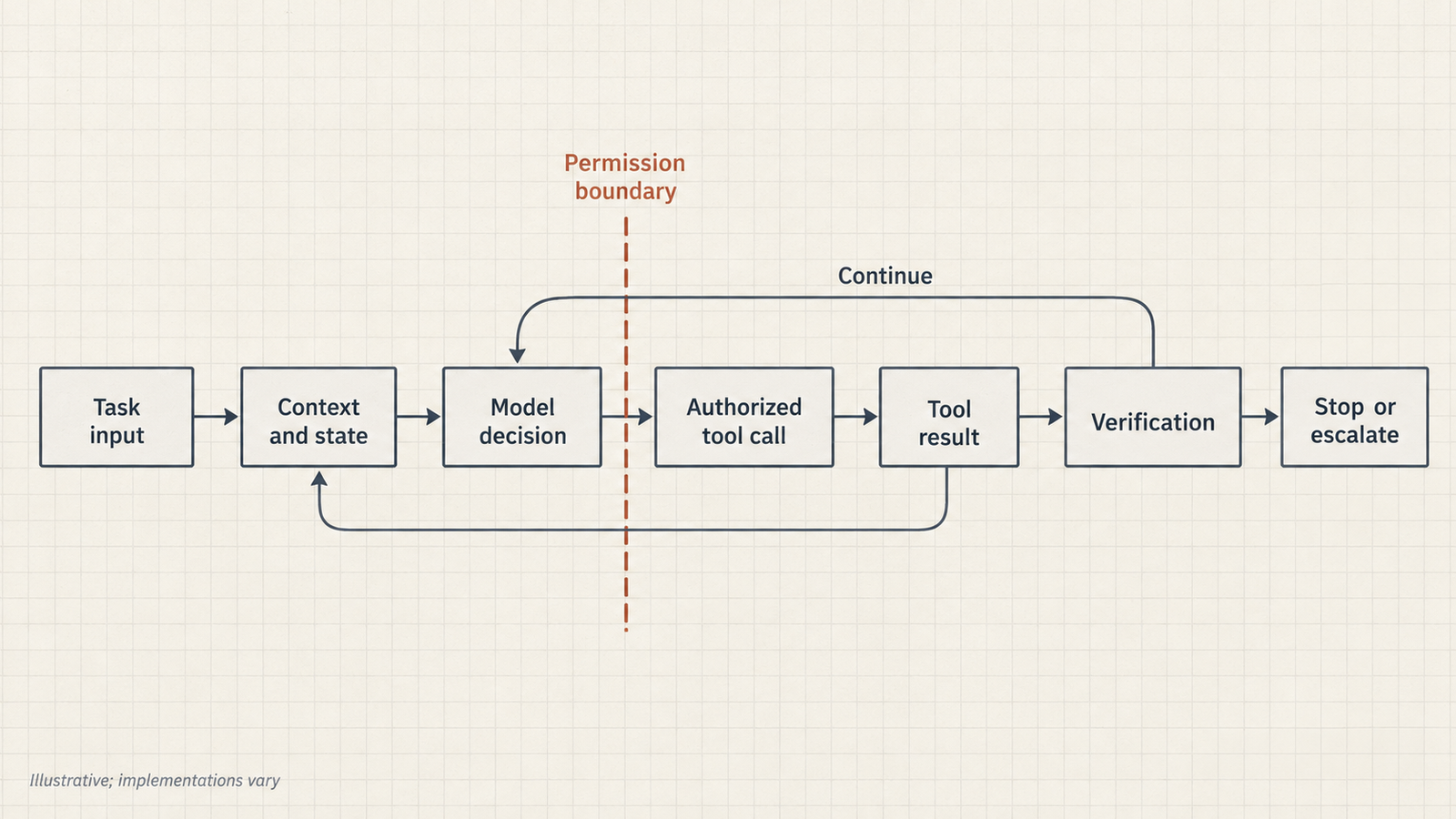
The loop is usually described as perceive, decide, act, verify, and then continue or stop. The research lineage is the ReAct paper (Yao et al., 2022), which interleaved model “reasoning traces and task-specific actions” so that actions could pull in outside information. Here is what that loop looks like in practice.
Hypothetical scenario. A deployment of a payments service has failed, and an on-call engineer asks an agent to find out why.
- Perceive. The runtime gives the model the request, the system instructions and descriptions of three tools:
get_deploy_logs,query_metricsandrun_diagnostic. Only read-only diagnostics are permitted. - Decide. The model requests the deploy logs for the failed release.
- Act. The runtime calls the logging API and appends 3,000 lines of output to the context.
- Verify. The model finds a connection-refused error to the database at the moment of rollout. It forms a hypothesis that a credential rotation broke the connection string.
- Continue. It queries metrics for the database. The metrics show the database healthy, with connections from the old release still succeeding. The hypothesis is weakened, and the model revises it: perhaps the new release points at the wrong host.
- Act again. It requests a DNS diagnostic from the new pod. The tool returns an error. The diagnostic container is not available in that namespace.
That last step is where the architecture shows. A well-built runtime returns the error to the model as data, and the model can choose a different route: inspect the release’s configuration diff, which is a read-only call it is allowed to make. A badly built one either crashes or lets the model keep retrying the same failing call. If the next move would be to restart the pod or roll back the release, a change with real side effects, the runtime should require the engineer’s approval rather than let the model proceed.
Verification deserves scepticism. When the model “checks” its own conclusion, that check is another model call, with the same blind spots as the first. The checks worth trusting come from the environment. Anthropic’s guide stresses gaining “ground truth” from tool results and code execution at each step. In this example, that means a metric that changes, a test that passes, or a configuration value that can be compared. An agent that reports “root cause found” without that kind of evidence has produced a hypothesis, not a finding.
The loop ends on one of three things: the objective is met, the agent escalates to a human, or a limit is hit. Anthropic recommends explicit stopping conditions, “such as a maximum number of iterations”. Without them, a confused agent simply keeps going.
AI agents versus LLM workflows: a spectrum, not a binary
The cleanest way to distinguish them is to watch execution rather than read the product page.
| Observable behaviour | LLM workflow | AI agent |
|---|---|---|
| Who chooses the next step | Code written in advance | The model, at runtime |
| Branching | Fixed branches, perhaps chosen by a model classification | Open-ended; the next tool and arguments are selected each turn |
| Number of model calls | Known in advance | Varies run to run |
| Stopping | When the pipeline ends | When the objective is met, a limit is hit or the agent escalates |
| Side effects | Usually at fixed, reviewed points | Wherever the model chooses, within its permissions |
| Human approval | Designed into specific steps | Must be enforced by the runtime for sensitive actions |
Real systems sit between the columns. A workflow can route a ticket using a model’s classification, which is a dynamic decision inside a fixed structure. An agent can run inside a workflow, handling one open-ended step before handing back to deterministic code. Treat this as a spectrum of autonomy. UniverseBlend’s comparison of agents, copilots, assistants and chatbots classifies systems by who approves consequential actions, which is a practical way to place a product on that spectrum.
Tools, memory, planning and permissions in AI agent architecture
Tools
Tools are what make actions possible: an API call, a database query, a shell command, a browser session. Each tool is also an interface the model must use correctly, so its design matters. A tool that returns 3,000 lines of raw log is technically working, but it spends context budget and buries the one relevant line. A tool with an ambiguous parameter name invites wrong arguments. Without tools, the system can only talk about the world. With poorly designed tools, it talks to the world unreliably.
Memory
There are at least three kinds of memory:
- The working context of the current call.
- Task state carried across steps: what has been tried, what failed, what remains.
- Persistent memory across sessions: notes, retrieval stores, user preferences.
Memory lets an agent avoid repeating a failed diagnostic. It also lets an error persist. A wrong conclusion written to the task record in step 3 becomes a premise in step 9. Retrieved or remembered text can also carry instructions from someone other than the user. Memory needs the same provenance checks as any other input.
Planning
Planning means breaking a goal into steps, choosing the next one, and revising the plan when evidence contradicts it. In the deployment example, the model planned around a credential hypothesis and abandoned it when the metrics disagreed. That revision is the valuable part. Without planning, an agent either follows its first idea regardless of evidence or wanders. Explicit plans written into state make that behaviour visible to an operator.
Permissions
Permissions separate deciding to act from being allowed to act. The model’s output is a request. The runtime, or the system the tool talks to, decides whether that request is executed. In practice that means:
- an identity for the agent distinct from the user;
- credentials scoped to the task;
- read and write separated;
- approval required for irreversible operations.
An agent with broad credentials and a careful system prompt is relying on the prompt. An agent with narrow credentials doesn’t need the prompt to hold.
What AI agents actually cost
A chat reply costs one model call. An agent task costs the sum of every call on the path it took, and that path isn’t known in advance. Agent cost is driven by the execution path, not the number of tasks submitted.
Three mechanisms make paths expensive:
- Repeated context. Each call re-sends the instructions, the tool definitions and the growing transcript, so later calls are larger than early ones.
- Variable length. A task that goes smoothly takes a few calls. One that hits a tool error, a dead-end hypothesis or a verification failure takes many more.
- Work outside the model. Tool APIs, retrieval queries, sandboxed compute, logging and storage all bill separately.
Anthropic’s write-up of its multi-agent research system reports that its agents “typically use about 4× more tokens than chat interactions”, and multi-agent systems “about 15×”. It also reports that on its browsing evaluation, token usage alone “explains 80% of the variance” in performance. Those figures are specific to that system and task, not a general rate, but they show the scale.
A worked example with labelled assumptions. Rates are Anthropic’s published Claude Sonnet 5.5 prices, checked on 22 October 2026: $2 per million input tokens and $10 per million output tokens, with no caching. The workload is hypothetical:
- Each call carries an 8,000-token fixed prefix (system prompt plus tool definitions).
- Each step adds 2,500 tokens of tool output and reasoning.
- Each call returns 400 output tokens.
| Path | Model calls | Input tokens | Output tokens | Cost |
|---|---|---|---|---|
| Clean run | 6 | 85,500 | 2,400 | $0.195 |
| Run with a tool error, a revised hypothesis and an extra verification | 11 | 225,500 | 4,400 | $0.495 |
The second run is less than twice as long in calls but more than 2.5 times as expensive. Input grows with every step, because each call re-reads everything before it. If 70% of runs are clean and 30% take the longer path, the average run costs about $0.29. Prompt caching can cut the repeated-prefix cost substantially, but only if the prefix stays byte-identical between calls.
The more important number is cost per successful task. Suppose, hypothetically, the agent above succeeds 90% of the time. A cheaper model at one-tenth the token price succeeds 50% of the time. Every failure costs $4 of an engineer’s time to review and redo. Then:
- Stronger model: ($0.285 + 0.10 × $4) ÷ 0.90 ≈ $0.76 per success
- Cheaper model: ($0.0285 + 0.50 × $4) ÷ 0.50 ≈ $4.06 per success
The token bill is the smallest line in that calculation. The success rates and review cost here are invented to show the mechanism. The point is that the cheapest response doesn’t produce the cheapest completed task once failures have a price. UniverseBlend’s analysis of when adding agents stops paying for itself follows the same arithmetic into multi-agent designs.
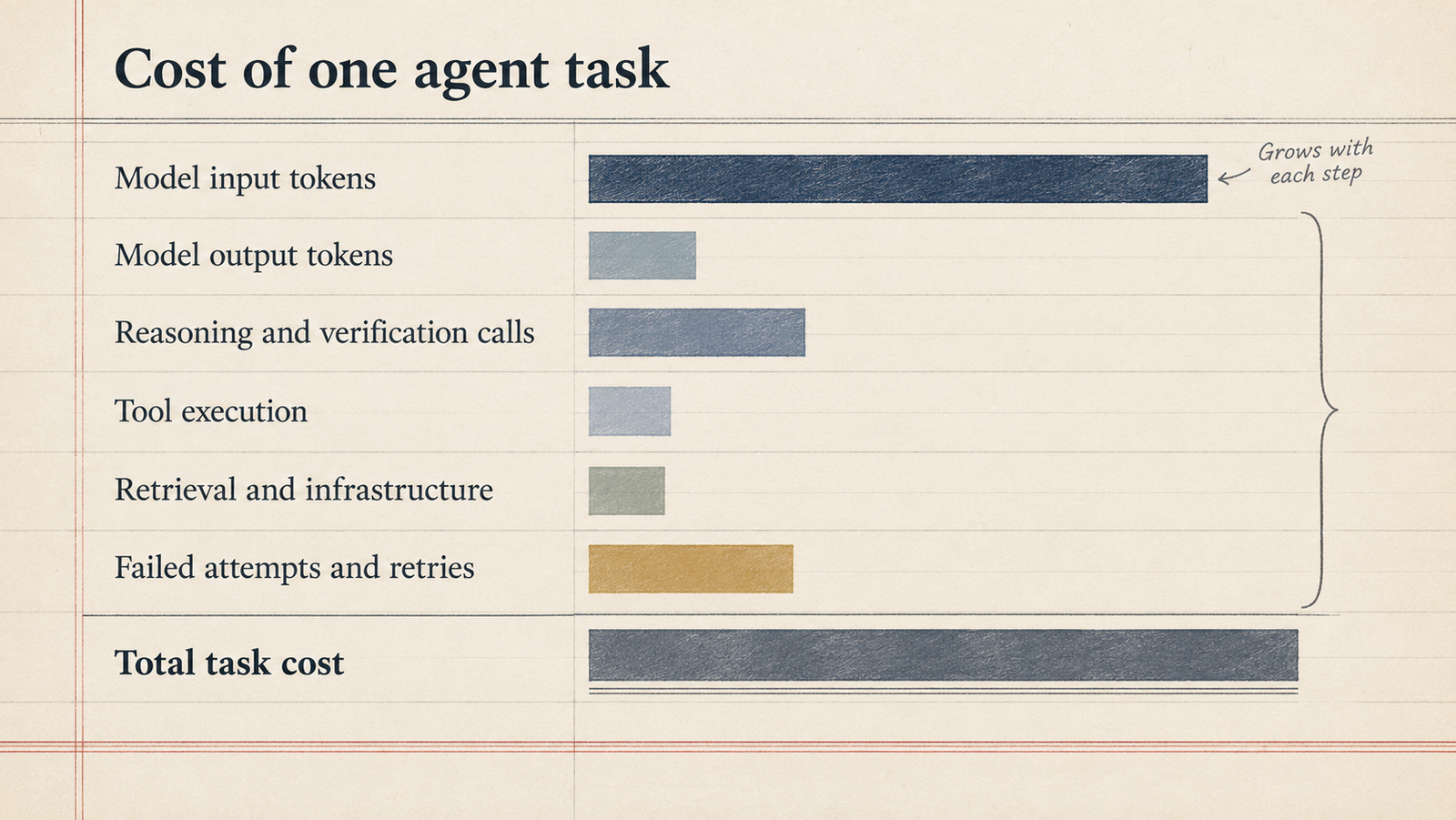
Latency follows the same path logic. Eleven sequential calls, each waiting for a model and a tool, take far longer than six. Concurrency limits and rate limits apply per call, not per task.
Where AI agents fail, and why AI agent security is an architecture problem
It helps to separate two kinds of failure. Model errors are wrong judgments: a misread log, a wrong hypothesis, a hallucinated parameter. Design failures are what the system allows those errors to do. Most damaging incidents need both: the model makes a mistake, and the architecture lets the mistake reach something that matters.
The failure modes worth designing against:
- Prompt injection. Text in a retrieved document, web page, ticket or tool output carries instructions the model may follow. OWASP’s Top 10 for agentic applications (December 2025) highlights agent behaviour hijacking, tool misuse and identity and privilege abuse among its risks.
- Excessive permissions: an agent that can delete when it only needed to read.
- Insecure tool integrations: tools that pass model-generated arguments straight into shells, queries or URLs.
- Sensitive-data exposure: private data in context sent to an external tool or rendered into an outbound link.
- Persistent wrong assumptions carried forward in state.
- Unbounded loops and retry storms: a failing call retried until a budget or rate limit intervenes.
- Duplicate or irreversible operations: a retry that sends the payment twice.
- Missing audit trails: no way to reconstruct which step did what.
- Cascading failures: one tool’s bad output becomes the next tool’s input.
Telling the model to ignore malicious instructions is not a control. It lowers the odds of compliance on a good day and offers nothing on a bad one. Defence in depth works at layers the model cannot talk its way past:
- constrained tool interfaces with validated arguments;
- least-privilege credentials;
- explicit authorization at the tool boundary;
- sandboxed execution;
- egress limits;
- idempotency keys for writes;
- human approval for irreversible steps.
No single one of these is sufficient. UniverseBlend’s guide to the four layers of sandbox isolation covers the containment side.
How to tell a real agentic AI system from a branded workflow
These questions assess architecture and autonomy. They are not a certification, and a useful system need not answer yes to all of them.
- Does the system choose its next action at runtime, or follow a sequence written in advance?
- Does it read tool results and change course when they contradict its plan?
- Does it keep task state across steps, so it knows what has been tried?
- Does it stop on a defined condition: objective met, escalation or limit?
- Are its actions bounded by explicit permissions enforced outside the model?
- Can an operator reconstruct what happened from logs, including tool arguments and results?
- Can it recover from a failure without repeating a dangerous action?
A product that answers “no” to the first three is a workflow with a model in it. That may be exactly the right product. A product that answers “yes” to the first three and “no” to the last four is an agent you shouldn’t deploy near anything important.
When not to use an agent
Anthropic’s guide recommends “finding the simplest solution possible”, which “might mean not building agentic systems at all”. That advice is easy to agree with and often ignored.
Use a deterministic function when the logic can be written down: validation, formatting, routing by known rules. Use an ordinary API integration when the steps are fixed and the data is structured. Use a single model call when the task is one transformation, such as summarising, classifying or extracting. Use a conventional workflow, perhaps with model calls at specific steps, when the process has to be predictable, auditable and fast.
An agent earns its cost and risk when the next step genuinely cannot be known in advance and the value of finding it outweighs:
- latency: many sequential calls;
- variable cost: the execution path decides the bill;
- harder audits;
- a larger failure surface.
If a mistake would be expensive or irreversible and the path is predictable, the agent is the wrong tool. So what is agentic AI, in the end? It’s a way of handing the choice of next action to a model. It is worth doing only where that choice is the hard part of the problem.
FAQ
What is agentic AI in simple terms?
Agentic AI is software in which a language model decides what to do next, uses tools to do it, looks at the result, and repeats until the task is finished or it needs help. The model makes the decisions, and the surrounding system controls what it is allowed to do.
How does agentic AI differ from generative AI?
Generative AI produces content in response to a prompt. Agentic AI uses a generative model as the decision-maker inside a loop that takes actions, such as calling APIs or running code, and reacts to their results. Our agentic AI vs generative AI comparison covers the cost and risk differences.
What is the difference between an AI agent and an LLM workflow?
In a workflow, developers write the sequence of steps in advance and the model fills in specific parts. In an agent, the model chooses the next step at runtime. Many real systems combine both.
Do AI agents need memory?
They need at least task state within a run, so they know what has been tried. Persistent memory across sessions is optional and adds risk, because incorrect or injected information can persist.
How do AI agents use tools?
The model outputs a structured request naming a tool and its arguments. The runtime checks that the request is permitted, executes it and returns the result as new context for the next decision.
Why can AI agents be expensive?
Each step is a model call that re-sends the growing context, and the number of steps varies with how the task unfolds. Retries, verification calls, tool fees and human review of failures add to the total.
What are the main security risks of agentic AI?
The main risks are prompt injection through external content, over-broad permissions, insecure tool integrations, data leakage and irreversible actions taken on a wrong assumption. Defence in depth applies to all of them: least privilege, validation, sandboxing and approval gates.
When should a business avoid using an AI agent?
Avoid an agent when the steps are predictable, when errors would be costly or irreversible, or when latency and auditability matter more than flexibility. A workflow or single model call is usually cheaper and easier to trust.
Keep reading
Here are the latest posts from the blog.

What Is Agentic AI? How AI Agents Work, What They Cost, and Where They Fail

AI Agent Authorization: Why a Bank Login Isn’t Permission

LLM Determinism: Why the Same Prompt Gives Different Answers