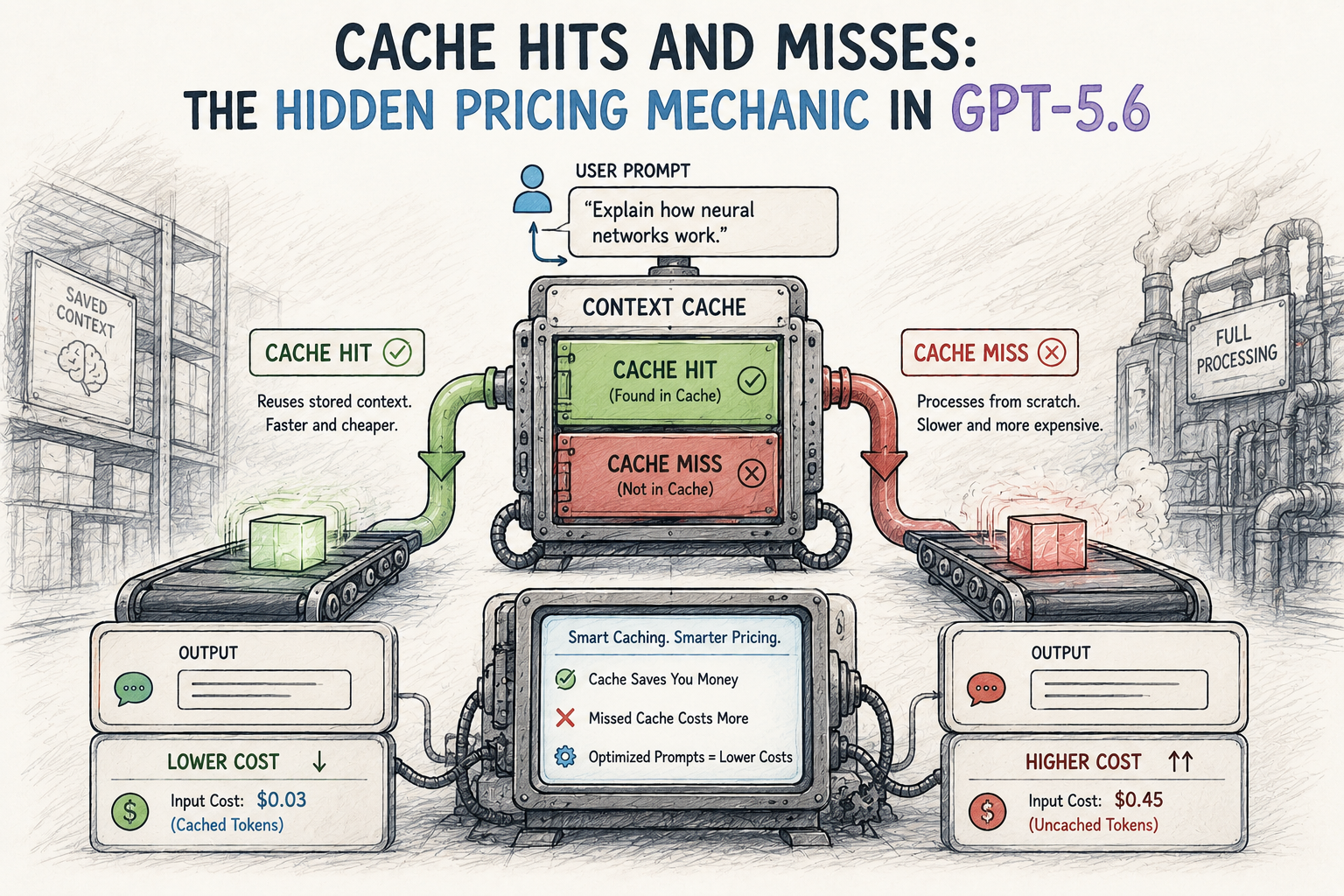
The cache hits cache misses hidden pricing mechanic is quietly reshaping how developers budget for AI — and most teams are completely missing it. If you’re running GPT-5.6 in production, you might be overpaying by 10x on repeat queries. That’s not a typo. OpenAI’s prompt caching system can cut input token costs by up to 90%, but only if you understand how it actually works.
Most developers know caching from web development: browser caches, CDN caches, database caches. However, prompt caching for large language models works differently — it’s baked directly into the API pricing itself. Get a cache hit, and you pay pennies. Get a cache miss, and you pay full price. The difference is enormous, and I’ve watched teams burn through budget for months before realizing what was happening.
So why aren’t more teams taking advantage of this? Mostly because the mechanics aren’t obvious. This post breaks down exactly how prompt caching works, shares real benchmarks, and gives you production-ready code to start saving immediately.
How the Cache Hits Cache Misses Hidden Pricing Mechanic Works
Benchmarks: Cached vs. Non-Cached Query Costs
Production Implementation: Code Snippets for Common Use Cases
Pricing Calculator: Estimate Your Savings
Common Mistakes That Kill Your Cache Hit Rate
How the Cache Hits Cache Misses Hidden Pricing Mechanic Works
Prompt caching works at the token level. When you send a request to GPT-5.6, OpenAI checks whether the beginning of your prompt matches a recently cached prefix. Specifically, the system looks for matching sequences of at least 1,024 tokens. A match means a cache hit — you pay the discounted rate. On a cache miss, distinguish ordinary input from a new cache write: their prices differ. Check the response usage rather than billing every missed token as ordinary input.
Here’s what matters most:
Consequently, the order of your prompt content matters enormously. Put your system prompt and static instructions first. Put variable content — user queries, dynamic data — last. This one structural change can convert the majority of your tokens into cached tokens, and it costs you nothing to implement.
Furthermore, OpenAI’s API documentation on prompt caching confirms that caching applies automatically for supported models. You don’t flip a switch, but you do need to structure prompts correctly. I’ve tested this on several production systems and the difference shows up immediately in the usage object of your API responses.
A support bot can place its 2,000-token instructions before each changing user message. This creates a stable prefix, not a guaranteed cache hit. A model-appropriate breakpoint and an available matching cache entry are also required. Measure actual cached tokens rather than assuming every later request reuses the prefix.
Benchmarks: Cached vs. Non-Cached Query Costs
The table is a hypothetical input-cost calculation, not a measured benchmark. Rates checked 16 September 2026: GPT-5.6 Sol (the gpt-5.6 alias) uses standard short-context rates of $4/M ordinary input tokens and $0.40/M cache-read tokens. Cache writes cost $5/M. The promotional rates are available at least through 21 November 2026; prompts above 272K input tokens have different rates. Output, tools, regional uplifts and other charges are excluded below.
Table: scroll sideways to view all columns when needed.
| Scenario | Input tokens per request | Cache-read tokens | Other input tokens | Modeled input cost/request | Same input without caching | Input savings |
|---|---|---|---|---|---|---|
| RAG system with fixed context | 4,000 | 3,500 | 500 new cache writes | $0.0039 | $0.0160 | 75.62% |
| Multi-turn chat (5 turns) | 6,000 | 5,000 | 1,000 new cache writes | $0.0070 | $0.0240 | 70.83% |
| Batch classification | 2,500 | 2,000 | 500 new cache writes | $0.0033 | $0.0100 | 67.00% |
| No caching optimization | 4,000 | 0 | 4,000 ordinary input tokens | $0.0160 | $0.0160 | 0% |
Each of the first three rows assumes the stated cache reads actually occur and all remaining input tokens are new cache writes. The last row is an ordinary-input baseline with no cache read or write. These are stated scenarios, not guaranteed hit rates. The classification row uses standard synchronous pricing, not the separate Batch API rate.
Key takeaways from the benchmarks:
Moreover, the savings compound fast. A team processing 10 million requests per month could save tens of thousands of dollars just by reordering their prompts. That’s the real kicker with understanding the cache hits and cache misses dynamic in production.
For additional context on how token-level pricing works across providers, Anthropic’s prompt caching documentation offers a useful comparison point. Their approach is similar but requires explicit cache control headers — a meaningful tradeoff if you’re weighing multi-provider architectures.
Production Implementation: Code Snippets for Common Use Cases
The following examples demonstrate request structure and asynchronous calls. They are shortened illustrations, not complete production caching configurations. Supply useful eligible-length content, review model/API-specific breakpoints and verify actual usage before treating them as caching implementations.
1. RAG system with fixed context window
import openai
SYSTEM_PROMPT = """You are a technical support agent for Acme Corp.
Use the following documentation to answer questions accurately.
[2,000 tokens of product documentation here]
Rules:
Always cite the relevant doc section
Never fabricate information
Escalate billing questions to human agents
"""
def query_with_caching(user_question: str) -> str:
    response = openai.chat.completions.create(
        model="gpt-5.6",
        messages=[
            {"role": "system", "content": SYSTEM_PROMPT},  # Stable prefix; cache reuse depends on eligibility and availability
            {"role": "user", "content": user_question}      # Changing suffix; do not assume reuse
        ]
    )
    return response.choices[0].message.content
Keep SYSTEM_PROMPT stable. The shortened examples demonstrate request structure, not a measured cache hit; their placeholder content must meet the model’s minimum length. For GPT-5.6, review breakpoint placement in the current cache guide.
2. Multi-turn conversation with growing cache
def chat_with_history(conversation_history: list, new_message: str) -> str:
    # History grows at the END of the cached prefix
    # Each turn extends the cacheable window
    messages = conversation_history + [
        {"role": "user", "content": new_message}
    ]
    response = openai.chat.completions.create(
        model="gpt-5.6",
        messages=messages
    )
    assistant_reply = response.choices[0].message.content
    conversation_history.append({"role": "user", "content": new_message})
    conversation_history.append({"role": "assistant", "content": assistant_reply})
    return assistant_reply
Similarly, each turn builds on the previous cached prefix. By turn five, most of your input tokens are cached — and the economics get better the longer the conversation runs.
3. Batch processing with shared system prompt
import asyncio
from openai import AsyncOpenAI
CLASSIFICATION_PROMPT = """Classify the following text into one of these categories:
[500 tokens of category definitions and examples]
Respond with only the category name."""
async def classify_batch(texts: list[str]) -> list[str]:
    async with AsyncOpenAI() as client:
        tasks = [
            client.chat.completions.create(
                model="gpt-5.6",
                messages=[
                    {"role": "system", "content": CLASSIFICATION_PROMPT},
                    {"role": "user", "content": text}
                ]
            )
            for text in texts
        ]
        responses = await asyncio.gather(*tasks)
        return [r.choices[0].message.content for r in responses]
Concurrent requests need not reach an already-populated cache. Measure cache reuse and total cost under the actual traffic pattern; concurrency alone does not establish savings.
Pricing Calculator: Estimate Your Savings
Understanding the cache hits cache misses hidden pricing mechanic starts with knowing your own usage patterns. Here’s a simple framework to estimate savings before you touch a single line of code.
Step 1: Measure your current prompt structure
static_tokens / total_tokensStep 2: Estimate your cache hit rate
Step 3: Calculate monthly savings
Use this formula:
Savings = [cache_read_tokens × (ordinary_rate − cache_read_rate) − cache_write_tokens × (cache_write_rate − ordinary_rate)] / 1,000,000
A worked example:
Illustrative result: 1.275 billion cache-read tokens and 225 million new cache-write tokens cost $510 + $1,125 = $1,635 for the prefix. Ordinary processing of those 1.5 billion tokens costs $6,000. The modeled difference is $4,365 per month, before dynamic input, output and other charges. The 85% reuse assumption is hypothetical; this is not an observed invoice or a savings guarantee.
The calculation applies only to the stated token categories and rates. Record actual usage before and after a prompt change, and include cache-write charges, variable input, output and any other billed services when comparing complete invoices.
For teams wanting to monitor cache performance in real time, Helicone’s LLM observability platform offers dashboards that track cache hit rates alongside cost metrics. Alternatively, you can parse the usage object in OpenAI’s API responses directly, which now includes cached_tokens counts. Set up that monitoring before you make prompt changes, not after.
Common Mistakes That Kill Your Cache Hit Rate
Even teams that understand the cache hits cache misses hidden pricing mechanic often sabotage their own savings. Here are the most frequent mistakes — and honestly, I’ve made a couple of these myself.
Putting timestamps or request IDs in the system prompt. This is surprisingly common. If your system prompt includes Current time: 2025-06-15T14:32:00Z, every single request gets a unique prefix — cache miss rate hits 100%. Instead, pass timestamps in the user message or as a separate parameter. It’s a five-minute fix with massive cost implications.
Randomizing few-shot examples. Some developers rotate examples for variety. Although this might slightly improve output quality in theory, it destroys caching completely. Pick a fixed set of examples, order them deliberately, and leave them alone.
Reordering tool definitions. If you’re using function calling, the order of your tool definitions matters more than you’d expect. Changing the order between requests creates a cache miss. Lock the sequence down and treat it like a contract.
Checking only system-message length. The GPT-5.6 minimum applies to the eligible visible prefix, which can include other shared content. A 500-token system message alone is too short, but that does not establish the length of the entire reusable prefix. The shortened code placeholders are not a cache-hit test.
Assuming a universal expiry. Current GPT-5.6 caching has a 30-minute minimum lifetime after writing or reuse; older models have different policies. Routing and availability still matter. Do not send paid keep-alive requests without measuring whether their cost is justified.
Monitor actual cache-read and cache-write counts, total input/output usage and realized cost. If reads remain zero, investigate eligibility, breakpoints and cache availability before claiming savings.
Importantly, these mistakes often go unnoticed for months. Teams assume they’re getting cached pricing without ever verifying it. Always check with actual API response data — assumptions are expensive.
Advanced Strategies: Maximizing Cache Efficiency at Scale
Once you’ve nailed the basics of the cache hits cache misses hidden pricing mechanic, several advanced strategies can push savings even further. These are worth trying once the fundamentals are solid.
Prompt layering for multi-tenant applications. If you serve multiple customers, structure prompts in layers. Put universal instructions first — cacheable across all tenants. Then add tenant-specific context, and finally append the user query. This way, the universal layer gets cached across your entire user base, not just within a single customer’s traffic.
Stable prefixes for RAG systems. Group reusable instructions and shared context before request-specific material so that eligible repeated prefixes can be cached. Measure the resulting hit rate on your own retrieval traffic; the document mix and ordering determine whether this helps. The earlier 20–30% improvement was not supported by a published benchmark. OpenAI’s prompt-caching guidance explains prefix matching and the relevant constraints.
Scheduled batch processing. Rather than processing items as they arrive, batch similar requests together and run them in rapid succession. This keeps the cache hot and maximizes hit rates. Additionally, OpenAI’s Batch API offers a 50% discount on top of caching benefits for non-time-sensitive workloads — which is a no-brainer for offline pipelines.
Cache-aware load balancing. If you’re spreading requests across multiple API keys or organizations, note that cache is scoped per organization. Therefore, splitting traffic across organizations splits your cache and drops your hit rate. Consolidate where possible — this one catches a lot of teams off guard.
Meanwhile, other providers are adopting similar mechanics. Google’s Gemini API offers explicit context caching with configurable TTL (time to live), which gives developers more control but requires manual cache management. The choice between automatic and explicit caching depends on your use case — automatic is easier to start with, but explicit gives you more levers to pull.
Conclusion
Caching is a core architectural consideration for production AI systems, but a discount on eligible cached input tokens is not the same as a reduction in the entire bill. Compare cached and uncached input, output, cache-write charges where applicable, retries and discounts using measured traffic. The earlier claim that teams routinely cut total costs by 70–90% should not be read as a benchmark result.
Your actionable next steps:
1. Audit your current prompts. Identify static vs. variable content. Measure your static-to-total token ratio.
2. Restructure prompt order. Move all static content to the front. Push variable content to the end.
3. Monitor cache hit rates. Check the cached_tokens field in API responses. Set up alerts for unexpected drops.
4. Eliminate cache-busting patterns. Remove timestamps, random elements, and reordered definitions from your prompt prefixes.
5. Set up batch processing where latency allows. Rapid successive requests maximize cache efficiency.
The cache hits and cache misses dynamic will only matter more as models get more expensive and context windows grow larger. Start optimizing now and you’ll build cost efficiency into your architecture from the ground up — instead of scrambling to retrofit it when the bills arrive.
FAQ
How long do cached prompts stay active before expiring?
For GPT-5.6, the default and supported prompt_cache_options.ttl value is 30m. It sets a minimum after the last write or reuse. Older-model retention differs. Routine paid keep-alive traffic is not required; measure costs and consult the model-specific guidance.
Do I need to enable prompt caching manually for GPT-5.6?
GPT-5.6 supports implicit and explicit caching. A stable prefix must reach 1,024 visible tokens, excluding hidden system content. Implicit caching of a longer request may not make a shorter shared prefix reusable; check breakpoint placement instead of assuming every repeated system prompt is cached.
How do I verify whether my requests are getting cache hits?
Check the response usage for actual cache-read tokens and cache-write tokens. The exact field names depend on the API; use the current usage guidance. A zero read count is an observation, not proof that the prompt alone is defective.
Does prompt caching affect response quality or accuracy?
Caching reuses input-processing state; it does not replay a previous answer. Generation still produces a new response, so identical output is not guaranteed. Validate application quality independently from the billing calculation.
References
Keep reading
Here are the latest posts from the blog.