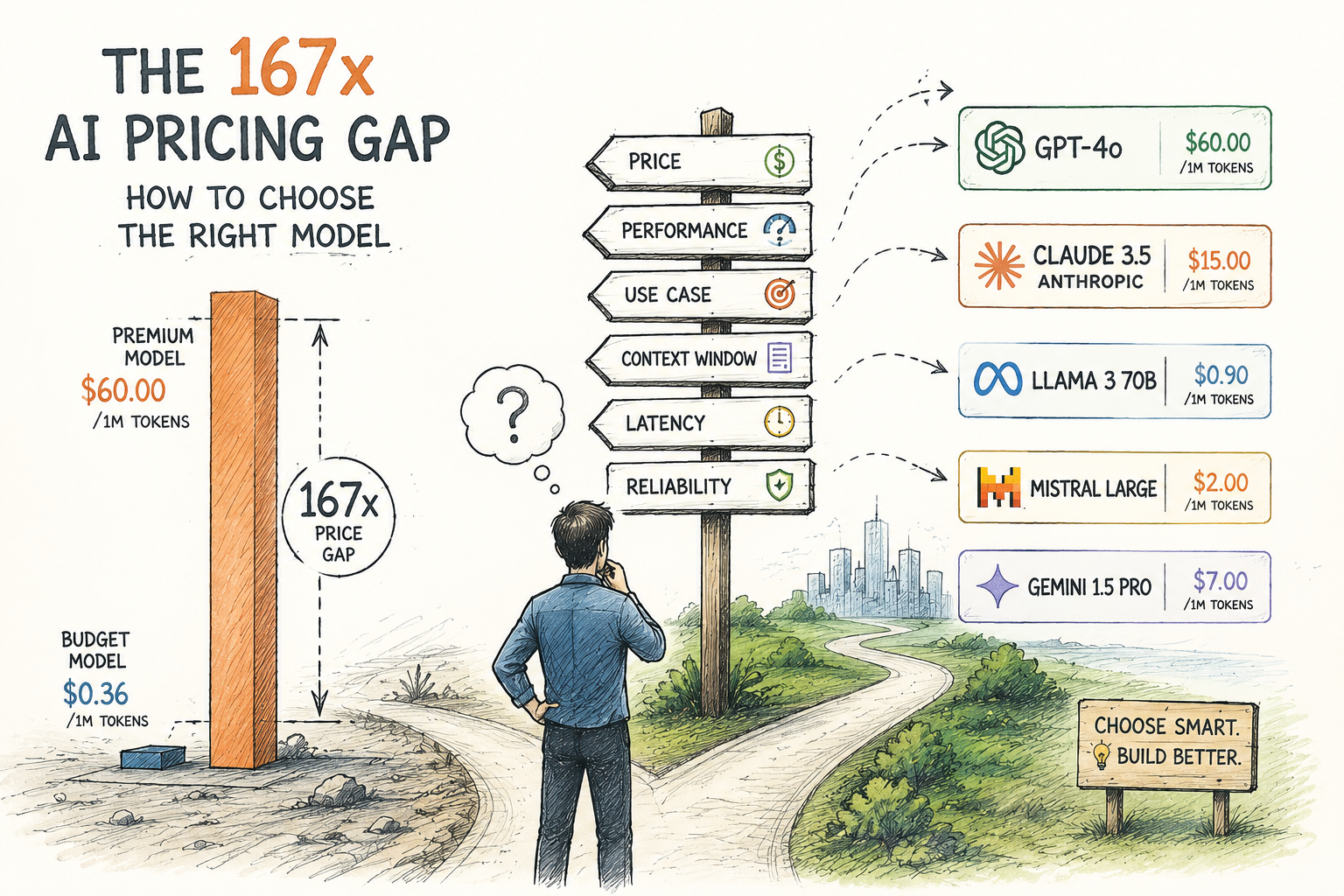
The AI model pricing gap between the cheapest and most expensive large language models isn’t just a fun trivia fact. It’s a decision that can make or break your monthly AI budget. Understanding the AI model pricing and choosing the right model for your workload can save thousands of dollars — and I’ve watched teams burn through budgets simply because nobody stopped to run the numbers.
The worked examples below use the displayed rates to explain input/output arithmetic. They are illustrative historical examples, not a verified current-market price range or a current model recommendation. Compare the same token type, pricing date and provider terms, then check current availability before making a purchasing decision.
Why the AI Model Pricing Gap Exists and What It Means for Your Budget
How to Choose the Right Model: A Cost-Per-Task Framework
Batch Processing, Caching, and Prompt Engineering: Cutting Your Token Spend
Comparing Claude, GPT-4, Llama, and Grok Across Real Workloads
Building Your Own AI Pricing Calculator
Why the AI Model Pricing Gap Exists and What It Means for Your Budget
The pricing spread across AI models reflects enormous differences in model size, training cost, and infrastructure. Specifically, frontier models like GPT-4o from OpenAI charge premium rates for maximum capability. Meanwhile, smaller open-source models like Meta’s Llama run at a fraction of that cost.
The following rates are retained for the worked examples. Their original quotation date is not established here, so treat the table as illustrative rather than a current price list.
Table: scroll sideways to view all columns when needed.
| Model | Input Cost (per 1M tokens) | Output Cost (per 1M tokens) | Relative input cost |
|---|---|---|---|
| GPT-4o | $2.50 | $10.00 | 16.7x |
| Claude 3.5 Sonnet | $3.00 | $15.00 | 20x |
| Claude 3 Opus | $15.00 | $75.00 | 100x |
| Grok-2 | $2.00 | $10.00 | 13.3x |
| GPT-4o mini | $0.15 | $0.60 | 1x (baseline) |
| Llama 3.1 (hosted) | $0.18 | $0.18 | ~1.2x |
This table is the core of the AI model pricing gap problem, right there in plain numbers. Claude 3 Opus output tokens cost 125 times more than GPT-4o mini output tokens. Furthermore, that gap widens considerably once you factor in output-heavy workloads like content generation. I’ve seen this catch teams off guard more times than I can count.
Using the output rates in this table, 100 million billed output tokens would cost $60 on GPT-4o mini or $7,500 on Claude 3 Opus. Input tokens are billed separately. If 100 million means the combined input and output volume, those totals do not apply: calculate each token type at its own rate before adding them.
To make the arithmetic concrete, assume 5,000 tickets a day, 600 billed output tokens per ticket and a 30-day month. That is 90 million output tokens. At the table’s output rates, the monthly output-only charges are $54 and $6,750, a difference of $6,696, or $80,352 over twelve identical months. These figures exclude input-token charges, caching, batch discounts, retries and other fees. They are an illustration using the table, not a current quote or a measured help-desk bill.
How to Choose the Right Model: A Cost-Per-Task Framework
Understanding the AI model pricing and choosing the right model starts with dropping per-token thinking entirely. Instead, think in cost-per-task terms. A single “task” might be answering a customer question, summarizing a document, or generating a block of code. This reframe changed how I evaluate models — it should change how you do too.
Step 1: Measure your input/output token ratio. Different workloads produce dramatically different ratios. Summarization tasks typically run 10:1 input to output, while creative writing runs closer to 1:5. This ratio fundamentally changes your effective cost — and most people skip this step entirely (big mistake). A document summarization pipeline, for example, might ingest a 4,000-token article and return a 400-token summary. That 10:1 ratio means input pricing dominates your bill, which shifts which model looks cheapest.
Step 2: Calculate cost per task, not cost per token. Here’s a practical example:
- Email classification task: 500 input tokens, 50 output tokens
- GPT-4o mini: $0.0001 per email
- Claude 3.5 Sonnet: $0.002 per email
- Claude 3 Opus: $0.011 per email
- Blog post generation: 1,000 input tokens, 3,000 output tokens
- GPT-4o mini: $0.002 per post
- Claude 3.5 Sonnet: $0.048 per post
- Claude 3 Opus: $0.240 per post
Notice how the gap between models widens as output volume grows. For the email classifier, Claude 3 Opus costs 110x more than GPT-4o mini per task. For blog post generation, that ratio jumps even higher because output tokens are priced at a premium and the task produces far more of them. This is exactly why measuring your specific ratio in Step 1 matters so much.
Step 3: Test quality at each price point. Run the same representative tasks through candidate models and use a consistent scoring rubric. Decide what differences matter for your application before comparing cost. A lower-cost model is only useful when its errors and review requirements remain acceptable.
Step 4: Build a routing system. Send simple tasks to cheap models and route complex tasks to premium models. This hybrid approach is how smart teams actually close the AI model pricing gap effectively. It’s not glamorous engineering, but it’s a no-brainer optimization.
Batch Processing, Caching, and Prompt Engineering: Cutting Your Token Spend
Per-token pricing is only part of the bill. Batch processing, eligible prompt caching and shorter prompts can reduce costs, but the combined reduction depends on which tokens and requests qualify; discounts must not be subtracted twice.
Batch processing discounts are the easiest win. OpenAI’s Batch API offers 50% discounts for non-urgent requests — you submit tasks in bulk and get results within 24 hours. Similarly, Anthropic offers prompt caching that cuts costs on repeated prefixes. If your workload isn’t real-time, you’re leaving money on the table by skipping this. A practical example: a legal tech company processing contract summaries overnight has no reason to pay real-time rates. Switching to batch processing alone cuts that bill in half before touching anything else.
Prompt caching works well for repetitive workloads. If you’re sending the same system prompt with every request, cached tokens cost 90% less on supported models. Specifically, Anthropic charges just 10% of the base input price for cached tokens — so for a customer service bot with a 2,000-token system prompt, this adds up fast. Fair warning: you’ll need to structure your prompts carefully to get the most out of the cacheable prefix. Put the stable content — your persona definition, rules, and static context — at the top of the prompt, and let the dynamic user input come at the end. Reversing that order breaks caching entirely.
Prompt engineering cuts token count directly. Consider these techniques:
- Strip unnecessary instructions from system prompts — ruthlessly
- Use structured output formats (JSON) to reduce output verbosity
- Replace long examples with concise few-shot demonstrations
- Compress context using summarization before sending to expensive models
Additionally, token-aware prompt design can shrink costs without changing models at all. A well-engineered prompt might use 40% fewer tokens while producing identical results. Therefore, prompt optimization should come before model switching in your cost reduction plan. I’ve seen teams cut spend in half without ever touching their model selection. One quick audit technique: paste your system prompt into a tokenizer tool, identify the five longest instruction blocks, and ask yourself whether each one is genuinely necessary or just defensive padding accumulated over time. Usually two or three blocks can be cut or compressed significantly.
Calculate the effective bill by token category: uncached input charges + cached-input charges + cache-write charges where applicable + output charges + other fees. Apply only the discounts supported for each category and avoid counting the same reduction twice.
Comparing Claude, GPT-4, Llama, and Grok Across Real Workloads
Choosing the right model within the AI model pricing gap requires workload-specific testing — not just benchmark reading. Although benchmarks help orient you, they don’t capture your unique requirements. Here’s how each model family actually performs across common use cases, based on what I’ve seen in practice.
For customer support and classification:
For support and classification, start with candidate models that can meet your required labels, structured-output constraints and review threshold. The older model names in this example illustrate a routing design; measure current models on your own labeled set rather than assuming a general 95% accuracy rate.
For content generation and creative writing:
For content generation, evaluate factual reliability, editing effort, tone and completeness on the same prompts. A model with a lower output-token rate can cost more overall if its answers need more review or retries. Treat the older model comparison here as illustrative, not a current ranking.
For code generation and debugging:
GPT-4o and Claude 3.5 Sonnet compete closely in this space. However, GPT-4o’s slightly lower output pricing gives it an edge for code-heavy workloads. Grok from xAI also shows strong coding performance at competitive rates — notably, it’s worth benchmarking if you haven’t tried it yet. One practical tradeoff worth noting: GPT-4o tends to produce more concise code with fewer explanatory comments, while Claude 3.5 Sonnet often includes inline documentation by default. Depending on whether your pipeline strips comments before execution, that difference can meaningfully affect your output token count.
For data analysis and reasoning:
This is where premium models genuinely earn their price. Claude 3 Opus and GPT-4o excel at multi-step analysis. Nevertheless, only truly complex queries deserve routing to these expensive options — and honestly, fewer queries qualify as “truly complex” than most teams assume. A useful test: if you can solve the problem by breaking it into two or three sequential simpler prompts on a cheaper model, you probably don’t need Opus.
The hybrid routing strategy in practice:
1. All incoming requests hit a lightweight classifier (GPT-4o mini)
2. Simple queries route to GPT-4o mini or Llama 3.1
3. Medium-complexity tasks go to Claude 3.5 Sonnet or GPT-4o
4. Only genuinely complex reasoning tasks reach Claude 3 Opus
Routing can reduce spending when the lower-cost route meets the task’s quality requirements. Measure the routed workload against a single-model baseline; this article does not establish a universal 60–80% saving.
Building Your Own AI Pricing Calculator
To truly master the AI model pricing and choosing the right decisions, you need a personalized calculator. Generic pricing pages don’t account for your specific token ratios, volumes, or caching opportunities — and they’re not supposed to. They’re marketing pages, not engineering tools.
Your calculator needs these inputs:
- Average input tokens per task
- Average output tokens per task
- Daily task volume
- Percentage of tasks eligible for caching
- Percentage eligible for batch processing
- Quality threshold (minimum acceptable accuracy)
Here’s a simplified calculation workflow:
1. Measure baseline: Run 1,000 representative tasks through your current model. Record total input tokens, output tokens, and quality scores.
2. Test alternatives: Run the same 1,000 tasks through two or three cheaper models and score quality identically.
3. Apply discounts: Calculate effective rates after caching and batch discounts for each model.
4. Project monthly costs: Multiply cost-per-task by projected monthly volume.
5. Factor in quality costs: Estimate the business cost of quality drops — customer complaints, rework, and similarly painful downstream effects.
On that last point: quality costs are easy to underestimate because they’re indirect. If a cheaper model causes your chatbot to misroute 2% more tickets, and each misrouted ticket costs your support team 10 minutes of manual correction, that’s a real dollar figure. Build it into your comparison. A model that costs 30% less but generates 5% more rework may not actually be cheaper once you run the full math.
Tools like LiteLLM help you route between models in code. Additionally, Helicone provides cost tracking and analytics across multiple providers. The two together make a solid starting stack.
Pro tip: Set up A/B testing between models in production and monitor both cost and quality metrics continuously. The AI model pricing gap isn’t static — providers adjust pricing frequently. Therefore, your calculator needs regular updates, or it’ll mislead you within a quarter.
Watch for hidden costs too. Some providers charge differently for:
- System prompt tokens versus user prompt tokens
- Streaming versus non-streaming responses
- Fine-tuned model inference versus base model inference
- Rate limit overages and priority access tiers
Check rate limits, service tiers, minimum commitments and overage terms in the provider agreement. Do not assume that exceeding a throughput limit automatically moves requests to a more expensive tier.
Common Mistakes When Facing AI Model Pricing Decisions
Even experienced teams make costly errors when facing the AI model pricing and choosing the right decisions. Here are the most frequent mistakes — and I’ve made a few of these myself, so no judgment.
Mistake 1: Defaulting to the most expensive model. Many teams start with GPT-4 or Claude 3 Opus “just to be safe” and never test cheaper alternatives. Consequently, they overspend by 10–50x on tasks that don’t require premium intelligence. It’s a comfort decision dressed up as a quality decision.
Mistake 2: Ignoring output token costs. Input tokens are usually cheaper than output tokens. For generation-heavy tasks, output costs dominate your bill — specifically, Claude 3 Opus charges 5x more for output tokens than input tokens. This surprised me when I first dug into the pricing details.
Mistake 3: Skipping prompt optimization. A bloated system prompt wastes money on every single request. Moreover, verbose output instructions cause models to generate unnecessary tokens. Fix your prompts before you fix your model selection.
Mistake 4: Not using caching. If your system prompt stays constant across requests, skipping caching is leaving real money on the table. Similarly, when users frequently ask similar questions, semantic caching can eliminate redundant API calls entirely. There’s no good reason to skip this.
Mistake 5: Treating all tasks equally. A one-size-fits-all approach ignores the core insight behind the AI model pricing gap. Smart routing based on task complexity is the single highest-impact optimization available — and also one of the most underused.
Mistake 6: Locking in a model choice without a review schedule. Providers cut prices, release faster variants, and retire older models on timelines that don’t align with your product roadmap. A model that was the right call six months ago may now be the expensive option in its category. Building a quarterly model review into your engineering calendar costs almost nothing and regularly surfaces meaningful savings.
Conclusion
The AI model pricing and choosing the right model decision ultimately comes down to matching capability to need. You don’t need a Ferrari for grocery runs. Similarly, you don’t need Claude 3 Opus for email classification. And yet, that’s exactly what most teams are doing right now.
Your actionable next steps:
1. Audit your current AI spending and sort tasks by complexity
2. Test your top three tasks on at least three differently priced models
3. Use prompt caching for repetitive system prompts
4. Build a simple routing layer that sends tasks to appropriate models
5. Set up cost monitoring with weekly reviews
6. Revisit pricing quarterly — the AI model pricing gap shifts as providers compete
Furthermore, remember that the cheapest option per token isn’t always the cheapest per task. Quality failures create hidden costs — rework, customer churn, manual review overhead. Nevertheless, most teams are significantly overspending because they haven’t done the work of testing cheaper alternatives.
The teams that thrive in this pricing environment treat model selection as an ongoing optimization problem. They test continuously, route intelligently, and cache aggressively. That’s how you choose the right model when costs range from $0.15 to $50 per million tokens — and that’s how you turn the AI model pricing gap from a threat into a genuine competitive advantage.
FAQ
What exactly is the 167x AI pricing gap?
There is no single reliable multiplier across all model prices. Compare matched token types and dated provider rates, then calculate the bill using your own input/output mix, quality target, retry rate and service requirements.
How do I choose the right AI model for my budget?
Start by defining your tasks clearly, then test three to four models at different price points on identical workloads. Score the outputs for quality and calculate cost-per-task rather than cost-per-token. Additionally, consider setting up a routing system that sends simple tasks to cheap models and complex tasks to premium ones. This hybrid approach balances quality and cost — and it’s more straightforward to set up than most teams expect.
Does prompt caching really reduce AI costs significantly?
Yes. Prompt caching can reduce input token costs by up to 90% for repeated content. If your application sends the same system prompt with every request, caching removes redundant processing charges. Anthropic’s prompt caching and OpenAI’s similar features make this relatively easy to set up. However, caching only helps with the repeated portions of your prompts — unique user inputs still incur full pricing, so it’s not a silver bullet.
Are open-source models like Llama always cheaper than proprietary ones?
Not always. Although Llama models are free to download, hosting them requires GPU infrastructure. Consequently, self-hosting costs depend heavily on your hardware, utilization rates, and engineering overhead. Hosted Llama options through providers like Together AI offer competitive per-token pricing without the infrastructure headache. Nevertheless, for low-volume use cases, managed APIs from OpenAI or Anthropic may actually cost less once you factor in the full picture.
How often do AI model prices change?
AI model pricing changes frequently — sometimes quarterly, sometimes faster. OpenAI has cut prices multiple times since launching GPT-4. Similarly, Anthropic and other providers adjust rates as they improve their infrastructure. Therefore, any pricing calculator or comparison you build should be reviewed at least quarterly. Moreover, new model releases often introduce entirely different pricing tiers that can shift the competitive picture significantly — and quickly.
Keep reading
Here are the latest posts from the blog.

The ‘ChatGPT moment’ for robotics is closer than most people are giving it credit for. Foundation models — those massive AI systems trained on enormous datasets — are doing f…
The promise sounds almost too good to be true. One software platform, every robot in your fleet, regardless of who built them. Why hardware agnostic AI why Robostral Navigate…

Europe just made its boldest move in the robotics race. Physical AI robots Europe Mistral Robostral Navigate represents a serious attempt to challenge American and Chinese do…