Two teams call the same model on the same tier. One runs a support chatbot and never sees a 429. The other runs a five-step agent loop over long documents and starts getting throttled on day one. Same account, same limits, different binding constraint.
That is the useful thing to understand about AI API rate limits in 2026, and it is the thing the comparison tables usually miss. Every provider enforces several ceilings at once. The one you hit depends on the shape of your traffic, not on which number is biggest.
The short version: OpenAI enforces RPM, TPM, RPD and TPD at the organization and project level, with four tiers gated on cumulative credit purchases. Anthropic splits tokens into input and output, caps them separately, and — crucially — does not count cached input tokens toward the input limit on most models. Google publishes a tier structure but has stopped publishing per-model numbers in the docs, pointing you to AI Studio instead. AWS does not do tiers at all; Bedrock quotas are per account, per region, per model, token-burndown based, and now split across two separate endpoints.
None of those providers publishes a concurrency limit for standard text inference. That absence matters more than most of the published numbers, and it comes up later.
Limits last checked: 9 October 2026. Every figure below links to the provider’s own documentation. Treat them as a snapshot — OpenAI’s tier names changed this year, and Google’s published tables disappeared sometime before September.
Key takeaways
- Rate limits are plural. OpenAI enforces up to six dimensions, Anthropic three plus spend caps, Gemini three plus a rolling ten-minute spend limit, Bedrock token-based quotas split across two endpoints.
- Cached input tokens do not count toward ITPM on most Claude models. At an 80% hit rate, a 2M ITPM limit processes around 10M total input tokens per minute, which makes cross-provider TPM comparisons close to meaningless.
- No provider publishes a concurrency limit for standard text inference. Derive yours from RPM and request duration, and enforce it in your client.
- A 429 with no
retry-afteron Anthropic means a spend cap, not a rate limit. Retrying cannot clear it. - Google no longer publishes per-model Gemini numbers in its documentation. AI Studio is the source of truth for your project.
- Limits attach above the key: organization and project on OpenAI, organization on Anthropic, project on Gemini, account and region on Bedrock. Minting more keys does not add capacity.
- OpenAI charges TPM against the maximum of
max_tokensand its own estimate. Anthropic ignoresmax_tokensfor OTPM. The same parameter is a cost on one platform and free on the other.
Quick Navigation
- Quick Referene: AI API Rate Limits, October 2026
- What the Numbers Actually Mean
- The Table Nobody Publishes
- OpenAI Rate Limits
- Anthropic Rate Limits
- Google Gemini Rate Limits
- AWS Bedrock Quotas
- The Concurrency Problem
- What Changes When You Add Agents
- When You Hit the Ceiling
- Which Limit Matters for Your Workload
- FAQ
Quick Referene: AI API Rate Limits, October 2026
The providers do not expose comparable quota systems, so this table does not pretend they do.
Table: scroll sideways to view all columns when needed.
| Provider | Scope | Dimensions enforced | Top published standard tier | Concurrency limit | How you move up |
|---|---|---|---|---|---|
| OpenAI | Organization and project | RPM, RPD, TPM, TPD, IPM, audio minutes | Grow: 15,000 RPM / 40M TPM (Astra, Sol, Terra); 30,000 RPM / 180M TPM (Luna) | Not published | Automatic at $500 total credit purchases |
| Anthropic | Organization, with optional workspace sub-limits | RPM, input TPM, output TPM | Scale: 10,000 RPM / 10M ITPM / 2M OTPM (Opus 5.5, Sonnet 5.5, Haiku 5.5) | Not published | Automatic on usage history; request increase in Console |
| Google Gemini | Project, not API key | RPM, input TPM, RPD, plus IPM/TPD on some models | Not published in docs; shown in AI Studio per project | Not published for standard; 100 concurrent batch jobs | Tier 2 at $100 paid + 3 days; Tier 3 at $1,000 paid + 30 days |
| AWS Bedrock | AWS account, per region, per model, per endpoint | Tokens per minute, requests per minute, varies by quota | Varies; see AWS General Reference | Not published as a single figure | Service Quotas increase request |
Anthropic’s Scale tier and OpenAI’s Grow tier look roughly comparable on RPM. They are not comparable on tokens, because the two companies count tokens differently — which is the first thing worth explaining.
What the Numbers Actually Mean
Six different things get called a rate limit.
- RPM counts requests in a rolling minute. It ignores how big each request is. OpenAI’s docs give the cleanest illustration: 20 requests of 100 tokens each will exhaust a 20 RPM limit even though you sent 2,000 tokens against a 150,000 TPM allowance.
- TPM counts tokens. Whether that means input tokens, output tokens, or both depends entirely on the provider, and this is where cross-provider comparison breaks down. Google counts input tokens. Anthropic runs two separate counters, ITPM and OTPM. OpenAI’s TPM covers the request as a whole.
- RPD and TPD are daily caps. Gemini’s RPD resets at midnight Pacific. OpenAI applies RPD and TPD on some models, mostly at lower tiers.
- Spend limits are a different animal and are easy to mistake for throttling. Anthropic’s tier spend caps ($500 Start, $1,000 Build, $200,000 Scale) stop API usage until the first of the next month when you hit them, returning a 429 with
rate_limit_errorbut noretry-afterheader. The distinguishing field iserror.details.error_code, which readsenforced_spend_limit_reached. Retrying will not help, and SDK auto-retry will burn through its attempts for nothing. Gemini enforces a spend-based limit on a rolling ten-minute window: $10 at Tier 1, $50 at Tier 2, $200 at Tier 3. - Acceleration or ramp limits throttle how fast your traffic grows rather than how much of it there is. OpenAI returns 429 with code
slow_downfor this, and states plainly that it can fire while you are inside your RPM and TPM. Their guidance: past roughly 1M input TPM, increase by no more than 50% every 15 minutes. Anthropic documents the same behaviour for sharp usage increases. - Concurrency is the number of requests in flight simultaneously. None of the four providers publishes one for standard text inference. More on that below, because it is the limit that most often surprises people.
Two more distinctions worth holding onto.
- Scope. OpenAI applies limits at organization and project level, not per user or per key. Anthropic applies them per organization, with optional lower limits per workspace. Google applies them per project, explicitly not per API key — so rotating keys inside one project buys you nothing. Bedrock applies them per AWS account, per region.
- Replenishment. Anthropic uses a token bucket, so capacity refills continuously rather than resetting on the minute. The practical consequence is that a 60 RPM limit may behave like one request per second, and a burst of 60 at the top of the minute can fail even though the per-minute figure says it should not.
The Table Nobody Publishes
Here is a thing I expected to find and did not: a documented maximum concurrent requests figure for standard text inference at any of the four providers.
OpenAI publishes RPM, RPD, TPM, TPD, IPM and audio minutes per minute. No concurrency. Anthropic publishes RPM, ITPM and OTPM, plus a batch processing queue limit. No concurrency for the Messages API. Google publishes concurrent batch requests (100) and Live API concurrent sessions, but nothing for standard generation. AWS publishes a long list of quotas per model and endpoint; concurrency appears for some async and provisioned-throughput operations, not as a general figure.
That is not an oversight. For a synchronous API, RPM plus request duration effectively determines concurrency, and the provider’s capacity management happens elsewhere. But it means your own concurrency ceiling is something you have to derive rather than look up.
OpenAI Rate Limits
The tier names changed. There is no Tier 1 through Tier 5 any more — the three paid tiers are Build, Launch and Grow, with Free below them. Advancement is automatic on cumulative credit purchases.
Table: scroll sideways to view all columns when needed.
| Tier | Qualification | Monthly usage limit |
|---|---|---|
| Free | Allowed geography | $100 |
| Build | $5 in total credit purchases | $500 |
| Launch | $100 in total credit purchases | $5,000 |
| Grow | $500 in total credit purchases | $200,000 |
The published standard rate limits, from OpenAI’s rate limits guide:
Table: scroll sideways to view all columns when needed.
| Tier | Models | RPM | TPM |
|---|---|---|---|
| Build | Astra, Sol, Terra | 5,000 | 1,000,000 |
| Build | Luna | 5,000 | 2,000,000 |
| Launch | Astra, Sol, Terra | 10,000 | 4,000,000 |
| Launch | Luna | 10,000 | 10,000,000 |
| Grow | Astra, Sol, Terra | 15,000 | 40,000,000 |
| Grow | Luna | 30,000 | 180,000,000 |
No Free-tier numbers appear in that table. If you are on Free, the dashboard at Settings → Organization → Limits is the only source.
Five things in the documentation matter more than the table.
- Shared limits across model families. Models grouped under a shared limit on your organization’s limits page draw from one pool. OpenAI’s example: a 3.5M shared TPM is consumed by calls to any model in that group. Routing between two models in the same family does not buy headroom.
- Long-context requests are limited separately. Long context models such as GPT-5.5 carry a distinct rate limit for long-context requests, visible only in the console. A RAG pipeline with large prompts can be throttled by a limit that does not appear in the standard table.
- Your TPM is charged against the larger of two numbers. The limit calculation uses the maximum of
max_tokensand an estimate derived from your request’s character count. Settingmax_tokensto 4096 out of habit on a workload that returns 200 tokens inflates your token consumption for limit purposes. That is a one-line fix with real headroom attached. - Vector store ingestion has its own ceiling. 300 requests per minute per vector store ID, shared across the files and file_batches endpoints. Use file_batches for bulk ingest.
- Two distinct failure codes. 429 with
slow_downmeans your rate grew too quickly. 503 withserver_is_overloadedmeans the model is saturated. Handling both matters: the SDKs map them to different exception types, and video endpoints changed which code they return this year. FollowRetry-Afterwhere present; where absent, back off with jitter.
Batch API queue limits are counted in queued input tokens per model, and tokens from pending jobs count until the job completes. Enterprise traffic that keeps tripping ramp limits can move to Scale Tier, or Reserved Tier for GPT-5.6 and later.
Anthropic Rate Limits
Three published tiers — Start, Build, Scale — plus a Custom tier arranged with an account team. Placement is automatic based on usage history, and new organizations may start in an Evaluation tier with limits below the published Start numbers while account history builds.
From Anthropic’s rate limits documentation, for the current flagship models (Opus 5.5, Opus 5, Sonnet 5.5, Sonnet 5, Haiku 5.5, Haiku 4.5 — all share the same figures):
Table: scroll sideways to view all columns when needed.
| Tier | RPM | ITPM | OTPM | Monthly spend cap |
|---|---|---|---|---|
| Start | 1,000 | 2,000,000 | 400,000 | $500 |
| Build | 5,000 | 5,000,000 | 1,000,000 | $1,000 |
| Scale | 10,000 | 10,000,000 | 2,000,000 | $200,000 |
Claude Fable 5.x runs lower: 1,000 RPM / 500K ITPM / 100K OTPM at Start, rising to 4,000 / 4M / 800K at Scale. Fable 5.1 and Fable 5 share one combined bucket; Mythos 5.1 and Mythos 5 share a separate one. Opus 4.x models (4.8 through 4.5) share a combined bucket that Opus 5.5 and Opus 5 are not part of — each of those has its own limit. Same pattern for Sonnet 4.x versus Sonnet 5.5 and Sonnet 5.
The detail that changes capacity planning: cached input tokens do not count toward ITPM on most models.
Specifically, input_tokens and cache_creation_input_tokens count; cache_read_input_tokens does not. Anthropic’s own worked example: a 2,000,000 ITPM limit with an 80% cache hit rate processes roughly 10,000,000 total input tokens per minute, because the 8M cached tokens are free of the limit. Claude Haiku 3.5 is the exception and does count cache reads.
For an agent re-sending a large stable prefix every turn, that is the difference between a workable deployment and constant throttling. It also means the ITPM headline number is not comparable to OpenAI’s TPM at all.
A related gotcha in the response shape: input_tokens only counts tokens after your last cache breakpoint. With a 200k cached document and a 50-token question, you will see input_tokens: 50. Total input is cache_read + cache_creation + input_tokens.
On the output side, OTPM is measured on tokens actually produced. max_tokens does not factor in, so there is no limit-based reason to set it conservatively — the opposite of OpenAI’s behaviour.
Other limits worth knowing:
- Message Batches API: separate RPM (1,000 / 2,000 / 4,000 by tier), a processing-queue cap (200K / 300K / 500K batch requests), and 100,000 requests per batch at every tier.
- Managed Agents endpoints: 300 RPM for creates, 1,200 RPM for reads, per organization, separate from Messages.
- Fast mode on Opus 5.5, Opus 5 and Opus 4.8 has dedicated limits separate from standard Opus, surfaced through
anthropic-fast-*headers. - Workspaces can be given lower limits than the organization, and organization limits always apply even if workspace limits sum to more.
- Inference geo does not split the pool:
usandglobaldraw from the same limits. - Claude Platform on AWS uses these same rate limits but bills through AWS Marketplace, starts organizations on Start tier, and does not offer the self-service tier increase flow or per-workspace configuration.
Google Gemini Rate Limits
Google’s documentation has changed in a way that matters for anyone writing or reading comparison articles: the per-model RPM, TPM and RPD tables are no longer in the docs. The rate limits page, last updated 2 September 2026, says limits depend on factors including your usage tier and can be viewed in Google AI Studio, then links to a per-project rate limit view. It also adds that specified rate limits are not guaranteed and actual capacity may vary.
So any article quoting you a universal Gemini number for a current model is quoting a snapshot of someone else’s project. Including this one — which is why there are no Gemini RPM figures in the reference table above.
What Google does publish is the structure, and the structure is informative.
Table: scroll sideways to view all columns when needed.
| Usage tier | Qualification | Billing tier cap | Spend limit per 10 min |
|---|---|---|---|
| Free | Active project or free trial | N/A | N/A |
| Tier 1 | Billing account linked | $250 | $10 |
| Tier 2 | $100 paid + 3 days from first payment | $2,000 | $50 |
| Tier 3 | $1,000 paid + 30 days from first payment | $20,000–$100,000+ | $200 |
Tier 2 and 3 qualification is based on cumulative spend on Google Cloud services for the linked billing account, not just Gemini. Upgrades from Free to Tier 1 are effectively instant; later ones take up to ten minutes.
The spend-based limit is the one to watch, because it is unusual. It is evaluated on a rolling ten-minute window, and hitting it returns 429 RESOURCE_EXHAUSTED — the same status as a conventional rate limit. A burst of expensive long-context calls at Tier 1 can exhaust $10 of spend in ten minutes without going anywhere near a token ceiling.
Other published specifics:
- Limits apply per project, not per API key. Minting more keys in the same project achieves nothing.
- RPD quotas reset at midnight Pacific.
- TPM counts input tokens. Some models carry IPM (images per minute) or TPD instead of or alongside the standard dimensions.
- Experimental and preview models are limited more tightly than stable ones.
- Priority inference gets 0.3x the standard rate limit per model and tier by default, while still counting against overall interactive traffic.
- Batch API: 100 concurrent batch requests, 2GB input file limit, 20GB file storage, and per-model enqueued-token caps that do appear in the docs — Gemini 3.8 Flash runs 3M enqueued tokens at Tier 1, 400M at Tier 2, 1B at Tier 3.
If you need current interactive numbers for your project, AI Studio’s rate limit page is now the authoritative source rather than the documentation.
AWS Bedrock Quotas
Bedrock does not have tiers. It has AWS Service Quotas, and that difference runs deeper than terminology.
From the Bedrock quotas documentation:
- Quotas are per account, per region, per model. The same model in two regions carries two separate allowances. This is genuinely useful — region is a capacity lever on Bedrock in a way it is not on the other three — and genuinely annoying, because it means your quota picture is a matrix rather than a list.
- Model inference is controlled by quotas on token usage, with AWS noting that some models consume tokens at a higher rate. There is a separate documentation page on token burndown, which is the mechanism to read if your usage does not match your arithmetic.
- There are now two inference endpoints with separate quota pools.
bedrock-runtimeandbedrock-mantleeach have their own per-model allocations, and traffic to one does not count against the other even when you are calling the same underlying model. If you are migrating between endpoints, your effective capacity changes without any quota being modified. - Defaults are not fixed. AWS states that the default quotas assigned to an account may be updated depending on regional factors, payment history, fraudulent usage, or an approved increase request. Two accounts in the same region can legitimately have different numbers.
Because of all that, the honest entry for Bedrock in any comparison table is “varies by model, region, account and endpoint — check Service Quotas.” The per-model values live in the AWS General Reference and in the Service Quotas console for your own account, where you can also see which quotas are adjustable.
One planning note. Because quotas are regional and some are adjustable, Bedrock rewards capacity planning that the direct APIs do not: spreading a workload across regions is a legitimate way to raise aggregate throughput, subject to data residency and latency. On OpenAI, Anthropic and Gemini, the equivalent move — more keys, more projects — mostly does not work, because limits attach to the organization or project above the key.
The Concurrency Problem
RPM is a rate. Concurrency is a count of things in flight. The two are related by how long a request takes, and that relationship is where capacity planning usually goes wrong.
The arithmetic, which is just Little’s Law:
Sustainable concurrency = (RPM ÷ 60) × average request duration in seconds
Illustrative, using a Build-tier OpenAI figure of 5,000 RPM. At 5,000 RPM you can start about 83 requests per second. If each request takes 2 seconds, roughly 167 are in flight at steady state. If your requests are reasoning-heavy and take 40 seconds, the same RPM implies about 3,300 concurrent requests — and your own infrastructure has to be able to hold 3,300 open HTTP connections, with the memory and file descriptors that implies.
Run it the other way and the trap appears. A worker pool of 200 threads, each making a 40-second call, starts only 5 requests per second — 300 RPM. You are using 6% of a 5,000 RPM allowance and your throughput is capped by your own pool size. The provider is not throttling you. You are.
The inverse case is the one that produces 429s nobody expected. Fire 500 requests simultaneously from an async client on a 1,000 RPM Anthropic Start tier, and the per-minute figure says you are fine. The token bucket says otherwise: capacity replenishes continuously, so a 1,000 RPM allowance behaves closer to 16 requests per second. Anthropic documents this directly, noting that a 60 RPM limit might be enforced as 1 request per second and that short bursts can trigger errors.
Four places concurrency bites in practice:
- Async clients with no semaphore.
asyncio.gatherover a list of 1,000 items will try to open 1,000 connections. Nothing in the SDK stops it. - Retry storms. A burst gets throttled, every failed request retries at the same moment, the retry burst is larger than the original. This is what jitter exists to prevent, and it is why OpenAI explicitly warns that unsuccessful requests still count against your per-minute limit.
- Long-running calls holding tokens. On OpenAI, TPM is charged using the maximum of
max_tokensand an estimate — so concurrent long-context requests can reserve a large share of your token budget while they run. - Agent fan-out, which deserves its own section.
The practical move is to set an explicit concurrency ceiling in your client, derived from the equation above with headroom, rather than discovering it empirically through 429s. A semaphore is four lines of code and it is the single highest-value thing most teams are missing.
What Changes When You Add Agents
A chat turn is one request. An agent turn is a loop, and the loop multiplies in two directions at once: more calls per task, and more context per call.
Illustrative, not measured. Take a modest research agent: a planning call, a retrieval call, two tool-selection and interpretation rounds, and a final synthesis call. Five model calls per task.
Table: scroll sideways to view all columns when needed.
| Concurrent users | Calls per task | Requests per task cycle |
|---|---|---|
| 10 | 5 | 50 |
| 100 | 5 | 500 |
| 100, with one retry in ten | 5.5 | 550 |
| 100, with three sub-agents on step 3 | 8 | 800 |
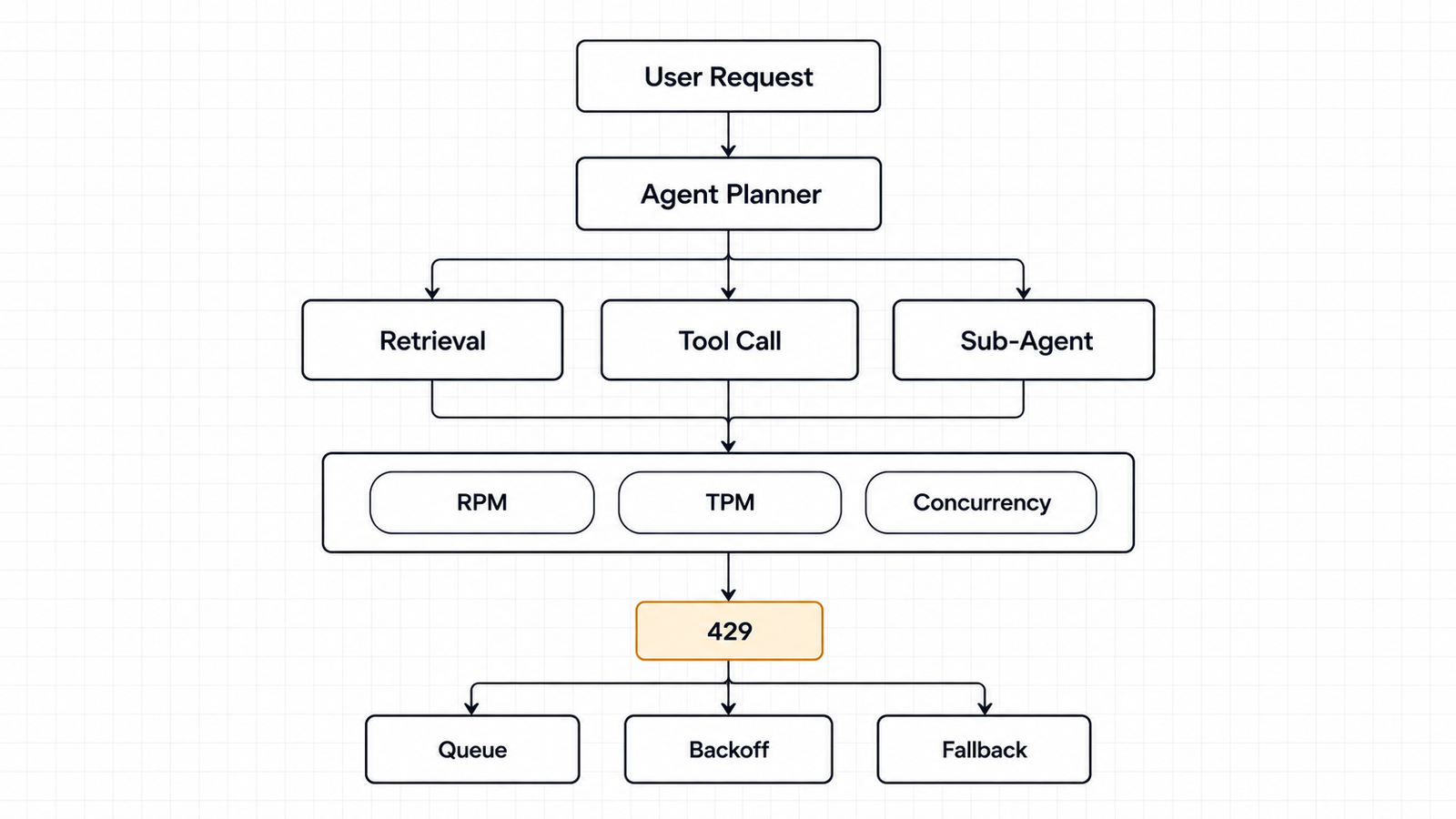
The RPM side of that is usually survivable on a paid tier. The token side is where it hurts, because each call in the loop carries the accumulated transcript. Step one sends 2,000 tokens. Step five sends 2,000 plus everything produced in between, which on a document-heavy task can be 50,000 or more.
So the input tokens for a single task are not five times 2,000. They are a growing series, and the last call dominates it.
This is exactly where Anthropic’s cache-aware ITPM changes the calculus. If the growing prefix is cached and the cache is hit, those tokens do not count toward the input limit. The same loop on a provider that counts all input tokens consumes several times the quota for identical work. It is the clearest case I found where two providers’ headline numbers are not measuring the same thing — and where the cheaper-looking option can be the more constrained one. We went through the billing side of that in our analysis of cache-read economics; the rate-limit side is arguably more consequential, because you cannot buy your way past a ceiling mid-request.
Three more agent-specific pressures:
- Fan-out concurrency. A supervisor delegating to four sub-agents in parallel turns one user action into four simultaneous requests. Ten users doing that is 40 in flight, and they arrive in a spike rather than spread across the minute.
- Tool loops that do not terminate. An agent retrying a failing tool call burns requests and tokens with no output to show for it. Rate limits are the place this becomes visible, usually before the cost dashboard catches up.
- Shared organization limits. Your production agents, your evaluation runs and the developer testing a new prompt all draw from the same pool. Anthropic’s workspace limits and OpenAI’s project-level limits exist for exactly this reason: use them to prevent a batch eval from starving production.
Agent permissions and agent capacity turn out to be the same design problem viewed from two angles — which is a theme we have covered from the security side in our work on testing agents against prompt injection.
When You Hit the Ceiling
First, read the error properly. A 429 is not one condition.
Table: scroll sideways to view all columns when needed.
| Signal | What it is | Right response |
|---|---|---|
429 with retry-after | Conventional rate limit | Wait at least that long, add jitter, retry |
429, OpenAI code slow_down | Traffic ramped too fast | Reduce rate, then increase gradually |
429, Anthropic enforced_spend_limit_reached | Monthly spend cap | Retrying cannot work; raise the cap or tier |
429 RESOURCE_EXHAUSTED on Gemini | Rate or spend-based limit | Back off; check the 10-minute spend window |
503 server_is_overloaded | Model saturated, not your fault | Retry with longer delays |
| 400 on an Anthropic self-set spend limit | Your own configured cap | Change the setting |
The distinction between the second and third rows is where real production time gets lost. A spend-cap 429 carries no retry-after, and SDK auto-retry will exhaust its attempts against a wall. Inspect error.details.error_code before retrying anything.
Then, in rough order of how much headroom they buy relative to effort:
- Cache aggressively, especially on Anthropic. Cached reads do not count toward ITPM on most Claude models. Nothing else on this list multiplies effective throughput by five.
- Set an explicit concurrency ceiling. A semaphore sized from the Little’s Law calculation, not from whatever your event loop will happily attempt.
- Fix
max_tokenson OpenAI. Your TPM charge uses the maximum ofmax_tokensand the estimate from your request. Padding it inflates consumption for no benefit. - Move eligible work to batch. OpenAI’s Batch API does not touch synchronous rate limits. Anthropic’s Message Batches have their own pool. Gemini’s batch quotas are separate and generous — 400M enqueued tokens for Gemini 3.8 Flash at Tier 2. Anything that tolerates delay should not be competing with interactive traffic.
- Ramp gradually. Past 1M input TPM, OpenAI suggests increasing by no more than 50% every 15 minutes. Cold-starting a large migration at full volume is how you discover acceleration limits.
- Route by task, not by habit. Small models carry separate pools and higher limits — OpenAI’s Luna sits at 180M TPM at Grow against 40M for the larger models. Classification and routing steps inside an agent rarely need the flagship.
- Separate your pools. Workspaces on Anthropic, projects on OpenAI, projects on Gemini, regions on Bedrock. Keep evaluation and development away from production capacity.
- Queue rather than retry. A bounded queue with a worker pool gives you backpressure. Retry loops give you a thundering herd.
- Fall back across providers only if your evaluation says the outputs are interchangeable for that step. Fallback that silently degrades quality is a worse failure than a 429.
- Then raise the tier. It is on the list, just not at the top — most teams have 2–5x of headroom available from caching and configuration before they need to spend anything.
Which Limit Matters for Your Workload
Find your shape, then look at the number that actually binds.
Table: scroll sideways to view all columns when needed.
| Workload | Binds first | Watch |
|---|---|---|
| High-volume classification, short in and out | RPM | Request count, not tokens. Batch if latency allows |
| RAG over large documents | Input TPM, long-context limits | Caching; OpenAI’s separate long-context limit |
| Reasoning-heavy generation | Output TPM | Anthropic’s OTPM is a fifth of its ITPM at Scale tier |
| Chat with moderate context | Usually nothing | You will hit spend limits before rate limits |
| Agent loops with growing context | Input TPM, then concurrency | Cache-hit rate is the lever |
| Multi-agent fan-out | Concurrency | Bursts, not averages |
| Bulk offline processing | Batch queue limits | Enqueued tokens, not RPM |
| Expensive calls at low volume | Spend limits | Gemini’s 10-minute window; Anthropic’s monthly cap |
The diagnostic sequence when something throttles: read the error code, check whether it carries retry-after, then look at which dimension the response headers say you exhausted. OpenAI and Anthropic both return remaining-capacity headers — Anthropic separates input and output token headers, and reports the most restrictive limit currently in effect. Those headers answer the question faster than any dashboard.
FAQ
What are AI API rate limits?
Caps a provider places on how much you can call its API in a period. They are enforced across several dimensions at once — requests per minute, tokens per minute, requests or tokens per day, and in some cases spend — and exceeding any one returns an error even if the others have headroom.
What is the difference between RPM and TPM?
RPM counts calls regardless of size. TPM counts tokens regardless of how many calls carried them. Twenty tiny requests can exhaust a 20 RPM limit while using a fraction of a 150,000 TPM allowance, which is OpenAI’s own example.
Which AI API has the highest rate limits?
On published standard tiers as of October 2026, OpenAI’s Grow tier lists the largest token figures: 40M TPM for Astra, Sol and Terra, and 180M for Luna. Anthropic’s Scale tier lists 10,000 RPM with 10M ITPM and 2M OTPM. The comparison is not clean, because Anthropic excludes cached input tokens from ITPM and OpenAI does not exclude them from TPM.
How do AI API concurrency limits work?
None of the four providers publishes a concurrency figure for standard text inference. Your effective concurrency is set by your rate limit and how long each request takes: roughly (RPM ÷ 60) × seconds per request. Anthropic’s token bucket also means a per-minute limit behaves like a per-second one for bursts.
How do I increase my AI API rate limit?
OpenAI upgrades tiers automatically on cumulative credit purchases ($5, $100, $500). Anthropic moves organizations up on usage history and offers a Request tier increase flow in the Console. Gemini upgrades on cumulative Google Cloud spend plus a waiting period. Bedrock requires a Service Quotas increase request, per region.
Why does my AI agent hit rate limits so quickly?
Because one task becomes many calls, and each call carries the accumulated context. Five calls per task across a hundred users is five hundred requests, with the last call in each loop carrying the largest prompt. Token limits usually bind before request limits.
How should I handle rate-limit errors?
Check the error code first. If retry-after is present, wait at least that long and add jitter. If the code indicates a spend cap, retrying will not work. If it indicates ramp speed, reduce your rate and increase gradually rather than retrying at the same volume.
Do API limits differ by model?
Yes, substantially, and some models share pools. OpenAI groups model families under shared limits and applies a separate limit to long-context requests. Anthropic gives Opus 5.5 and Opus 5 their own limits while Opus 4.x models share one bucket. Gemini limits preview and experimental models more tightly than stable ones.
How do I calculate the capacity I need?
Measure input and output tokens per request separately, multiply by calls per task and tasks per minute at peak, then compare against each dimension individually. Add your cache-hit rate if you are on Anthropic, since cached reads do not consume ITPM on most models.
Keep reading
Here are the latest posts from the blog.
AI API Rate Limits in 2026: The Numbers That Bind
The $60B AI Chip Financing and Its Residual-Value Problem

AI Chip Leasing Export Controls and the Tencent Deal