Before anyone argues about which GPU to rent, a smaller question settles most of the argument: how many bytes have to sit in accelerator memory before the first token comes out? For Kimi K3.1 Pro hardware requirements, that number already exists, even though the model’s own weights don’t.
Moonshot AI launched Kimi K3.1 Pro on its API on 23 October and describes it as a post-trained version of Kimi K3. K3’s weights have been public since July, and they occupy 1.561 TB. Unless Moonshot changes the format when it publishes K3.1 Pro, that’s the floor: about 1.56 TB of weights before a single cached token, activation buffer or draft model.
A model name doesn’t give you a GPU count. Weight format, memory per accelerator, the engine’s reservation, context length and concurrency do. This guide works through each with the arithmetic shown, so you can swap in your own numbers.
Quick Answer
- Weights: 1.561 TB (1.420 TiB) for the native MXFP4 K3 checkpoint. A plain 8-bit copy would be 2.78 TB; BF16 would be 5.56 TB.
- Beyond weights: about 14 KB of compressed attention cache per token at FP8, plus a fixed recurrent state of roughly 0.2 to 0.4 GB per active request, plus runtime buffers.
- GPU floor: eight 288 GB accelerators (NVIDIA B300 or AMD MI355X class) in one node: 2,304 GB raw. That’s also the minimum the vLLM recipe states.
- Single GPU: no. The largest current accelerators hold 288 GB, under a fifth of the weights.
- Multi-node: required on 141 to 192 GB parts, and advised for production on anything; Moonshot recommends 64 or more accelerators for efficient serving.
- API or self-host: one on-demand 8x B300 node on AWS runs about $102,540 a month. To beat $2/$10 per million tokens on a 20k-in, 2k-out workload, it must sustain roughly 13,000 input and 1,300 output tokens per second, all day, every day. Start with the API.
Key Takeaways
- Kimi K3.1 Pro’s weights are promised by 4 November 2026; until then, size against K3’s 1.561 TB MXFP4 checkpoint and expect to re-check.
- “2.8 TB at 8-bit” is arithmetic for a file that doesn’t exist. The native release is already 4-bit, trained that way.
- Eight 288 GB GPUs in one node are the floor. B200, H200 and H100 fleets need two or more nodes just to hold the weights.
- Every request costs a fixed 0.2 to 0.4 GB of KDA state plus about 14 KB per token of FP8 MLA cache, so short requests aren’t as cheap as their length suggests and million-token contexts are cheaper than on dense models.
- A single on-demand AWS node costs about $102,540 a month before redundancy, staff or storage.
- Matching the $2/$10 API on a 20k-in, 2k-out workload takes roughly 13,000 input and 1,300 output tokens per second, sustained around the clock. Measure whether your hardware can do that before you sign anything.
- The K3 licence isn’t MIT: model-as-a-service businesses above $20 million in total company revenue need a separate agreement.
Quick Navigation
- What is confirmed about Kimi K3.1 Pro
- Calculating Kimi K3.1 Pro weight memory
- How many GPUs Kimi K3.1 Pro needs
- The KV cache changes the Kimi K3.1 Pro calculation
- Quantisation trade-offs
- The real cost of self-hosting Kimi K3.1 Pro
- Kimi K3.1 Pro API vs self-hosting: the break-even
- Licence and operational constraints
- A practical Kimi K3.1 Pro deployment decision
- Conclusion
- Frequently asked questions
- How much VRAM does Kimi K3.1 Pro need?
- Can Kimi K3.1 Pro run on one GPU?
- How many GPUs are needed for a model of this size?
- Does 4-bit quantisation reduce memory requirements?
- How much does self-hosting cost per month?
- Is an API cheaper than running the model locally?
- Can the model run on a workstation?
- What licence applies to commercial deployment?
What is confirmed about Kimi K3.1 Pro
The model is real and callable today as kimi-k3.1-pro, with a 1,048,576-token context window. Almost everything a hardware plan needs, though, comes from its predecessor’s repository.
| Item | Status on 26 Oct 2026 | Basis |
|---|---|---|
| Model exists, API live | Confirmed | Moonshot release post, API docs |
| 2.8T total, 104B active parameters | Inferred for K3.1 Pro | K3 model card; “post-trained version of K3”; Artificial Analysis listing |
| 896 experts, 16 routed + 2 shared per token | Confirmed for K3 only | K3 config.json |
| Native MXFP4 weights | Confirmed for K3 only | K3 config and model card |
| Weights downloadable | No; promised by 4 Nov 2026 | Moonshot release post |
| Licence | Unpublished; K3’s used as reference | Kimi K3 License |
Two architectural facts drive everything below. K3 is a mixture-of-experts (MoE) model: a router sends each token through 16 of 896 expert networks plus 2 shared ones, so only about 104 billion parameters do work per token. All 2.8 trillion still have to be resident, because any token can be routed to any expert.
The second fact is the attention design. Of 93 layers, 69 use Kimi Delta Attention (KDA), a linear-attention variant that keeps a fixed-size state per request instead of a growing cache. The other 24 use gated multi-head latent attention (MLA), which caches one compressed vector per token. That split makes K3’s memory behaviour unlike a conventional transformer’s.
Calculating Kimi K3.1 Pro weight memory
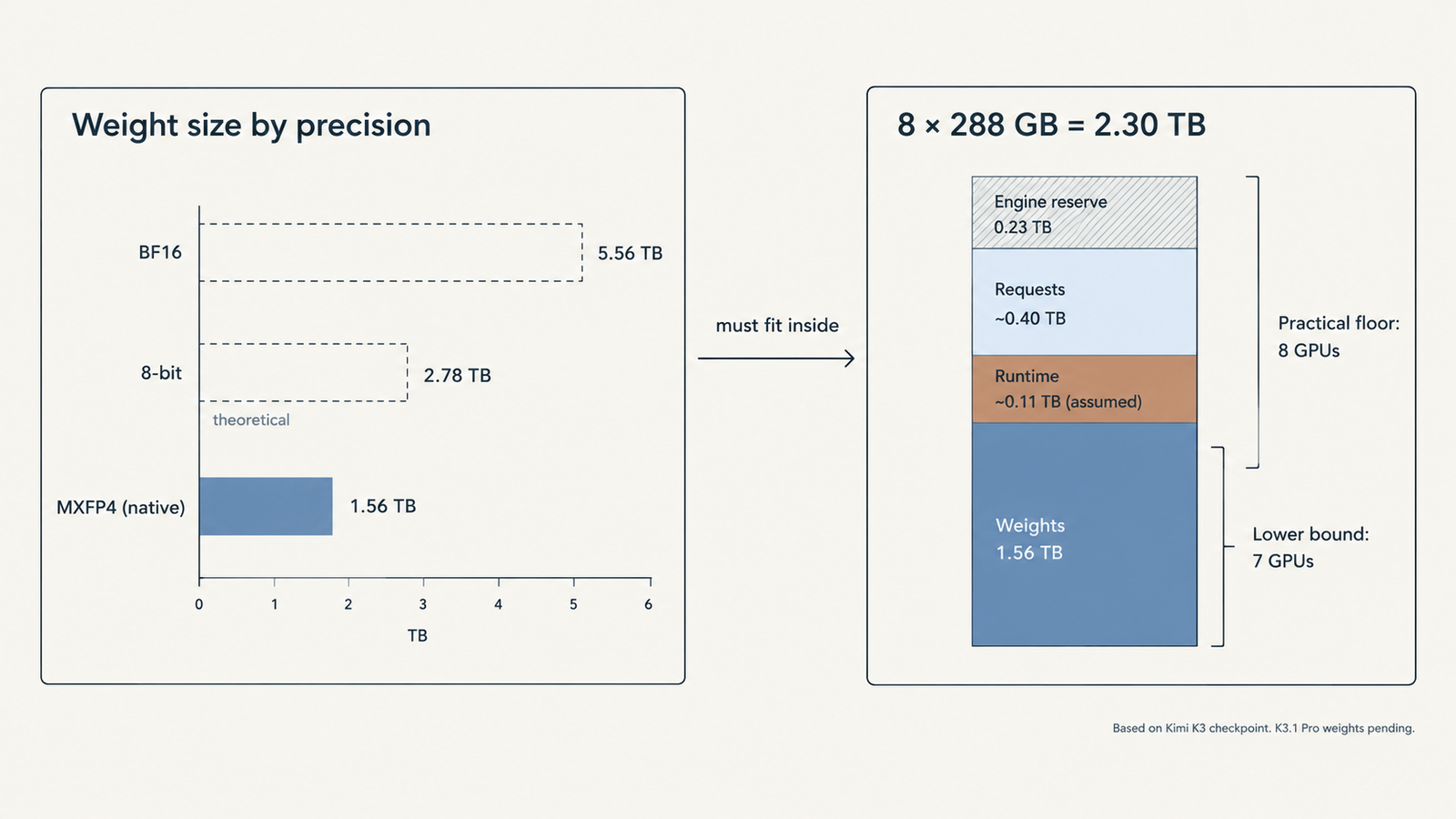
The formula is plain: weight bytes = parameters x bits per parameter ÷ 8. Using K3’s 2,779,931,837,184 parameters:
| Precision | Bits per parameter | Decimal TB | Binary TiB | What it represents |
|---|---|---|---|---|
| BF16 | 16 | 5.560 | 5.057 | Theoretical; no such release |
| 8-bit (FP8/INT8) | 8 | 2.780 | 2.528 | Theoretical |
| 4-bit, no scales | 4 | 1.390 | 1.264 | Theoretical minimum |
| MXFP4 everywhere | 4.25 | 1.477 | 1.343 | Adds one 8-bit scale per 32 weights |
| Actual K3 checkpoint | 4.49 (effective) | 1.561 | 1.420 | Published repository, 96 shards |
All rows are weights only, with no runtime overhead. The brief’s “2.8 TB at 8-bit, 1.4 TB at 4-bit” is correct arithmetic for the wrong question. Moonshot trained K3 to run in MXFP4 from supervised fine-tuning onward, so there is no 8-bit release to plan around.
The gap between 1.39 TB and 1.561 TB has two sources. MXFP4 stores a shared 8-bit scale for every block of 32 weights, adding about 0.09 TB. And the config leaves attention, shared experts, the dense first-layer MLP, the output head and the vision encoder unquantized. The “5.6 TB” figures circulating for K3 come from assuming BF16.
Watch your units. TB is 10^12 bytes and TiB is 2^40, about 10% larger. NVIDIA lists a DGX B300’s total GPU memory as “2.1 TB”, yet eight 288 GB GPUs hold 2,304 GB, which is 2.10 TiB. Compare a TiB capacity with a TB weight file and you’ve lost a tenth of your headroom on paper.
How many GPUs Kimi K3.1 Pro needs
The lower bound is: GPUs = ceiling(weight bytes ÷ (memory per GPU x usable fraction)). vLLM’s Kimi K3 recipes run at 0.88 to 0.92 of GPU memory; this guide uses 0.90.
| Accelerator | Memory per GPU | Lower bound | Practical layout | Fits one 8-GPU node? |
|---|---|---|---|---|
| NVIDIA B300 / GB300 | 288 GB | 7 | 8 | Yes, ~513 GB left after weights |
| AMD MI355X | 288 GB | 7 | 8 | Yes, same arithmetic |
| NVIDIA B200 | 180 GB | 10 | 16 (two nodes) | No: 1,440 GB total |
| NVIDIA H200 | 141 GB | 13 | 16 (two nodes) | No: 1,128 GB total |
| NVIDIA H100 | 80 GB | 22 | 24 to 32 (three to four nodes) | No |
Memory per GPU from AMD’s MI355X page (which also lists B200 at 180 GB) and NVIDIA. Seven 288 GB GPUs clear the bound, but tensor parallelism splits the 96 attention heads across GPUs, and 96 doesn’t divide by seven. Eight is the real floor, and it’s what the vLLM recipe states: at least 8x GB300, or 8x MI355X/MI350X on ROCm, with “multi-node for real production traffic”.
Eight GPUs are not one 2.3 TB pool. Each holds its own shard, and every layer exchanges activations between them. Inside a DGX B300 that traffic rides NVLink at 14.4 TB/s aggregate. Between nodes it crosses InfiniBand or Ethernet at up to 800 Gb/s per port, roughly 100 GB/s, which is why two-node recipes split the model into pipeline stages (TP8 x PP2) and why NVIDIA’s Dynamo recipes target GB200 and GB300 racks with NVLink spanning trays: 16 GB200s aggregated, or 32 split between prefill and decode.
Hopper is the awkward case. H100 and H200 lack native FP4 tensor cores, so MXFP4 experts run through dequantising kernels. The recipe page builds commands for H200, but its stated minimum is Blackwell or MI355X, and we found no published throughput for K3 on Hopper.
Can a single GPU or workstation run it?
No single GPU comes close. The workstation route is llama.cpp with the experts in system RAM. One published test loaded a ~554 GB 1-bit GGUF of K3 on a 160 GB VRAM machine with the MoE weights on CPU. Nobody has published quality figures for that quant. The 4-bit GGUF is 1,508.7 GB, barely smaller than the native file, because the native file is already 4-bit. It’s a way to poke at the model, not to serve users, and K3.1 Pro quants can’t exist until the weights do.
The KV cache changes the Kimi K3.1 Pro calculation
Weights are a one-off cost. Every active request adds its own memory, and K3’s hybrid design splits that into two parts with very different behaviour.
- MLA cache, which grows with context. Per token: 24 layers x (512 latent + 64 positional) = 13,824 values. That’s 13.8 KB at FP8, the precision vLLM’s recipes use, or 27.6 KB at BF16. The config sets
mla_use_nope, so if the positional part isn’t stored the cache is about 11% smaller; treat 13.8 KB as an upper bound. - KDA state, which doesn’t. Each of 69 layers holds a 128 x 128 state matrix per head across 96 heads: 108.5 million values per request, 0.22 GB in BF16 or 0.43 GB in FP32, whether the prompt is 50 tokens or 500,000. That size assumes the Kimi Linear formulation Moonshot published for KDA; check your engine’s reported cache allocation.
| Context per request | MLA cache (FP8) | KDA state (BF16) | Total per request |
|---|---|---|---|
| 8K tokens | 0.11 GB | 0.22 GB | 0.33 GB |
| 32K tokens | 0.45 GB | 0.22 GB | 0.67 GB |
| 128K tokens | 1.81 GB | 0.22 GB | 2.03 GB |
| 1M tokens | 14.50 GB | 0.22 GB | 14.71 GB |
Two things fall out. Below about 16,000 tokens the fixed state outweighs the growing cache, so short chat traffic carries a per-request floor most sizing guides ignore. At the other end, long contexts are cheap: a 70B dense model with grouped-query attention needs about 160 KB per token, as our breakdown of AI memory costs works out, or roughly 172 GB for a million tokens against K3’s 14.7 GB.
On one 8x B300 node, 0.90 of 2,304 GB leaves about 2,074 GB, and weights take 1,561 GB. Set aside an assumed 110 GB for activations, CUDA graphs, communication buffers and the speculative draft model the recipes load, and roughly 400 GB remains for requests. That’s an upper bound of about 600 concurrent requests at 32K, 197 at 128K, or 27 at the full million.
Those counts assume the cache is spread across GPUs without duplication. vLLM’s decode context parallelism does that for MLA; without it, tensor-parallel ranks can each hold a copy and the numbers fall sharply. The recipes also spill to host RAM: one AMD prefill configuration budgets 1,799 GB of host DRAM for cache offload. Memory scales linearly with concurrency and context. Throughput at those concurrencies is a separate question that only measurement answers.
Quantisation trade-offs
Weight quantisation and cache quantisation are separate levers, and the first one is mostly pulled already.
| Lever | Memory effect | What you risk |
|---|---|---|
| Keep native MXFP4 weights | Baseline 1.561 TB | Nothing; this is how the model was trained |
| Up-cast to FP8 or BF16 | 1.8x to 3.6x more | Hardware cost, with no documented quality gain |
| Community 1-bit or 2-bit quants | About 0.55 TB for the smallest published 1-bit GGUF | Unmeasured quality loss; K3-only until K3.1 Pro weights ship |
| FP8 KV cache | Halves the MLA cache versus BF16 | Small accuracy risk; recipes use it by default |
| FP32 vs BF16 KDA state | Doubles or halves the fixed per-request state | Some low-latency backends require FP32 |
Because K3 went through quantization-aware training, its 4-bit weights aren’t a lossy copy of some better original that’s available to you. Going below 4 bits is a real compression, and nobody has published K3 or K3.1 Pro quality numbers for those quants. Run your own evaluation against the hosted API before trusting one.
Hardware matters here too. Blackwell and AMD’s CDNA 4 parts execute MXFP4 natively; AMD lists 10.1 PFLOPs of MXFP4 matrix throughput for the MI355X. Hopper doesn’t, which is a second reason the recipes start at Blackwell. The cache side has its own knobs: the latency-tuned GB300 profile switches the KDA state to FP32, doubling that per-request floor to about 0.43 GB.
The real cost of self-hosting Kimi K3.1 Pro
Two dated price points for one 8x B300 node, on demand, 30 days at 24 hours:
| Item | AWS p6-b300.48xlarge | Median specialist cloud |
|---|---|---|
| Hourly, 8x B300 | $142.42 | $65.44 ($8.18 per GPU) |
| 30 days continuous (720 h) | $102,540 | $47,117 |
| Effective rate at 50% useful utilisation | $284.83/h | $130.88/h |
| Effective rate at 25% useful utilisation | $569.66/h | $261.76/h |
AWS rate: us-east-1, Linux, on demand, per Vantage’s EC2 tracker, read 26 October 2026; the instance includes 4,096 GiB of host RAM and 8 x 3.84 TB local NVMe. Specialist rate: median across 10 providers per getdeploying, 8 September 2026; those offers may not match AWS on networking, storage or availability.
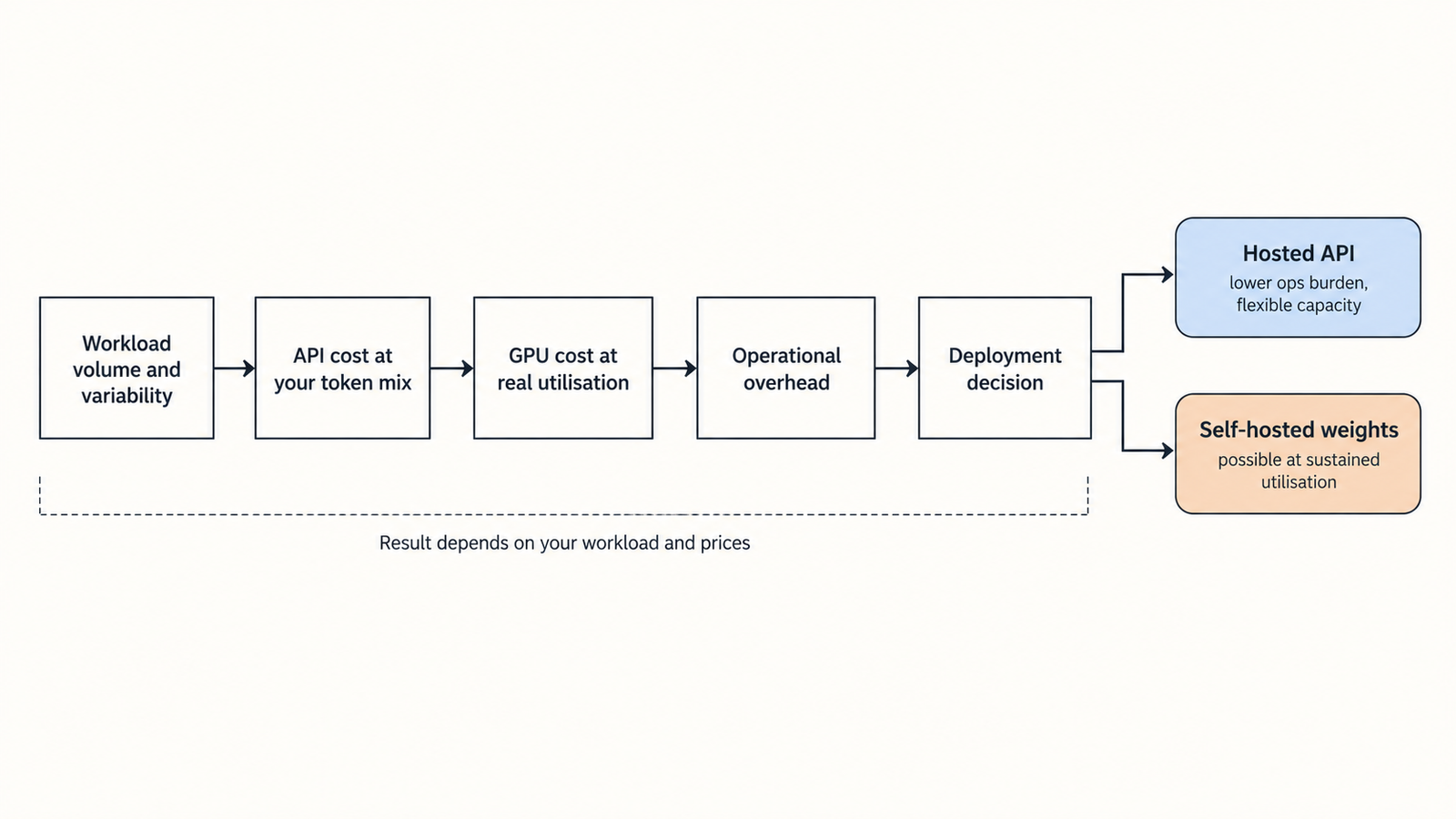
The effective-rate rows are the ones that matter. A node you pay for around the clock but keep busy half the time costs twice as much per useful hour, and real traffic has nights and weekends.
The GPU line also isn’t the bill. One node has no redundancy, so a production service needs a second, doubling the fixed cost before it serves an extra token. Add engineering time, monitoring, storage for 1.56 TB of weights plus staging on every node, egress, and the work of swapping in K3.1 Pro weights when they arrive. Published estimates of that total put it at 1.3 to 5 times the raw GPU rate, a range we unpack in the hidden fees in self-hosted LLM cost.
Kimi K3.1 Pro API vs self-hosting: the break-even
Moonshot’s API price for standard kimi-k3.1-pro is $2 per million input tokens, $10 per million output and $0.20 per million cached input, confirmed by Artificial Analysis. The Highspeed variant costs $4/$20. Cache writes are billed separately at a rate that wasn’t displayed when we checked.
The formula: API cost = (input tokens ÷ 1,000,000 x input rate) + (output tokens ÷ 1,000,000 x output rate).
Illustrative workload, an assumption: an agentic coding call with 20,000 input tokens and 2,000 output tokens, reasoning included. Uncached, that’s $0.04 + $0.02 = $0.06 per call. With 90% of input served from cache, it’s $0.0076 + $0.02 = $0.0276, before cache-write fees.
Break-even calls per month = monthly self-hosting cost ÷ API cost per call. Spread over 2,592,000 seconds in 30 days:
| Scenario (GPU cost only) | Calls/month to match API | Sustained calls/s | Input tokens/s | Output tokens/s |
|---|---|---|---|---|
| AWS, no cache | 1.71M | 0.66 | 13,187 | 1,319 |
| AWS, 90% cache hits | 3.72M | 1.43 | 28,667 | 2,867 |
| Specialist cloud, no cache | 785K | 0.30 | 6,059 | 606 |
| Specialist cloud, 90% cache hits | 1.71M | 0.66 | 13,172 | 1,317 |
Caching makes the API cheaper, so it pushes break-even further away. And these are averages held for 720 hours straight. Peaks need headroom above them, so a fleet that just breaks even on average is running below capacity most of the day.
Can one node sustain those rates at an acceptable latency? There’s no independent published throughput for K3.1 Pro on 8x B300, so that’s the number to measure, not assume. Remember too that the right comparison is the cheapest API that meets your quality bar. Third-party hosts listed K3 below Moonshot’s own price on OpenRouter, and the same is likely once K3.1 Pro weights circulate. Our Kimi K3.1 Pro vs Sonnet 5.5 comparison covers per-task token use, which moves the API side of this equation more than the rate card does.
Self-hosting earns its place when data can’t leave your infrastructure, when load is high and steady enough to keep a node busy, when you need to fine-tune, or when you already own Blackwell capacity sitting idle.
Licence and operational constraints
K3.1 Pro’s licence isn’t published. K3’s, the likely template, is a custom “Kimi K3 License”. Its grant borrows MIT’s wording (use, copy, modify, distribute, sell, fine-tune), but it isn’t MIT. The licence text adds:
- A model-as-a-service clause. If you or your affiliates run a business giving third parties inference or fine-tuning access with meaningful control over inputs, parameters or training data, and your total revenue with affiliates exceeds $20 million over any 12 consecutive months, you need a separate agreement with Moonshot before commercial use. The threshold is company revenue, not revenue from the model.
- A branding clause. Products above 100 million monthly active users or $20 million in monthly revenue must display “Kimi K3” prominently.
- Exemptions. Internal use that exposes neither the model nor its outputs to third parties, and use through Moonshot’s own products or certified inference partners.
That’s a reading of K3’s terms, not legal advice. Have counsel read K3.1 Pro’s licence when it ships.
The operational constraints are less visible. The vLLM image is a CUDA 13 build needing an r580 or newer NVIDIA driver. Recipes raise engine start-up timeouts to between one and two hours, because loading 1.56 TB across GPUs and autotuning kernels is slow; that’s your recovery time after a crash. Every node needs its own copy of the weights. And the recipe warns that K3 occasionally emits tool calls its own parser doesn’t expect, so validate and retry.
A practical Kimi K3.1 Pro deployment decision
- Use the hosted API when traffic is small, spiky or unproven, or nobody on the team runs GPU clusters. Moonshot offers zero data retention to API customers, which settles some privacy objections without any hardware.
- Rent one 8x B300 or MI355X node for evaluations, fine-tuning experiments or steady internal batch work you can keep busy. Accept that it has no redundancy.
- Plan multi-node or rack-scale for production with latency targets, long contexts at high concurrency, or uptime commitments. Moonshot’s 64-plus accelerator guidance describes this tier.
- Benchmark before you sign. Replay 50 to 200 real requests, measure tokens per second at your p95 latency target, and compare any quantised variant’s outputs with the hosted API.
What would change this estimate? The K3.1 Pro file size and precision; the KDA state dtype your engine uses; your measured throughput per node; GPU rental prices, which roughly doubled for B300 through 2026 according to price trackers; and the K3.1 Pro licence terms.
Conclusion
Three figures here are solid: 1.561 TB of K3 weights, 288 GB per B300 or MI355X, and the $2/$10 API price. The per-request memory numbers are calculations from K3’s published config and should hold if K3.1 Pro keeps the architecture. What nobody can give you yet is throughput, and throughput decides whether any of the cost arithmetic works.
So don’t rent for Kimi K3.1 Pro hardware requirements yet. Use the API, log your real token mix and concurrency, and when the weights land, check the file size against 1.56 TB, then spend a week on one rented node measuring tokens per second at your latency target. If that number can’t clear the break-even rates in the table above with room for peaks and a second replica, the API was the cheaper machine all along.
Frequently asked questions
How much VRAM does Kimi K3.1 Pro need?
Provisionally, at least 1.56 TB just for weights, based on the Kimi K3 checkpoint that K3.1 Pro is post-trained from. Add memory for each active request and for runtime buffers. In practice that means about 2.3 TB of GPU memory, such as eight 288 GB accelerators. The figure will be confirmed when Moonshot publishes K3.1 Pro weights, promised by 4 November 2026.
Can Kimi K3.1 Pro run on one GPU?
No. The largest current accelerators, NVIDIA B300 and AMD MI355X, hold 288 GB each, under a fifth of the 1.56 TB weight file. Even heavily compressed community quants of K3 run to roughly 550 GB, which still needs several GPUs or large amounts of system RAM.
How many GPUs are needed for a model of this size?
Eight 288 GB GPUs are the practical minimum and match the vLLM recipe’s stated floor. With 180 GB B200s or 141 GB H200s you need 16 across two nodes. Moonshot recommends 64 or more accelerators for efficient production serving.
Does 4-bit quantisation reduce memory requirements?
For this model it’s already applied. Kimi K3 ships in MXFP4, a 4-bit format with shared scales, trained that way from fine-tuning onward. Converting to 8-bit would roughly double memory. Going below 4 bits shrinks the file further, but no published quality data exists for those quants.
How much does self-hosting cost per month?
One 8x B300 node costs about $102,540 for 30 days on AWS on demand, or about $47,117 at the median specialist-cloud rate (prices checked September to October 2026). Redundancy, staff, storage and idle time add substantially to that GPU line.
Is an API cheaper than running the model locally?
For most workloads, yes. At $2/$10 per million tokens, a self-hosted AWS node only matches the API if it sustains about 1.7 million 20k-token calls a month. Self-hosting can win on data control, steady high load or fine-tuning needs.
Can the model run on a workstation?
Only experimentally. Testers have loaded a 1-bit K3 quant with experts held in system RAM on a machine with 160 GB of VRAM. Output quality at that compression is unmeasured, and K3.1 Pro quants can’t exist until its weights ship.
What licence applies to commercial deployment?
K3.1 Pro’s licence is unpublished. K3 uses the custom Kimi K3 License, which permits commercial use but requires a separate agreement for model-as-a-service businesses above $20 million in 12-month company revenue, and “Kimi K3” branding above 100 million monthly users or $20 million monthly revenue.
Keep reading
Here are the latest posts from the blog.
Kimi K3.1 Pro Hardware Requirements: GPUs, Memory, Cost
Kimi K3.1 Pro vs Sonnet 5.5: Same Price, Different Bill

RAG vs Fine-Tuning: Which One You Actually Need