Published 30 October 2026. API prices checked 28–30 October 2026 on each provider’s official pricing page. Cost figures below are labelled as illustrative where they rest on assumptions.
Every production generative AI architecture has seven layers, from the model at the centre to the security boundary around it. The model is now the easiest of the seven to replace. The commitments that are hard to undo build up in the layers around it: the data pipeline, the evaluation harness, the compute contracts and the trust boundaries.
Teams still spend most of their architecture time comparing models, which makes sense when models change weekly. In the last ten days of October 2026, Moonshot shipped Kimi K3.1 Pro on the 23rd, OpenAI released GPT-6.1 Terra on the 26th and Google announced Gemini 4 Carbon on the 28th, while Gemini 4 Argon prices double on 1 December. A system designed to swap models absorbs all of that in a configuration change.
Key Takeaways
- Rank the layers by how hard they are to reverse. The model is usually cheapest to change. Security boundaries and data pipelines are the most expensive to retrofit.
- Calls per request drive the bill more than price per token. In the illustrative deployment below, going from one to three calls per request triples the model bill.
- Embeddings are cheap. Retrieval operations aren’t. Re-embedding a 50-million-token corpus costs about $1. A million hosted file-search calls cost $2,500.
- Self-hosting rarely pays at moderate volume. At about 300 output tokens per second on average, most of a rented GPU node sits idle.
- Build evaluation before you need it. A regression set is cheap on day one and hard to reconstruct after behaviour has drifted.
- Identity, permissions and egress are architecture, not prompts. Filtering doesn’t stop prompt injection; least privilege limits what an injected instruction can do.
Quick Navigation
- The generative AI architecture at a glance
- The seven generative AI architecture layers, by cost and reversibility
- Layer 1: the model, the easiest part to replace
- Layer 2: data and retrieval
- Layer 3: context
- Layer 4: orchestration and tools
- Layer 5: serving and compute, where generative AI infrastructure gets committed
- Layer 6: evaluation and observability
- Layer 7: security, the hardest part of a generative AI architecture to retrofit
- What a production generative AI architecture costs
- Which generative AI architecture decisions to make first
- A pre-launch generative AI architecture checklist
- What to remember about generative AI architecture
- Frequently asked questions
- What are the seven layers of generative AI architecture?
- What is included in a generative AI tech stack?
- How much does a production generative AI architecture cost?
- What is the difference between API-based and self-hosted inference?
- Does every generative AI architecture need a vector database?
- Which generative AI architecture components are hardest to change?
The generative AI architecture at a glance
A request passes through the layers in a fairly fixed order. Security authenticates the caller and limits what it may touch. Orchestration picks the steps, retrieval fetches documents and the context layer assembles the prompt. The model runs on the serving layer’s hardware, looping if tools are involved, while evaluation and observability record every step.
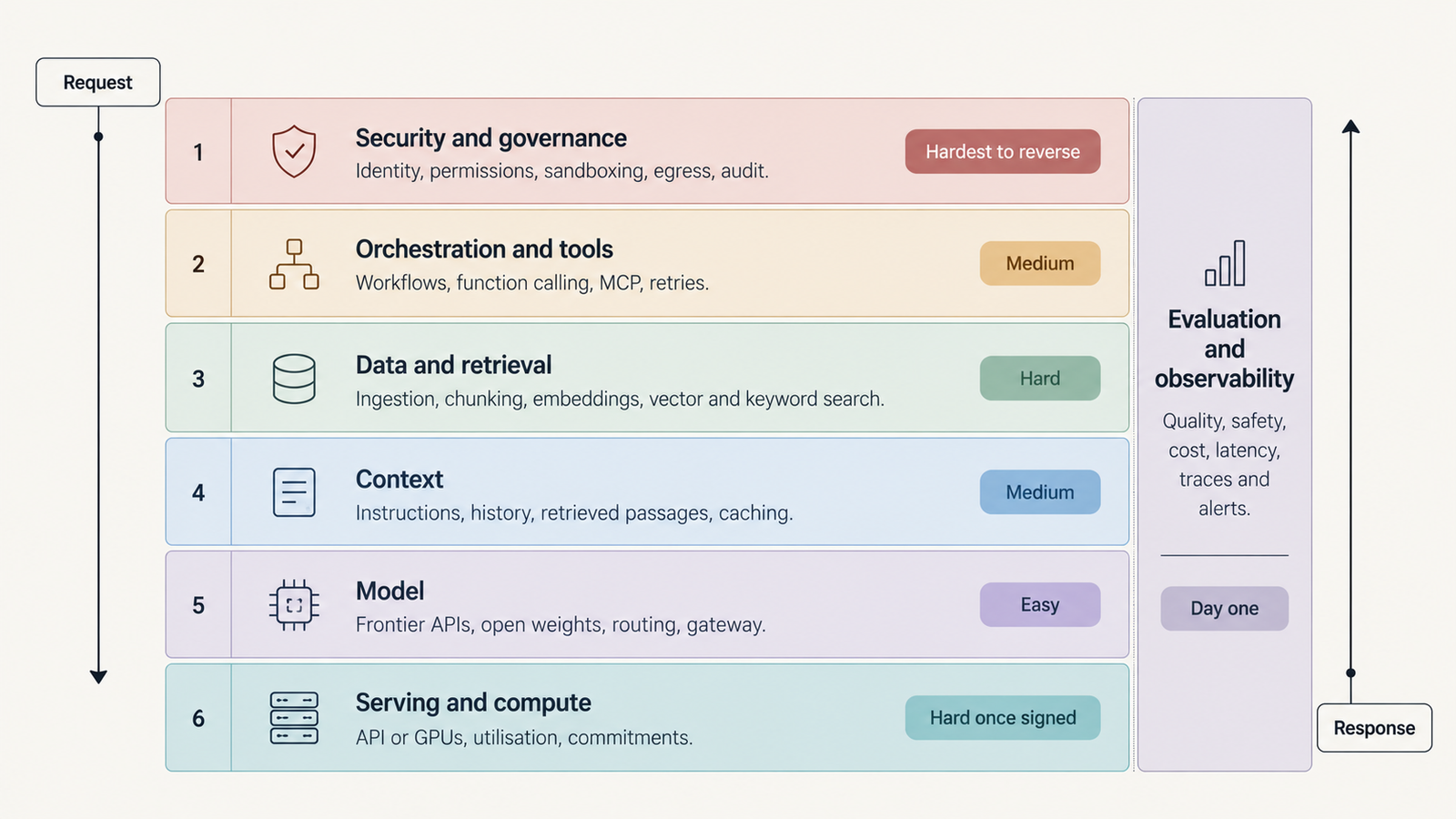
Not every system needs every layer at full strength. A support assistant answering from a product manual might be one model call over a small vector index, with logging, a few hundred regression questions and a server-side API key. An agentic enterprise deployment adds a tool registry, Model Context Protocol (MCP) servers, per-agent identities, sandboxes, egress controls, approval gates and audit retention. Both have seven layers. What changes is how heavy each one is.
The dependencies are uneven. Swapping the model touches context formatting and evaluation. Changing the security model touches identity, tool permissions, network topology and logging, which is nearly everything.
The seven generative AI architecture layers, by cost and reversibility
Table: scroll sideways to view all columns when needed.
| Layer | Main cost driver | How hard to reverse | Decide |
|---|---|---|---|
| 1. Model | Calls per task × tokens per call | Easy, behind a gateway | Late, per task |
| 2. Data and retrieval | Pipeline engineering, re-indexing, retrieval calls | Hard | Early |
| 3. Context | Repeated input tokens, cache misses | Medium | Early policy, tune later |
| 4. Orchestration and tools | Loop depth, retries, external APIs | Medium | Interfaces early, frameworks later |
| 5. Serving and compute | Utilisation, idle capacity, commitments | Hard once contracted | Before signing |
| 6. Evaluation and observability | Eval runs, judge calls, trace storage | Cheap early, costly to retrofit | Day one |
| 7. Security and governance | Isolation, policy, audit, review | Hardest | Day one |
Layer 1: the model, the easiest part to replace
The model layer covers frontier APIs, open-weight models you host and the routing logic that sends each task to the right one. A summarisation step doesn’t need the model that writes your migrations. Public leaderboards are a poor guide to that choice, for reasons our piece on why benchmark scores don’t transfer sets out.
Price lists make models look easy to compare. On OpenAI’s pricing page, GPT-6.1 Sol costs $2 per million input tokens, $0.10 cached and $10 output; GPT-6 Luna costs $0.10, $0.01 and $0.50. But the bill depends on how many calls a task needs, how much reasoning the model emits (billed as output) and how often it retries. That’s why cost per completed task is the number to track.
Reversibility depends on a gateway. If every call goes through one internal interface with provider-neutral formats, logging and evaluation, changing models is a config change plus an eval run. If SDK calls are scattered through the codebase, it’s a migration. Decide the gateway early and the model late, and watch the model deprecation tracker, because retirements force switches you didn’t plan.
Layer 2: data and retrieval
Retrieval means ingestion, parsing, chunking, embedding, vector storage, hybrid search, metadata filters and re-ranking, plus the pipelines that keep it current. The embeddings are cheap. OpenAI’s text-embedding-3-small costs $0.02 per million tokens, so embedding a 50-million-token corpus costs about $1. Queries cost more in aggregate: OpenAI’s hosted file search charges $2.50 per 1,000 calls, plus $0.10 per GB per day of storage.
The real cost is reversibility. Chunk size, embedding dimensions, metadata schema and access-control tags end up assumed in prompts, filters, citations and evaluation sets. Change the embedding model and every vector must be regenerated and re-validated against your retrieval tests. Change the chunking and citation offsets break.
Failures here are quiet: stale documents retrieved confidently, permissions leaking because a filter ran after retrieval, a parser dropping the table that held the answer. Decide early how documents carry access rights and versions. Whether you need retrieval at all is covered in RAG versus fine-tuning.
Layer 3: context
Context is everything the model sees on a call: instructions, tool definitions, history, retrieved passages, tool results and memory. A 1M-token window is a ceiling, not a strategy. Every token is billed, delays the first token and can dilute the passages that matter. Context engineering covers what deserves the space.
Prompt caching changes the arithmetic, but only for stable prefixes. Anthropic’s prompt caching charges 1.25 times the input price to write a five-minute cache entry, and cached reads on Opus 5.5 cost $0.20 per million tokens against $4 uncached. Put a timestamp or user ID at the top of the prompt and every call misses.
This layer is medium to reverse: context policies can be rewritten, but answer behaviour and evaluation baselines shift when they are.
Layer 4: orchestration and tools
Orchestration covers prompt templates, workflow engines, function calling, MCP servers, retry policies and agent loops. A system becomes agentic when the model, not your code, decides the next step. That’s where cost becomes variable. A fixed three-step workflow costs three calls. An agent that plans, uses tools and retries might make eight on a good day and twenty on a bad one, each carrying the growing context.
MCP has made tools easier to plug in, and extra agents compound the overhead, as our analysis of multi-agent token cost shows. Individual tools are easy to replace. Workflow state, handoff formats and retry semantics are not, because other components come to depend on them.
Layer 5: serving and compute, where generative AI infrastructure gets committed
The choice is between paying per token and paying per hour, and per-hour only wins when the hardware stays busy. In our GPU cloud pricing survey, checked on 10 October, an 8-GPU H200 node on CoreWeave listed at $50.44 an hour and a single H200 on RunPod at $5.29. The survey’s own example priced H200 output at $0.83 per million tokens at 60% utilisation, which implies roughly 3,000 tokens per second per GPU at full load, or more than 20,000 for the node. The deployment modelled below averages about 300.
That gap is the self-hosting problem. Batching lowers cost per token only when there’s traffic to batch, and peaks, redundancy, engineering time and idle nights all land on your bill, as our breakdown of self-hosted LLM cost shows. APIs bring rate limits instead, but no contract you can’t exit. This layer is easy to change before you sign and hard afterwards.
Layer 6: evaluation and observability
A deterministic service can be tested once. A language model can’t: the same prompt can produce different answers, for reasons covered in LLM determinism. So evaluation means a versioned set of real tasks with pass criteria, run several times per change, with scores reported as ranges. Observability means traces for every model call, tool call and retrieval, tagged with tokens, latency and outcome; our guide to agent observability lists the signals.
The cost is modest early. In the illustrative deployment below, a nightly run of 500 tasks, three attempts each, costs roughly $1,100 a month, and about the same again if an LLM judge grades them (judges have biases, so sample their work by hand). Retrofitting is what gets expensive: without traces from launch, you can’t reproduce last month’s failure or prove a new model isn’t worse.
Layer 7: security, the hardest part of a generative AI architecture to retrofit
Prompt injection is why this layer can’t live in the prompt. OWASP’s LLM01:2025 says “it is unclear if there are fool-proof methods of prevention”, and recommends least privilege, human approval for privileged operations and segregating untrusted content. Filters catch known patterns, but any document or tool result can carry instructions the model follows, across eight distinct injection classes.
What bounds the damage is structural. Each agent gets its own identity, with authorization kept separate from access. Tool permissions are scoped per task. Code runs in isolated sandboxes with egress restricted to named hosts. Secrets stay out of model context, and audit logs attribute every action. NIST’s Generative AI Profile maps the governance actions around this.
None of it is expensive in licences, only in retrofitting. A shared service account baked into ten tools becomes ten migrations.
What a production generative AI architecture costs
This is an illustrative model, not a quote. Token prices are list prices checked on 30 October, GPU prices come from our 10 October survey, and everything else is an assumption.
Assumptions: an internal knowledge assistant handling 1 million requests a month at 1.6 model calls per request, because some requests need a tool and extra calls. Each call sends 8,000 input tokens, including a 3,000-token prefix cached at a 90% hit rate, and returns 500 output tokens, reasoning included. That’s 12.8 billion input and 0.8 billion output tokens a month, about 300 output tokens per second on average.
Table: scroll sideways to view all columns when needed.
| Scenario | Set-up | Model or compute cost per month |
|---|---|---|
| A. API-first | Every call on GPT-6.1 Sol | $25,392 |
| A2. API with routing | 40% of calls on Sol, 60% on GPT-6 Luna | $10,932 |
| B. Hybrid | 40% on Sol; 60% on an open-weight model on two single-H200 pods (redundant), 730 hours each | $10,157 + $7,723 = $17,880 |
| C. Primarily self-hosted | Large open-weight model on one 8×H200 node, plus the two pods for small tasks | $36,821 + $7,723 = $44,545 |
Scenario A, per request: 8,480 uncached input tokens at $2, 4,320 cached at $0.10 and 800 output at $10, all per million, come to $0.0254. Across a million requests that’s $25,392. Scenarios B and C exclude the engineering time to run inference, often the largest self-hosting cost.
Retrieval and evaluation sit on top: about $4 a month for query embeddings, $2,500 in hosted file-search fees (a self-managed store avoids those but adds operations work) and roughly $2,300 for evaluation. Three things stand out.
- Routing beats self-hosting at this volume. Sending the easy 60% of calls to a small API model costs less than renting GPUs for them and keeps capacity elastic, provided the small model passes your evaluation set for those tasks.
- Self-hosting the large model is the most expensive option here, because a node sized for peaks runs at a tiny fraction of its throughput. At ten or twenty times this volume, with steady traffic, the answer can flip.
- Calls per request matter most. Holding everything else in scenario A constant, one call per request costs $15,870 a month and three cost $47,610. Losing the cache raises the bill to $33,600; doubling output length raises it to $33,392. A model at half the price that needs twice the calls saves nothing.
Which generative AI architecture decisions to make first
Sort decisions by how much they cost to reverse, not by how urgent they feel.
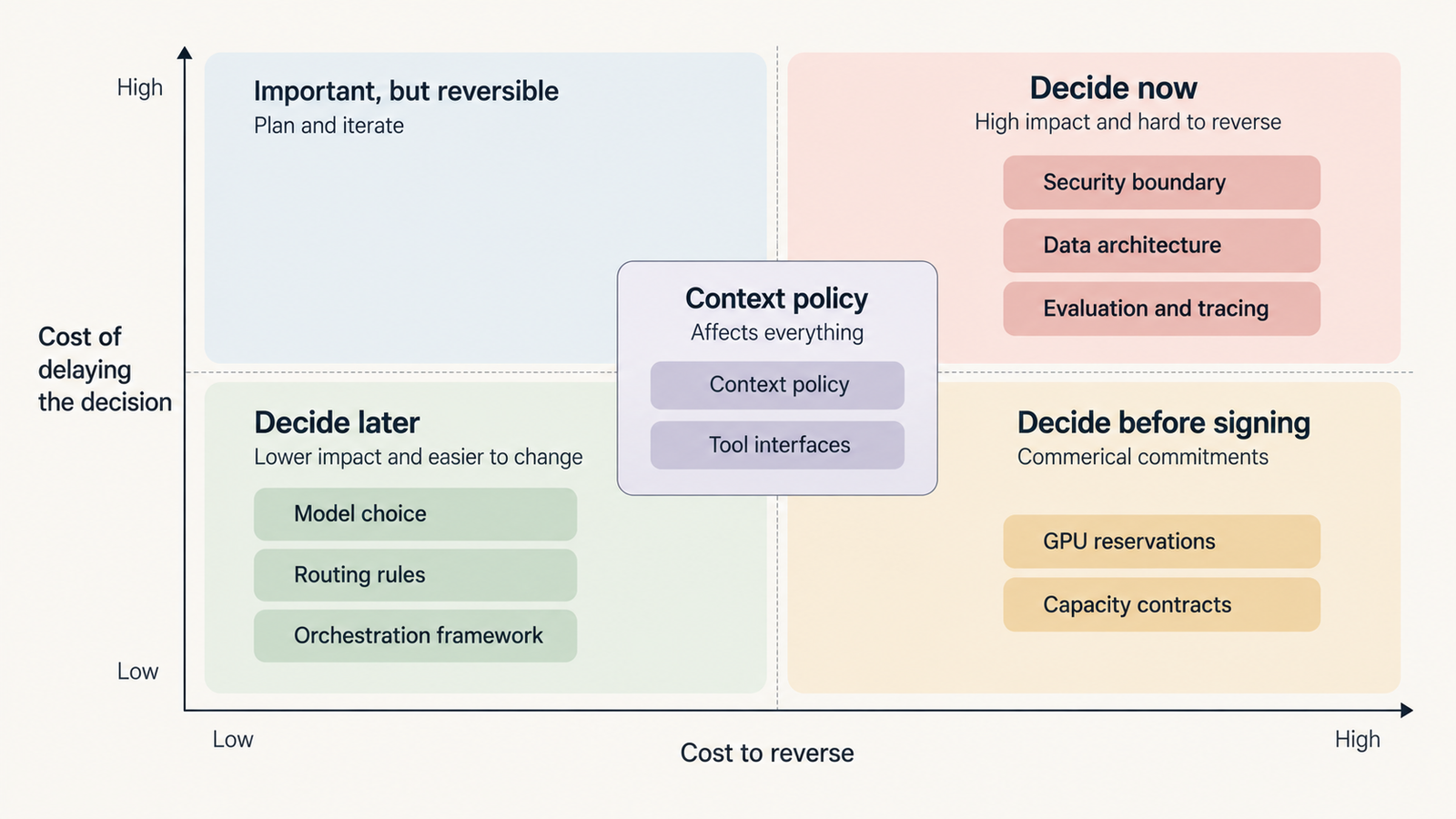
Decide now: the data architecture (document IDs, versioning, access metadata, re-indexing), the evaluation set and tracing, and the security boundary (agent identity, tool permissions, sandboxing, egress). These shape every other layer.
Decide later: the model, routing rules and most orchestration components. Put them behind interfaces and let evaluation results choose.
Decide before signing anything: reserved capacity and GPU contracts. Wait until real traffic shows sustained utilisation.
A three-person team applies this lightly: one API, a managed vector store, a few hundred evaluation cases and no self-hosting. An enterprise adds weight: a central gateway, data lineage, a shared evaluation service, security review of every tool and procurement rules that block capacity deals without utilisation evidence. The order doesn’t change. The depth does.
A pre-launch generative AI architecture checklist
- Can you change the model by editing one configuration value and rerunning one evaluation command?
- Do you know your average and 95th-percentile model calls per request?
- Is your cache hit rate measured, and is the cached prefix free of per-request values?
- Can you rebuild the retrieval index from source, and how long does it take?
- Are access permissions enforced inside the retrieval query?
- Does every agent have its own identity, with tool permissions scoped to its job?
- Is outbound traffic from tool execution restricted to an allowlist?
- Can you replay any production request from its trace?
- Does a regression set run on every prompt or model change?
- What is your cost per completed task, and who is alerted when it doubles?
- If you’ve signed a capacity contract, what was your measured utilisation before signing?
What to remember about generative AI architecture
It’s a set of commitments with different exit costs. The model is the one you’ll change most often, so keep it behind an interface and choose it per task with your own evaluation set. Data pipelines, evaluation and security boundaries outlive several model generations, so design them first. Compute contracts can lock in a cost before you know your traffic, so leave them until utilisation is measured.
Frequently asked questions
What are the seven layers of generative AI architecture?
Model, data and retrieval, context, orchestration and tools, serving and compute, evaluation and observability, and security and governance. They differ most in how hard they are to change later: the model is easiest, security and data hardest.
What is included in a generative AI tech stack?
Typically a model API or self-hosted model, an embedding model and search index, context assembly, an orchestration framework, tool integrations such as MCP servers, an inference platform, evaluation and tracing tools, and identity, secrets, sandboxing and audit infrastructure.
How much does a production generative AI architecture cost?
It depends mostly on calls per request, tokens per call and cache hit rate. In our illustrative example of a million requests a month, model costs ranged from about $11,000 with routing to $25,000 on one frontier API and about $45,000 mostly self-hosted. Engineering and retrieval costs come on top.
What is the difference between API-based and self-hosted inference?
API inference charges per token and scales without capacity planning, but brings rate limits and provider changes. Self-hosted inference charges per GPU-hour whether or not the hardware is busy, so it only wins with sustained high utilisation.
Does every generative AI architecture need a vector database?
No. Small, stable knowledge fits in a cached prompt. Retrieval earns its place when documents are large, change often or need per-user access control, and even then keyword search or a managed store may be enough at first.
Which generative AI architecture components are hardest to change?
Security boundaries and the data architecture, followed by signed compute commitments. Identity, permissions, document metadata and embedding choices spread into every layer. The model is usually easiest, if it sits behind a gateway.
Keep reading
Here are the latest posts from the blog.
Generative AI Architecture: The 7 Layers That Are Hard to Undo

Gemini 4 Carbon Hit 0% on Indirect Prompt Injection. Is That Enough?
Gemini 4 Carbon Is Here. But Can You Actually Use It?